



بروز خطا
[message]
اشتراک در سوال
رای ها
[dataList]
کم آوردن فضای معموری در طراحی ui و کند کار کردن اپلیکیشن (حل شد )

0
0
سلام دوستان
من یه ui مشابه صفحه اول اپلیکیشن دیجی کالا طراحی کردم
اما مشکلی که دارم اینه که بعد از دوبار اجرا گرفتن از پروژه ، خطای out of memory میده و مجبور میشم برنامه رو کاملا حذف کنم و دوباره نصب کنم با اینکه حجم تصاویر استفاده شده ی من کلا به 2 مگ نمیرسه
مشکل دومم هم لگ داشتن و کند بودن برنامه هنگام اسکرول کردنه در حالی که اپ دیجی کالا هم از همین عناصر استفاده کرده اما خیلی روون کار میکنه
موقع اسکرول کردن وقتی به قسمتی که توی عکس مشخص کردم خیلی خیلی کند اسکرول میشه
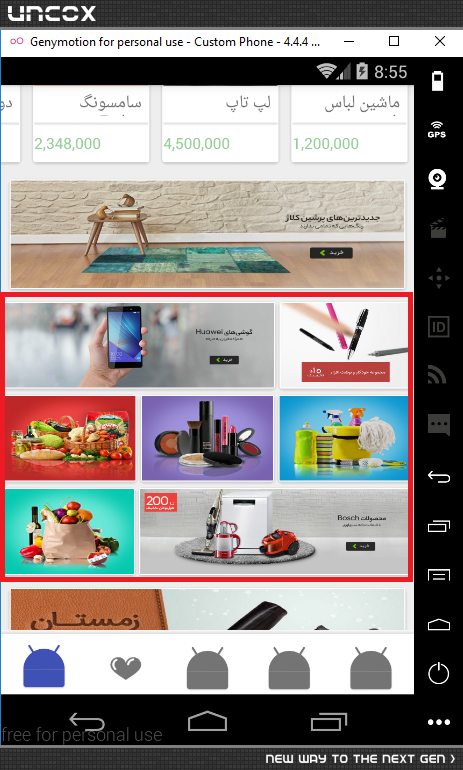
برای رفع این مشکل چه راه حلی پیشنهاد می کنید؟
اینم کد های xml این صفحه
<ScrollView
    xmlns:android="http://schemas.android.com/apk/res/android"
    android:layout_width="match_parent"
    android:layout_height="match_parent">

    <LinearLayout
        xmlns:android="http://schemas.android.com/apk/res/android"
        android:layout_width="match_parent"
        android:layout_height="match_parent"
        android:background="#EEEEEE"
        android:orientation="vertical"
        >

        <LinearLayout
            android:layout_width="match_parent"
            android:layout_height="170dip">

            <com.example.mohammad.shahrvandproject.Custom_ViewFlipper
                android:id="@+id/ViewFliper"
                android:layout_width="match_parent"
                android:layout_height="match_parent"
                android:autoStart="true"
                android:flipInterval="5000"
                android:inAnimation="@android:anim/slide_in_left"
                android:outAnimation="@android:anim/slide_out_right"
                >
            </com.example.mohammad.shahrvandproject.Custom_ViewFlipper>
        </LinearLayout>


        <LinearLayout
            android:layout_width="match_parent"
            android:layout_height="70dip"
            android:gravity="center"
            >

            <Button
                android:id="@+id/frg_btn_cat"
                android:layout_width="match_parent"
                android:layout_height="40dip"
                android:layout_marginLeft="6dp"
                android:layout_marginRight="6dp"
                android:background="#66BB6A"
                android:elevation="4dp"
                android:text="مشاهده ی لیست دسته بندی محصولات"
                android:textColor="#FFFFFF"
                android:textSize="19dp"
                />

        </LinearLayout>

        <LinearLayout
            android:layout_width="match_parent"
            android:layout_height="40dip">

            <TextView
                android:id="@+id/pishnahad"
                android:layout_width="match_parent"
                android:layout_height="match_parent"
                android:gravity="center_vertical"
                android:text="پیشنهاد شهروند"
                android:textSize="24dip"
                android:layout_marginRight="6dp"/>

        </LinearLayout>

        <LinearLayout
            android:layout_width="match_parent"
            android:layout_height="wrap_content">

            <android.support.v7.widget.RecyclerView
                android:id="@+id/recycler_offer"
                android:layout_width="match_parent"
                android:layout_height="match_parent"

                />

        </LinearLayout>

        <LinearLayout
            android:layout_width="match_parent"
            android:layout_height="120dip">

            <android.support.v7.widget.CardView
                android:layout_width="match_parent"
                android:layout_height="match_parent"
                android:layout_margin="6dp"
                >

                <ImageView
                    android:layout_width="match_parent"
                    android:layout_height="match_parent"
                    android:scaleType="fitXY"
                    android:src="@drawable/pooster"
                    />

            </android.support.v7.widget.CardView>

        </LinearLayout>

        <LinearLayout
            android:layout_width="match_parent"
            android:layout_height="260dip"
            android:orientation="vertical">


            <LinearLayout
                android:layout_width="match_parent"
                android:layout_height="0dip"
                android:layout_weight="0.33"
                android:orientation="horizontal">

                <LinearLayout
                    android:layout_width="0dip"
                    android:layout_height="match_parent"
                    android:layout_weight="0.67"
                    android:orientation="horizontal">

                    <android.support.v7.widget.CardView
                        android:layout_width="match_parent"
                        android:layout_height="match_parent">

                        <ImageView
                            android:layout_width="match_parent"
                            android:layout_height="match_parent"
                            android:scaleType="fitXY"
                            android:src="@drawable/pooster2"
                            />
                    </android.support.v7.widget.CardView>
                </LinearLayout>

                <LinearLayout
                    android:layout_width="0dip"
                    android:layout_height="match_parent"
                    android:layout_weight="0.33"
                    android:orientation="horizontal">

                    <android.support.v7.widget.CardView
                        android:layout_width="match_parent"
                        android:layout_height="match_parent">

                        <ImageView
                            android:layout_width="match_parent"
                            android:layout_height="match_parent"
                            android:scaleType="fitXY"
                            android:src="@drawable/pooster3"
                            />

                    </android.support.v7.widget.CardView>
                </LinearLayout>

            </LinearLayout>

            <LinearLayout
                android:layout_width="match_parent"
                android:layout_height="0dip"
                android:layout_weight="0.33"
                android:orientation="horizontal">

                <LinearLayout
                    android:layout_width="0dip"
                    android:layout_height="match_parent"
                    android:layout_weight="0.33"
                    android:orientation="horizontal">

                    <android.support.v7.widget.CardView
                        android:layout_width="match_parent"
                        android:layout_height="match_parent">

                        <ImageView
                            android:layout_width="match_parent"
                            android:layout_height="match_parent"
                            android:scaleType="fitXY"
                            android:src="@drawable/pooster4"/>

                    </android.support.v7.widget.CardView>

                </LinearLayout>

                <LinearLayout
                    android:layout_width="0dip"
                    android:layout_height="match_parent"
                    android:layout_weight="0.33"
                    android:orientation="horizontal">

                    <android.support.v7.widget.CardView
                        android:layout_width="match_parent"
                        android:layout_height="match_parent">

                        <ImageView
                            android:layout_width="match_parent"
                            android:layout_height="match_parent"
                            android:scaleType="fitXY"
                            android:src="@drawable/pooster5"/>

                    </android.support.v7.widget.CardView>

                </LinearLayout>

                <LinearLayout
                    android:layout_width="0dip"
                    android:layout_height="match_parent"
                    android:layout_weight="0.33"
                    android:orientation="horizontal">

                    <android.support.v7.widget.CardView
                        android:layout_width="match_parent"
                        android:layout_height="match_parent">

                        <ImageView
                            android:layout_width="match_parent"
                            android:layout_height="match_parent"
                            android:scaleType="fitXY"
                            android:src="@drawable/pooster6"/>

                    </android.support.v7.widget.CardView>

                </LinearLayout>
            </LinearLayout>

            <LinearLayout
                android:layout_width="match_parent"
                android:layout_height="0dip"
                android:layout_weight="0.33"
                android:orientation="horizontal">

                <LinearLayout
                    android:layout_width="0dip"
                    android:layout_height="match_parent"
                    android:layout_weight="0.33"
                    android:orientation="horizontal">

                    <android.support.v7.widget.CardView
                        android:layout_width="match_parent"
                        android:layout_height="match_parent">

                        <ImageView
                            android:layout_width="match_parent"
                            android:layout_height="match_parent"
                            android:scaleType="fitXY"
                            android:src="@drawable/pooster7"/>

                    </android.support.v7.widget.CardView>

                </LinearLayout>

                <LinearLayout
                    android:layout_width="0dip"
                    android:layout_height="match_parent"
                    android:layout_weight="0.67"
                    android:orientation="horizontal">

                    <android.support.v7.widget.CardView
                        android:layout_width="match_parent"
                        android:layout_height="match_parent">

                        <ImageView
                            android:layout_width="match_parent"
                            android:layout_height="match_parent"
                            android:scaleType="fitXY"
                            android:src="@drawable/pooster8"/>

                    </android.support.v7.widget.CardView>

                </LinearLayout>
            </LinearLayout>


        </LinearLayout>

        <LinearLayout
            android:layout_width="match_parent"
            android:layout_height="120dip">

            <android.support.v7.widget.CardView
                android:layout_width="match_parent"
                android:layout_height="match_parent"
                android:layout_margin="6dp"
                >

                <ImageView
                    android:layout_width="match_parent"
                    android:layout_height="match_parent"
                    android:scaleType="fitXY"
                    android:src="@drawable/pooster9"
                    />

            </android.support.v7.widget.CardView>

        </LinearLayout>

        <LinearLayout
            android:layout_width="match_parent"
            android:layout_height="40dip">

            <TextView
                android:id="@+id/new_shop"
                android:layout_width="match_parent"
                android:layout_height="match_parent"
                android:gravity="center_vertical"
                android:text="جدیدترین فروشگاه ها"
                android:textSize="24dip"
                android:layout_marginRight="6dip"/>

        </LinearLayout>

        <LinearLayout
            android:layout_width="match_parent"
            android:layout_height="wrap_content">

            <android.support.v7.widget.RecyclerView
                android:id="@+id/recycler_newShop"
                android:layout_width="match_parent"
                android:layout_height="match_parent"
                />

        </LinearLayout>

        <LinearLayout
            android:layout_width="match_parent"
            android:layout_height="40dip">

            <TextView
                android:id="@+id/new_kala"
                android:layout_width="match_parent"
                android:layout_height="match_parent"
                android:gravity="center_vertical"
                android:text="جدیدترین محصولات"
                android:textSize="24dip"
                android:layout_marginRight="6dip"/>

        </LinearLayout>

        <LinearLayout
            android:layout_width="match_parent"
            android:layout_height="wrap_content">

            <android.support.v7.widget.RecyclerView
                android:id="@+id/recycler_newCommodity"
                android:layout_width="match_parent"
                android:layout_height="match_parent"
                />

        </LinearLayout>

    </LinearLayout>
</ScrollView>
+1
0

اوه چکار کردی خوب معلومه مموری کم میاد شما یه کاری کن به جای این خط توی ایمیج ویوو ها اینو بزار ببین درست میشه
android:src="@drawable/pooster"
app:src="@drawable/pooster" (9 سال پیش)
0
0
کاری که گفتین رو انجام دادم اما الان ارور میده که نمیتونه تصاویر رو پیدا کنه :| (9 سال پیش)
0
0
خوب شما روی app الت اینتر زدین و ایمپورتش کردین؟ (9 سال پیش)
0
0
اره عزیز ایمپورت کردم (9 سال پیش)
0
0
اره ایمپورررررررررررررررررررررررررررررررررررررررررررررت کردم (9 سال پیش)
+1
0
هههه شوخی کردم ولا همین به ذهنم میرسه من قبلا این مشکل رو داشتم با اینکار حل شد :) (9 سال پیش)
+1
0
اصلا کلا این کارتون اشتباست مگه این عکس های که گذاشتین کلا ثابتن توی برنامه یا می خواین از سرور بگیرین و اونجا نشون بدین ؟ (9 سال پیش)
0
0
به عنوان پیش فرض ثابت گذاشتم ولی بعدا از سرور دریافت میشه (9 سال پیش)
+1
0
خوب همین دیگه شما به اندازه عکس هاتون به این کارد ویوو ها طول و عرض بده و عکسی روشون ست نکن اینجوری مشکلت حل میشه (9 سال پیش)
0
0
خب بعدا موقع اتصال به سرور هم تصاویر روی کاردویو ها لود میشن دیگه , باز میشه همین آش و همین کاسه (9 سال پیش)
+1
0
شما یه بار این جوری امتحان کنید فک نکنم مشکلی پیش بیاد ولی ریسایکلر هم این خاصیت رو داره که اینجوری چیده بشه یه سرچی بکنید در کل این روش شما منطقی به نظر نمیرسه (9 سال پیش)
0
0
با ریسایکلر ویو میشه اینجوری طراحی کرد؟ چجوری؟؟؟ البته اینم بگم عکسا رو من توی سایز های استاندارد ذخیره نکردما همینجوری یه چیزی گذاشتم. میتونه از این هم باشه؟ (9 سال پیش)
0
0
شما بگید دقیقا چی می خواید تا راهنماییتون کنم اگه می خواین عکس ها رو به صورت یه لیست نشون بدین یه چیزیه اگه می خواین دقیقا این جوری باشه یه چیز دیگه یه مثال بدین بگین می خوام دقیقا همچین چیزی باشه (9 سال پیش)
0
0
به صورت لیست رو بلدم. میخوام شبیه همون قسمتی باشه که توی عکس مشخص کردم.اصل کندی برنامم هم همون قسمته (9 سال پیش)
+1
0

سلام . برای بهتر کردن سرعت نرم افزار چند کار باید انجام بدید . اول اینکه سایز عکس ها رو با توجه به اسکرین صفحه نمایش تعیین کنید منظورم اینه که با دستور های bitmap عکس ها رو توی imageview بر اساس سایز صفحه نمایش ست کنید . دوم اینکه عناصری که توی صفحه معلوم نیستند رو لود نکنید که این کار از طریق دستورات scroolbar قابل دسترسی هست
(9 سال پیش)
+1
0

از drawable به mipmap انتقال بده اوکی میشه (9 سال پیش)
0
0
سایز عکس ها رو مطابق با صفحه نمایش تغییر دادم و انتقالشون دادم توی mipmap ، دررررررررست و روون شد. ممنونم دوستان (9 سال پیش)
برای این سوال پاسخی وجود ندارد.
پاسخگویی و مشاهده پاسخ های این سوال تنها برای اعضای ویژه سایت امکان پذیر است .
چنانچه تمایل دارید به همه بخش ها دسترسی داشته باشید میتوانید از این بخش لایسنس این آموزش را خریداری نمایید .
