


برنامه ی ارسال و دریافت اس ام اس (کارگروهی )

سلام
دوستان عزیز لطفا در این برنامه مشارکت کنید .
برنامه ی ارسال و دریافت اس ام اس اختصاصی شبیه به نرم افزار اس ام اس خود اندروید
شاید برای شما خیلی ساده باشد ولی برای کسانی مثل من که در حال یادگیری هستند و برنامه نویس حساب نمی شوند خیلی سخت است !
من چیزی که بر رویش کارکردم را در پست بعدی قرار می دهم جاهایی که مرتب و منطقی هست از کدهای استاد استفاده شده و جاهای غیر اصولی تمرین های خودم است .
لطفا کمک کنید تا یک برنامه ی اس ام اس شبیه به نرمافزار خود اندروید بسازیم -لطفا کدهای اصلاح شده را در پاسخ به این پست قرار بدهید .
چیزی که در حال حاضر داریم
AndroidManifest.xml
 <?xml version="1.0" encoding="utf-8"?>
<manifest xmlns:android="http://schemas.android.com/apk/res/android"
    package="ir.test.sms"
    android:versionCode="1"
    android:versionName="1.0" >

    <uses-permission android:name="android.permission.RECEIVE_SMS" />
    <uses-permission android:name="android.permission.SEND_SMS" />
        <uses-permission android:name="android.permission.WRITE_EXTERNAL_STORAGE"/>


    <uses-sdk android:minSdkVersion="8" />

    <application
        android:name=".G"
        android:icon="@drawable/ic_launcher"
        android:label="@string/app_name" >
        <activity
            android:name=".ActivityMain"
            android:label="@string/app_name" >
            <intent-filter>
                <action android:name="android.intent.action.MAIN" />

                <category android:name="android.intent.category.LAUNCHER" />
            </intent-filter>
        </activity>

        <activity
            android:name=".ActivitySmsDetaile"
            android:label="@string/app_name" >
        </activity>

        <receiver
            android:name=".SmsReceiver">
            <intent-filter>
                <action android:name="android.provider.Telephony.SMS_RECEIVED" />
            </intent-filter>
        </receiver>
    </application>

</manifest>
کلاس G
 package ir.test.sms;

import java.io.File;
import java.io.IOException;
import java.io.InputStream;
import java.util.ArrayList;
import java.util.Calendar;
import android.app.Activity;
import android.app.Application;
import android.content.Context;
import android.content.res.AssetManager;
import android.database.sqlite.SQLiteDatabase;
import android.os.Environment;
import android.view.LayoutInflater;


public class G extends Application {

    public static Context               context;
    public static LayoutInflater        inflater;
    public static Activity              currentActivity;
    public static ArrayList<StructNote> notes        = new ArrayList<StructNote>();
    public static ArrayList<StructNote> smsD         = new ArrayList<StructNote>();
    public static String                time;

    ///

    public static SQLiteDatabase        database;
    public static final String          DIR_SDCARD   = Environment.getExternalStorageDirectory().getAbsolutePath();
    public static final String          DIR_DATABASE = DIR_SDCARD + "/sms/";


    @Override
    public void onCreate() {
        super.onCreate();
        context = getApplicationContext();
        inflater = (LayoutInflater) getSystemService(Context.LAYOUT_INFLATER_SERVICE);

        new File(DIR_DATABASE).mkdirs();


        database = SQLiteDatabase.openOrCreateDatabase(DIR_DATABASE + "/database.sqlite", null);
         \\جدول افراد
        database.execSQL("CREATE  TABLE  IF NOT EXISTS con (" +
                "id INTEGER PRIMARY KEY  AUTOINCREMENT  NOT NULL  UNIQUE , " +
                "name TEXT, " +
                "family TEXT, " +
                "pnumber TEXT" +
                ")");
        ////جدول دریافتی
        database.execSQL("CREATE  TABLE  IF NOT EXISTS resive (" +
                "id INTEGER PRIMARY KEY  AUTOINCREMENT  NOT NULL  UNIQUE , " +
                "sender TEXT, " +
                "smsbody TEXT, " +
                "receveTime TEXT" +
                ")");
        ///جدول ارسالی
        database.execSQL("CREATE  TABLE  IF NOT EXISTS sendSms (" +
                "id INTEGER PRIMARY KEY  AUTOINCREMENT  NOT NULL  UNIQUE , " +
                "smsTo TEXT, " +
                "sendSmsBody TEXT, " +
                "sendTime TEXT" +
                ")");

    }


    ////////////////// برای ثبت زمان ارسال و دریافت اس ام اس  در دیتابیس استفاده می کنیم
    public static void getTime() {
        Calendar calendar = Calendar.getInstance();
        int year = calendar.get(calendar.YEAR);
        int month = calendar.get(calendar.MONTH);
        int day = calendar.get(calendar.DAY_OF_MONTH);
        //برای زمان
        int hour = calendar.get(calendar.HOUR);
        int min = calendar.get(calendar.MINUTE);
        int sec = calendar.get(calendar.SECOND);
        time = "" + year + "" + month + "" + day + "" + hour + "" + min + "" + sec;

    }

}
کلاس ActivityMain
 package ir.test.sms;

import android.app.Activity;
import android.database.Cursor;
import android.os.Bundle;
import android.util.Log;
import android.view.View;
import android.view.View.OnClickListener;
import android.view.animation.Animation;
import android.view.animation.AnimationUtils;
import android.view.animation.LayoutAnimationController;
import android.widget.ArrayAdapter;
import android.widget.Button;
import android.widget.EditText;
import android.widget.ListView;


public class ActivityMain extends Activity {

    public ArrayAdapter  adapter;
    public static Cursor cursor;


    @Override
    protected void onResume() {
        G.currentActivity = this;
        super.onResume();
        G.notes.clear();
        personList();

        if (adapter != null) {
            adapter.notifyDataSetChanged();
        }
    }


    @Override
    public void onCreate(Bundle savedInstanceState) {
        super.onCreate(savedInstanceState);
        setContentView(R.layout.activity_main);
        ListView lstContent = (ListView) findViewById(R.id.lstContent);
        Animation animation = AnimationUtils.loadAnimation(this, R.anim.translate);
        final EditText edtMesege = (EditText) findViewById(R.id.edtMesege);
        Button btnSend = (Button) findViewById(R.id.btnSend);

        lstContent.setLayoutAnimation(new LayoutAnimationController(animation));

        adapter = new AdapterNote(G.notes);
        lstContent.setAdapter(adapter);
        /*
                //for (int i = 0; i < 10; i++) {
                StructNote note = new StructNote();

                Bundle extras = getIntent().getExtras();

                if (extras != null) {
                    String sender = extras.getString("SENDER");
                    String message = extras.getString("MESSAGE");

                    note.sender = sender;
                    note.rmesege = message;
                    note.done = false;

                    G.notes.add(note);

                }
            */
        //  }

        adapter.notifyDataSetChanged();

        btnSend.setOnClickListener(new OnClickListener() {

            public void onClick(View arg0) {
                // TODO Auto-generated method stub
                String textforsend = edtMesege.getText().toString();
                HelperSms.sendSms("5556", textforsend);

            }
        });
    }


    /////////////////
    ////////////////////////////////////////////////////////////////////////////فانشن  خواندن لیست پرسنل از دیتابیس

    public static void personList() {
        cursor = G.database.rawQuery("SELECT * FROM con ", null);
        //if (cursor != null && cursor.moveToNext()) {
        while (cursor.moveToNext()) {
            String person = cursor.getString(cursor.getColumnIndex("pnumber"));
            Log.i("LOG", "person>>>>" + person);

            StructNote note = new StructNote();
            note.sender = person;

            G.notes.add(note);

        }
        cursor.close();
    }
    ///////////////////

}
کلاس ActivitySmsDetaile
 package ir.test.sms;

import android.app.Activity;
import android.database.Cursor;
import android.os.Bundle;
import android.util.Log;
import android.view.View;
import android.view.View.OnClickListener;
import android.widget.ArrayAdapter;
import android.widget.Button;
import android.widget.EditText;
import android.widget.ListView;


public class ActivitySmsDetaile extends Activity {

    public static ArrayAdapter adapter;
    public static Cursor       cursor3;
    public static Cursor       cursor2;
    public static String       sender;


    @Override
    protected void onResume() {
        G.currentActivity = this;
        adapter.notifyDataSetChanged();
        super.onResume();

        Bundle extras = getIntent().getExtras();
        int position = 0;
        if (extras != null) {
            position = extras.getInt("POSITION");
        }

        final StructNote note = G.notes.get(position);
        sender = note.sender;
        G.smsD.clear();
        smsList();
        sendSmsList();

    }


    @Override
    public void onCreate(Bundle savedInstanceState) {
        super.onCreate(savedInstanceState);
        setContentView(R.layout.activity_sms_details);

        ListView lstSmsD = (ListView) findViewById(R.id.lstSmsD);
        final EditText edtMesege = (EditText) findViewById(R.id.edtMesege);

        Button btnsend = (Button) findViewById(R.id.btnSend);
        btnsend.setOnClickListener(new OnClickListener() {

            public void onClick(View arg0) {
                // TODO Auto-generated method stub

                String textforsend = edtMesege.getText().toString();
                HelperSms.sendSms(sender, textforsend);
                G.getTime();
                InsertCommands.insertSendSms(textforsend, sender, G.time);
                sendSmsList();

            }
        });

        adapter = new AdapterSdetail(G.smsD);
        lstSmsD.setAdapter(adapter);
    }


    ////////////////////////////////////////////////////////////////////////////فانشن  خواندن لیست اس ام اس از دیتابیس

    public static void smsList() {
        cursor2 = G.database.rawQuery("SELECT * FROM resive WHERE  sender='" + sender + "' ORDER BY receveTime   ", null);

        while (cursor2.moveToNext()) {
            String rSms = cursor2.getString(cursor2.getColumnIndex("smsbody"));
            Log.i("LOG", "person>>>>" + rSms);

            StructNote smslist = new StructNote();
            smslist.smsdlist = rSms;
            smslist.sender = sender;
            G.smsD.add(smslist);

        }
        cursor2.close();
    }


    ////
    ////////////////////////////////////////////////////////////////////////////فانشن  خواندن لیست ارسالی   دیتابیس

    public static void sendSmsList() {
        cursor3 = G.database.rawQuery("SELECT * FROM sendSms WHERE  smsTo='" + sender + "' ORDER BY sendTime   ", null);

        while (cursor3.moveToNext()) {
            String replaysms = cursor3.getString(cursor3.getColumnIndex("sendSmsBody"));

            StructNote smslist = new StructNote();
            smslist.replayText = replaysms;
            G.smsD.add(smslist);

        }
        cursor3.close();
    }
    /////////////

}
کلاس AdapterSms
 package ir.test.sms;

import java.util.ArrayList;
import android.content.Intent;
import android.graphics.Color;
import android.view.View;
import android.view.View.OnClickListener;
import android.view.ViewGroup;
import android.widget.ArrayAdapter;
import android.widget.CheckBox;
import android.widget.ImageView;
import android.widget.TextView;


public class AdapterSms extends ArrayAdapter<StructNote> {

    public AdapterNote(ArrayList<StructNote> array) {
        super(G.context, R.layout.adapter_notes, array);
    }


    private static class ViewHolder {

        public ViewGroup layoutRoot;
        public TextView  txtSender;
        public TextView  txtMesege;
        public CheckBox  chkDone;
        public ImageView imgDelete;


        public ViewHolder(View view) {
            txtSender = (TextView) view.findViewById(R.id.txtTitle);
            txtMesege = (TextView) view.findViewById(R.id.txtDescription);
            chkDone = (CheckBox) view.findViewById(R.id.chkDone);
            layoutRoot = (ViewGroup) view.findViewById(R.id.layoutRoot);
            imgDelete = (ImageView) view.findViewById(R.id.imgDelete);
        }


        public void fill(final ArrayAdapter<StructNote> adapter, final StructNote item, final int position) {
            txtSender.setText(item.sender);
            txtMesege.setText(item.rmesege);
            chkDone.setChecked(item.done);

            imgDelete.setOnClickListener(new OnClickListener() {

                public void onClick(View arg0) {
                    adapter.remove(item);
                }
            });
            layoutRoot.setOnClickListener(new OnClickListener() {

                public void onClick(View arg0) {
                    Intent intent = new Intent(G.currentActivity, ActivitySmsDetaile.class);
                    intent.putExtra("POSITION", position);
                    G.currentActivity.startActivity(intent);
                }
            });
            chkDone.setOnClickListener(new OnClickListener() {

                public void onClick(View view) {
                    CheckBox checkBox = (CheckBox) view;
                    item.done = checkBox.isChecked();

                    if (item.done) {
                        txtSender.setTextColor(Color.RED);
                    } else {
                        txtSender.setTextColor(Color.WHITE);
                    }
                }
            });

            if (item.done) {
                txtSender.setTextColor(Color.RED);
            } else {
                txtSender.setTextColor(Color.WHITE);
            }
        }
    }


    @Override
    public View getView(int position, View convertView, ViewGroup parent) {
        ViewHolder holder;

        StructNote item = getItem(position);
        if (convertView == null) {
            convertView = G.inflater.inflate(R.layout.adapter_notes, parent, false);
            holder = new ViewHolder(convertView);
            convertView.setTag(holder);
        } else {
            holder = (ViewHolder) convertView.getTag();
        }

        holder.fill(this, item, position);
        return convertView;
    }
}
کلاس HelperSms
 package ir.test.sms;

import android.telephony.SmsManager;


public class HelperSms {

    public static void sendSms(String destination, String message) {
        SmsManager smsManager = SmsManager.getDefault();
        smsManager.sendTextMessage(destination, null, message, null, null);

    }

}
کلاس وارد کردن اس ام اس ها و شماره ها به دیتابیس
 package ir.test.sms;

import android.app.Application;
import android.widget.Toast;


public class InsertCommands extends Application {

    @Override
    public void onCreate() {
        super.onCreate();

    }


    /////////////////////////////////////////////////////////////////وارد کردن پرسنل
    public static void insertPerson(String name, String family, String pnumber) {
        SmsReceiver.cursor = G.database.rawQuery("SELECT * FROM con WHERE pnumber ='" + pnumber + "' ", null);
        if ( !SmsReceiver.cursor.moveToFirst()) {

            G.database.execSQL("INSERT INTO con (name,family,pnumber)  VALUES ('" + name + "','" + family + "','" + pnumber + "')");
        } else {
            Toast.makeText(G.context, "شماره موبایل تکرای است", Toast.LENGTH_SHORT).show();
        }

    }


    /////////////////////////////////////////////////////////////////وارد کردن sms
    public static void insertsms(String smsBody, String smsSender, String receveTime) {


        G.database.execSQL("INSERT INTO resive (smsbody,sender,receveTime)  VALUES ('" + smsBody + "','" + smsSender + "','" + receveTime + "')");


    }


    /////////////////////////////////////////////////////////////////وارد کردن sms
    public static void insertSendSms(String smsBody, String smsresip, String sendTime) {

        G.database.execSQL("INSERT INTO sendSms (sendSmsBody,smsTo,sendTime)  VALUES ('" + smsBody + "','" + smsresip + "','" + sendTime + "')");

    }

}
کلاس SmsReceiver
 package ir.test.sms;

import android.content.BroadcastReceiver;
import android.content.Context;
import android.content.Intent;
import android.database.Cursor;
import android.telephony.SmsMessage;
import android.widget.Toast;


public class SmsReceiver extends BroadcastReceiver {

    public static Cursor cursor;
    public static String name   = "name";
    public static String family = "family";


    @Override
    public void onReceive(Context context, Intent intent) {
        Object[] pdus = (Object[]) intent.getExtras().get("pdus");
        SmsMessage sms = SmsMessage.createFromPdu((byte[]) pdus[0]);
        String senderTel = sms.getOriginatingAddress();
        ////
        String messageBody = sms.getMessageBody();
        Toast.makeText(G.context, senderTel + ": " + messageBody, Toast.LENGTH_SHORT).show();
        Intent detailIntent = new Intent(G.context, ActivitySmsDetaile.class);
        detailIntent.addFlags(Intent.FLAG_ACTIVITY_NEW_TASK);
        detailIntent.putExtra("SENDER", senderTel);
        detailIntent.putExtra("MESSAGE", messageBody);
        G.getTime();
        InsertCommands.insertPerson(name, family, senderTel);
        InsertCommands.insertsms(messageBody, senderTel, G.time);
        //G.context.startActivity(detailIntent);

    }

}
کلاس StructNote
 package ir.test.sms;

public class StructNote {

    public String  sender;
    public String  rmesege;
    public String  smsdlist;
    public String  replayText;
    public boolean done;
}
ویوها :
adapter_sdetail.xml
 <?xml version="1.0" encoding="utf-8"?>
<LinearLayout xmlns:android="http://schemas.android.com/apk/res/android"
    android:layout_width="match_parent"
    android:layout_height="match_parent"
    android:orientation="vertical" android:padding="8dip">


    <LinearLayout
        android:id="@+id/layoutRoot"
        android:layout_width="match_parent"
        android:layout_height="wrap_content"
        android:layout_marginBottom="8dip" >

        <LinearLayout
            android:layout_width="wrap_content"
            android:layout_height="wrap_content"
            android:orientation="vertical">

            <TextView
                android:id="@+id/txtTitle"
                android:layout_width="fill_parent"
                android:layout_height="wrap_content"
                android:text="TextView"
                android:textColor="#ffffff"
                android:textSize="24dip" />

            <TextView
                android:id="@+id/txtDescription"
                android:layout_width="fill_parent"
                android:layout_height="wrap_content"
                android:layout_marginLeft="8dip"
                android:text="TextView"
                android:textColor="#dddddd"
                android:textSize="18dip"/>

        </LinearLayout>

        <LinearLayout
            android:layout_width="0dp"
            android:layout_height="match_parent"
            android:layout_weight="0.5"
            android:orientation="vertical" >

            <TextView
                android:id="@+id/TextView01"
                android:layout_width="fill_parent"
                android:layout_height="wrap_content"
                android:gravity="right"
                android:textColor="#ffffff"
                android:textSize="24dip" />

            <TextView
                android:id="@+id/txtReplay"
                android:layout_width="fill_parent"
                android:layout_height="wrap_content"
                android:layout_marginLeft="8dip"
                android:gravity="right"
                android:text="txtReplay"
                android:textColor="#dddddd"
                android:textSize="18dip" />

        </LinearLayout>

    </LinearLayout>

</LinearLayout>
و adapter_notes.xml
 <?xml version="1.0" encoding="utf-8"?>
<LinearLayout xmlns:android="http://schemas.android.com/apk/res/android"
    android:layout_width="match_parent"
    android:layout_height="match_parent"
    android:orientation="vertical" android:padding="8dip">


    <LinearLayout
        android:id="@+id/layoutRoot"
        android:layout_width="match_parent"
        android:layout_height="wrap_content"
        android:layout_marginBottom="8dip" >


        <LinearLayout
            android:layout_width="0dip"
            android:layout_height="wrap_content"
            android:orientation="vertical" android:layout_weight="1">

            <TextView
                android:id="@+id/txtTitle"
                android:layout_width="fill_parent"
                android:layout_height="wrap_content"
                android:text="TextView"
                android:textColor="#ffffff"
                android:textSize="24dip" />

            <TextView
                android:id="@+id/txtDescription"
                android:layout_width="fill_parent"
                android:layout_height="wrap_content"
                android:layout_marginLeft="8dip"
                android:text="TextView"
                android:textColor="#dddddd"
                android:textSize="18dip"/>
        </LinearLayout>


        <ImageView
            android:id="@+id/imgDelete"
            android:layout_width="48dip"
            android:layout_height="48dip"
            android:scaleType="centerInside"
            android:src="@android:drawable/ic_delete" />


        <CheckBox
            android:id="@+id/chkDone"
            android:layout_width="wrap_content"
            android:layout_height="wrap_content" />

    </LinearLayout>

    <ImageView
        android:id="@+id/imageView1"
        android:layout_width="fill_parent"
        android:layout_height="2dip"
        android:src="#efefef" />

</LinearLayout>
و activity_sms_details.xml
 <?xml version="1.0" encoding="utf-8"?>
<LinearLayout xmlns:android="http://schemas.android.com/apk/res/android"
    android:layout_width="fill_parent"
    android:layout_height="fill_parent"
    android:orientation="vertical" >


    <ListView
        android:id="@+id/lstSmsD"
        android:layout_width="match_parent"
        android:layout_height="0dip"
        android:layout_weight="0.5"
        android:divider="@null"
        android:dividerHeight="0dip" >

        <!-- Preview: listitem=@layout/adapter_notes -->
    </ListView>


    <LinearLayout
        android:layout_width="match_parent"
        android:layout_height="wrap_content"
        android:orientation="vertical" >

        <LinearLayout
            android:layout_width="match_parent"
            android:layout_height="wrap_content" >


            <EditText
                android:id="@+id/edtMesege"
                android:layout_width="0dip"
                android:layout_height="wrap_content"
                android:layout_weight="1"
                android:ems="10" >

                <requestFocus />
            </EditText>


            <Button
                android:id="@+id/btnSend"
                android:layout_width="68dip"
                android:layout_height="48dip"
                android:layout_gravity="right"
                android:text="send" />

        </LinearLayout>

    </LinearLayout>

</LinearLayout>
وactivity_main.xml
 <?xml version="1.0" encoding="utf-8"?>
<LinearLayout xmlns:android="http://schemas.android.com/apk/res/android"
    android:layout_width="fill_parent"
    android:layout_height="fill_parent"
    android:orientation="vertical" >

    <ListView
        android:id="@+id/lstContent"
        android:layout_width="match_parent"
        android:layout_height="0dip" android:dividerHeight="0dip" android:divider="@null" android:layout_weight="0.5">
        <!-- Preview: listitem=@layout/adapter_notes -->
    </ListView>

    <LinearLayout
        android:layout_width="match_parent"
        android:layout_height="wrap_content"
        android:orientation="vertical" >

        <LinearLayout
            android:layout_width="match_parent"
            android:layout_height="wrap_content" >


            <EditText
                android:id="@+id/edtMesege"
                android:layout_width="0dip"
                android:layout_height="wrap_content"
                android:layout_weight="1"
                android:ems="10" >

                <requestFocus />
            </EditText>


            <Button
                android:id="@+id/btnSend"
                android:layout_width="68dip"
                android:layout_height="48dip"
                android:layout_gravity="right"
                android:text="send" />

        </LinearLayout>

    </LinearLayout>

</LinearLayout>
اس ام اس ها را دریافت و در دیتابیس ذخیره می کند
مشکلات :
1-اس ام اس ها را برحسب تاریخ مرتب نمی کند
2- بد خط است خب ! من در حال تمرین و یادگیری هستم !
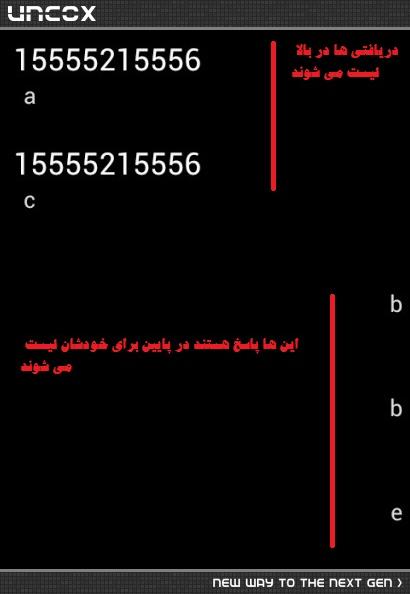
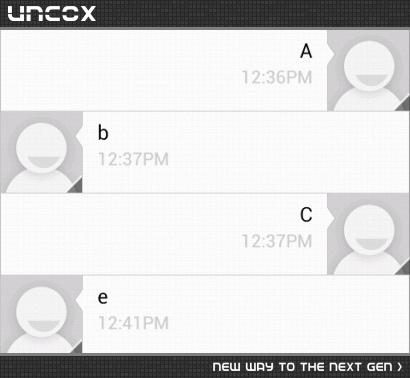
باید به ترتیب زیر مرتب شود :
پاسخگویی و مشاهده پاسخ های این سوال تنها برای اعضای ویژه سایت امکان پذیر است .
چنانچه تمایل دارید به همه بخش ها دسترسی داشته باشید میتوانید از این بخش لایسنس این آموزش را خریداری نمایید .
