


البته سایز ImageView ها بستگی به خودتون داره که چه اندازه ای باشه.
بروز خطا
[message]
اشتراک در سوال
رای ها
[dataList]
پرسش و پاسخ
طراحی ui
مدیریت گفتگو
 سپهر
12 سال پیش
سپهر
12 سال پیش
آخرین تغییر: 12 سال پیش
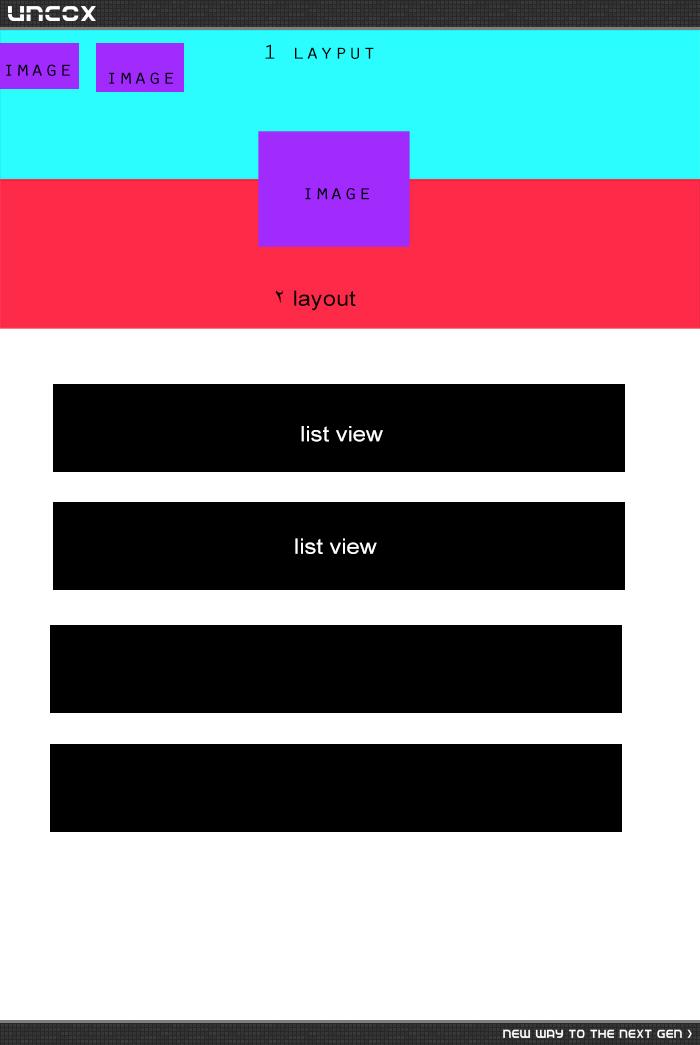
چطور میشه یک ui به صورت زیر طراحی کرد ؟ ممنون میشم راهنمایی کنید
پاسخها 5
 MILAD-MB
12 سال پیش
MILAD-MB
12 سال پیش
سلام اگه اشتباه نکنم باید اینطور باشه. برای اینکه بیشتر بتونید روی این طرح مسلط باشید، در بعضی Layou ها از RelativLayout استفاده کنید. اگه دوستان راه دیگه ای هم دارن مطرح کنند...

نظرات
سپهر
12 سال پیش
دقیقا به همین صورت میخواستم ، ممنون از کمکت ، سعی میکنم خودم پیاده سازیش کنم ، اگر لطفی کنی و کدهای xml ش رو هم در پاسخ بذاری ممنونت میشم
سپهر
12 سال پیش
الان نقش relativelayout 2 چی هست در اینجا؟
سپهر
12 سال پیش
چطور relativelayout 2 رو بردین زیر linearlayout ؟ من هر کاری میکنم روی اون قرار میگیره
 override
12 سال پیش
override
12 سال پیش
اون جوری که در تصویر مشخصه به نظر میاد RelativeLayout 2 زیر مجموعه ی RelativeLayout 1 قرار گرفته.
سپهر
12 سال پیش
خب درسته ولی بازم میفته روش ، به نظرم باید margin داده باشه بهش ، مطمئن نیستم
override
12 سال پیش
یه چیز دیگه هم هست اون دو تا Layout قرمز و سبز رو من تو قسمت outLine نمیبینم، الان خودمم کنجکاو شدم ببینم میتونم اینو بسازم یا نه .تا حالا با Relative کار نکردم
سپهر
12 سال پیش
layout قرمز همون linearlayout هست و آبیه هم relative layout 2 این جوری که من متوجه شدم و بهشون background داده
سپهر
12 سال پیش
تونستم پیاده سازیش کنم با margin ولی نمیدونم کار درستی هست یا نه اما همین خروجی رو بهم داد
override
12 سال پیش
کد xmlشو بذارید لطفاً. وقتی درگ میکنیم خودشون بسته به موقعیت آیتم ها align میشن .چه جالب :)
MILAD-MB
12 سال پیش
سلام. شما اصلا تمام Layout هاتونو روی RelativLayout ست کنید. با کشیدن Image ها براحتی میتونید انجام بدید. اما بعضی وقتا مشکل ساز میشه که داخل این طراحی مشکلی ایجاد نکرد
سپهر
12 سال پیش
 <?xml version="1.0" encoding="utf-8"?>
<RelativeLayout xmlns:android="http://schemas.android.com/apk/res/android"
    android:id="@+id/RelativeLayout1"
    android:layout_width="fill_parent"
    android:layout_height="fill_parent" >

    <LinearLayout
        android:id="@+id/linearLayout1"
        android:layout_width="fill_parent"
        android:layout_height="48dip"
        android:background="#ff33b5e5" >

        <ImageView
            android:id="@+id/login"
            android:layout_width="wrap_content"
            android:layout_height="wrap_content"
            android:layout_alignParentLeft="true"
            android:scaleType="centerInside"
            android:src="@drawable/ic_launcher" />

        <ImageView
            android:id="@+id/search"
            android:layout_width="wrap_content"
            android:layout_height="wrap_content"
            android:layout_alignTop="@+id/login"
            android:layout_toRightOf="@+id/login"
            android:scaleType="centerInside"
            android:src="@drawable/ic_launcher" />

        <View
            android:layout_width="0dp"
            android:layout_height="0dp"
            android:layout_weight="1" />

        <ImageView
            android:id="@+id/drawer"
            android:layout_width="wrap_content"
            android:layout_height="wrap_content"
            android:scaleType="centerInside"
            android:src="@drawable/ic_launcher" />
    </LinearLayout>

    <ImageView
        android:id="@+id/ImageView01"
        android:layout_width="fill_parent"
        android:layout_height="100dip"
        android:layout_marginTop="48dip"
        android:scaleType="fitXY"
        android:src="@drawable/back" />

    <ListView
        android:id="@+id/listView1"
        android:layout_width="fill_parent"
        android:layout_height="fill_parent"
        android:layout_marginTop="148dip" >
    </ListView>

    <ImageView
        android:id="@+id/profile"
        android:layout_width="wrap_content"
        android:layout_height="wrap_content"
        android:layout_alignParentTop="true"
        android:layout_centerHorizontal="true"
        android:layout_marginTop="20dip"
        android:scaleType="centerInside"
        android:src="@drawable/nature" />

</RelativeLayout>
نظرات
override
12 سال پیش
منم جواب گرفتم ولی اینطوری
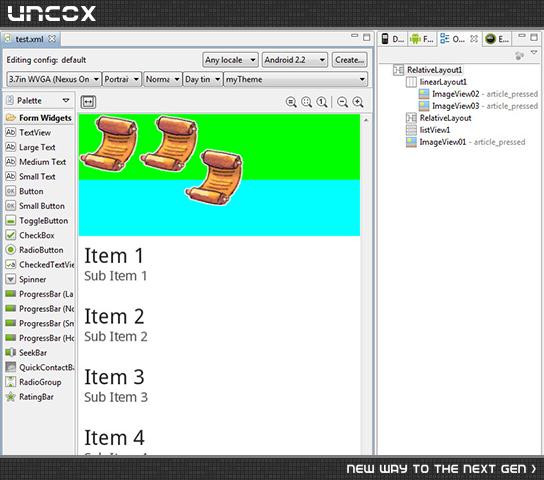
 <?xml version="1.0" encoding="utf-8"?>
<RelativeLayout xmlns:android="http://schemas.android.com/apk/res/android"
    android:id="@+id/RelativeLayout1"
    android:layout_width="match_parent"
    android:layout_height="match_parent"
    android:orientation="vertical" >

    <LinearLayout
        android:id="@+id/linearLayout1"
        android:layout_width="match_parent"
        android:layout_height="130dip"
        android:background="#00ff00" >

        <ImageView
            android:id="@+id/ImageView02"
            android:layout_width="wrap_content"
            android:layout_height="wrap_content"
            android:src="@drawable/article" />

        <ImageView
            android:id="@+id/ImageView03"
            android:layout_width="wrap_content"
            android:layout_height="wrap_content"
            android:src="@drawable/article" />
    </LinearLayout>


    <RelativeLayout
        android:layout_width="fill_parent"
        android:layout_height="60dip"
        android:layout_above="@+id/listView1"
        android:background="#00ffff" >

    </RelativeLayout>


    <ListView
        android:id="@+id/listView1"
        android:layout_width="match_parent"
        android:layout_height="wrap_content"
        android:layout_below="@+id/linearLayout1" >

    </ListView>

    <ImageView
        android:id="@+id/ImageView01"
        android:layout_width="wrap_content"
        android:layout_height="wrap_content"
        android:layout_alignBottom="@+id/linearLayout1"
        android:layout_alignParentLeft="true"
        android:layout_marginBottom="30dp"
        android:layout_marginLeft="112dp"
        android:src="@drawable/article" />

</RelativeLayout>
نظرات
سپهر
12 سال پیش
پس فکر کنم با همون margin باشه اونم
 مجتبی یگانه
12 سال پیش
مجتبی یگانه
12 سال پیش
دوستان حواستون به دستگاه های مختلف هم باشه ، همین رو تو صفحه ی بزرگ تر و کوچیک تر هم تست کنید
MILAD-MB
12 سال پیش
مجتبی جان توی صفحه های کوچک و بزرگ تست کردم خدا رو شکر مشکلی نداشت
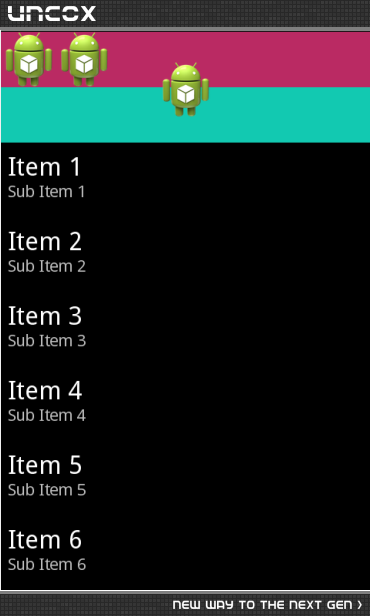
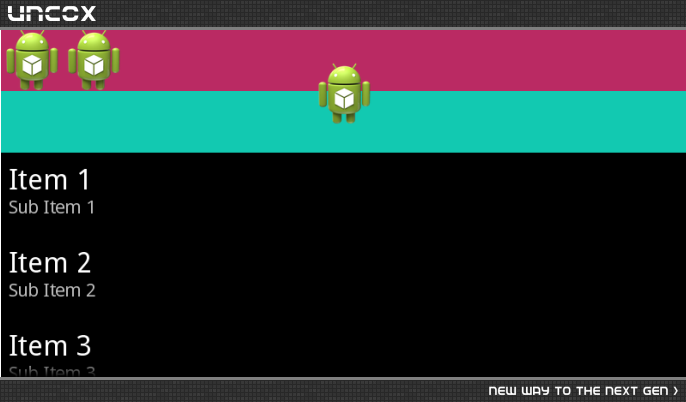
نظرات
سپهر
12 سال پیش
شما هم از margin استفاده کردی؟
MILAD-MB
12 سال پیش
نه استفاده نکردم. شما اگه از RelativLayout استفاده کنید حساب کار دستتون میاد. یک بار انجام بدین و اطلاع بدید. وقتی روی این Layout ست میکنی با موس اون ایمیج ها رو بکش و جابه جا کن. برای Layout هم طبق روش استاد سایز بندی کن :)
override
12 سال پیش
خب من هم با موس اون تصویر وسط رو جا به جا کردم خودش اتوماتیک margin اضافه کرد منظور اینه که در فایل xml شما هم در کد xml برای تصویر آخر margin اضافه شده ؟ کد xml که گذاشتم نگاه کنید برای تصویر آخر margin ست شده.
MILAD-MB
12 سال پیش
الان کد رو پایین می نویسم ببینید
MILAD-MB
12 سال پیش
خدمت شما...
 <RelativeLayout xmlns:android="http://schemas.android.com/apk/res/android"
    android:id="@+id/RelativeLayout1"
    android:layout_width="fill_parent"
    android:layout_height="fill_parent"
    android:orientation="vertical" >

    <LinearLayout
        android:id="@+id/linearLayout1"
        android:layout_width="match_parent"
        android:layout_height="48dp"
        android:layout_alignParentTop="true"
        android:layout_centerHorizontal="true"
        android:background="#BA2A63"
        android:orientation="horizontal" >

        <ImageView
            android:id="@+id/imageView2"
            android:layout_width="wrap_content"
            android:layout_height="wrap_content"
            android:src="@drawable/ic_launcher" />

        <ImageView
            android:id="@+id/imageView3"
            android:layout_width="wrap_content"
            android:layout_height="wrap_content"
            android:src="@drawable/ic_launcher" />
    </LinearLayout>

    <RelativeLayout
        android:id="@+id/RelativeLayout2"
        android:layout_width="match_parent"
        android:layout_height="48dp"
        android:layout_alignParentLeft="true"
        android:layout_below="@+id/linearLayout1"
        android:background="#12C9B1"
        android:orientation="vertical" >
    </RelativeLayout>

    <ImageView
        android:id="@+id/imageView1"
        android:layout_width="wrap_content"
        android:layout_height="wrap_content"
        android:layout_alignBottom="@+id/RelativeLayout2"
        android:layout_centerHorizontal="true"
        android:layout_marginBottom="22dp"
        android:src="@drawable/ic_launcher" />

    <ListView
        android:id="@+id/listView1"
        android:layout_width="wrap_content"
        android:layout_height="wrap_content"
        android:layout_alignParentLeft="true"
        android:layout_below="@+id/RelativeLayout2" >
    </ListView>

</RelativeLayout>
نظرات
override
12 سال پیش
خب درسته کد شما هم برای تصویر وسطی، از پایین بهش margin اضافه شده برای اینکه در وسط هم قرار بگیره layout_centralHorizental مقدارش true ست شده من چون دقیقاً تا وسط تصویر رو قرار ندادم بهش 112dp margin داد.
پاسخگویی و مشاهده پاسخ های این سوال تنها برای اعضای ویژه سایت امکان پذیر است .
چنانچه تمایل دارید به همه بخش ها دسترسی داشته باشید میتوانید از این بخش لایسنس این آموزش را خریداری نمایید .
ویرایش
پیام
نظرات