


نه ،باز همونطوره
بروز خطا
[message]
اشتراک در سوال
رای ها
[dataList]
پرسش و پاسخ
نازیبا شدن متن با اسکرول !
مدیریت گفتگو
 Rassam
12 سال پیش
Rassam
12 سال پیش
آخرین تغییر: 12 سال پیش
من تو برنامهم ، عنوان و متن دارم که وقتی اسکرول میکنم عنوان با متن قاطی میشه،این شکلی میشه :
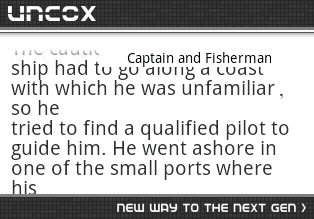
راهنمایی میکنین چیکار کنم که اینجوری نشه ؟ و تر و تمیز باشه
کد xml رو هم میذارم
 <RelativeLayout xmlns:android="http://schemas.android.com/apk/res/android"
    xmlns:tools="http://schemas.android.com/tools"
    android:layout_width="match_parent"
    android:layout_height="match_parent"
    android:background="#FFFFFF"
    android:paddingBottom="@dimen/activity_vertical_margin"
    android:paddingLeft="@dimen/activity_horizontal_margin"
    android:paddingRight="@dimen/activity_horizontal_margin"
    android:paddingTop="@dimen/activity_vertical_margin"
    tools:context=".St" >


    <ScrollView
        android:id="@+id/scrollView1"
        android:layout_width="wrap_content"
        android:layout_height="wrap_content" >

        <LinearLayout
            android:layout_width="match_parent"
            android:layout_height="match_parent"
            android:orientation="vertical" >

            <TextView
                android:id="@+id/txtEng"
                android:layout_width="match_parent"
                android:layout_height="300dp"
                android:layout_marginBottom="10dp"
                android:layout_marginTop="80dp"
                android:text="TextView" />

            <TextView
                android:id="@+id/txtFars"
                android:layout_width="match_parent"
                android:layout_height="match_parent"
                android:layout_marginTop="67dp"
                android:gravity="right"
                android:text="TextView" />
        </LinearLayout>
    </ScrollView>


    <Button
        android:id="@+id/btnTitle"
        android:layout_width="200dp"
        android:layout_height="wrap_content"
        android:layout_alignParentRight="true"
        android:background="#FFB6C1"
        android:text="Button" />

</RelativeLayout>
پاسخها 2
 Spirit
12 سال پیش
Spirit
12 سال پیش
سوالتون رو ویرایش و عکس رو تو سایت آپلود کنید :)
تو notepad کمی تغییر دادم ببینید بهتر شد یا نه؟
<LinearLayout xmlns:android="http://schemas.android.com/apk/res/android"
    xmlns:tools="http://schemas.android.com/tools"
    android:layout_width="match_parent"
    android:layout_height="match_parent"
    android:orientation="vertical" >

    <Button
        android:id="@+id/btnTitle"
        android:layout_width="200dp"
        android:layout_height="wrap_content"
        android:layout_gravity="center"
        android:layout_margin="5dp"
        android:background="#FFB6C1"
        android:text="Button" />

    <ScrollView
        android:layout_width="match_parent"
        android:layout_height="wrap_content"
        android:background="#FFFFFF" >

        <LinearLayout
            android:layout_width="match_parent"
            android:layout_height="wrap_content"
            android:orientation="vertical" >

            <TextView
                android:id="@+id/txtEng"
                android:layout_width="match_parent"
                android:layout_height="wrap_content"
                android:layout_marginBottom="10dp"
                android:layout_marginTop="20dp"
                android:text="English text goes here" />

            <TextView
                android:id="@+id/txtFars"
                android:layout_width="match_parent"
                android:layout_height="wrap_content"
                android:layout_marginBottom="10dp"
                android:layout_marginTop="20dp"
                android:gravity="right"
                android:text="Persian text goes here" />
        </LinearLayout>
    </ScrollView>

</LinearLayout>
نظرات
Spirit
12 سال پیش
عوضش کردم یبار دیگه ببینید
Rassam
12 سال پیش
تو خروجی صفحه ی خالی سیاه میاد ، دکمه ی عنوان هم اینجوری زیر تکست ویو ها قرار میگیره
Spirit
12 سال پیش
این بار تو eclipse عوض کردم تست کنید :)
Rassam
12 سال پیش
مرسی از وقتی که گذاشتین.بازم صفحه ی سیاه نشون میده،من متن و عنوانم و از دیتابیس میخونم نمیدونم چرا صفحه سیاه میده :|
تو یه پروژه ی دیگه کد شمارو امتحان کردم فرقی نکرده بود.
چجوری میتونم همین دکمه رو بچسبونم به بالای صفحه ؟
Rassam
12 سال پیش
الانن این شکلیه با اسکرول :
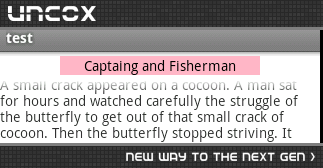
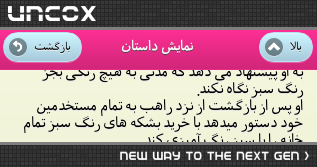
من میخوام دکمه ی عنوانم اینجوری باشه و با اسکرول متن ،بدشکل نشه
نظرات
پاسخگویی و مشاهده پاسخ های این سوال تنها برای اعضای ویژه سایت امکان پذیر است .
چنانچه تمایل دارید به همه بخش ها دسترسی داشته باشید میتوانید از این بخش لایسنس این آموزش را خریداری نمایید .
ویرایش
پیام
نظرات