


سلام.. اندروید استودیو 2.3.3 یا هر استودویی نیاز به sdk essential مربوطه اون داره که از داخل settings -> gradle -> Use local gradle distribution قابل تنظیم و ست کردن است. موفق باشید.
بروز خطا
[message]
اشتراک در سوال
رای ها
[dataList]
پرسش و پاسخ
Error:(76) Error parsing XML: not well-formed (invalid token)
مدیریت گفتگو
 alireza099
7 سال پیش
alireza099
7 سال پیش
آخرین تغییر: 7 سال پیش
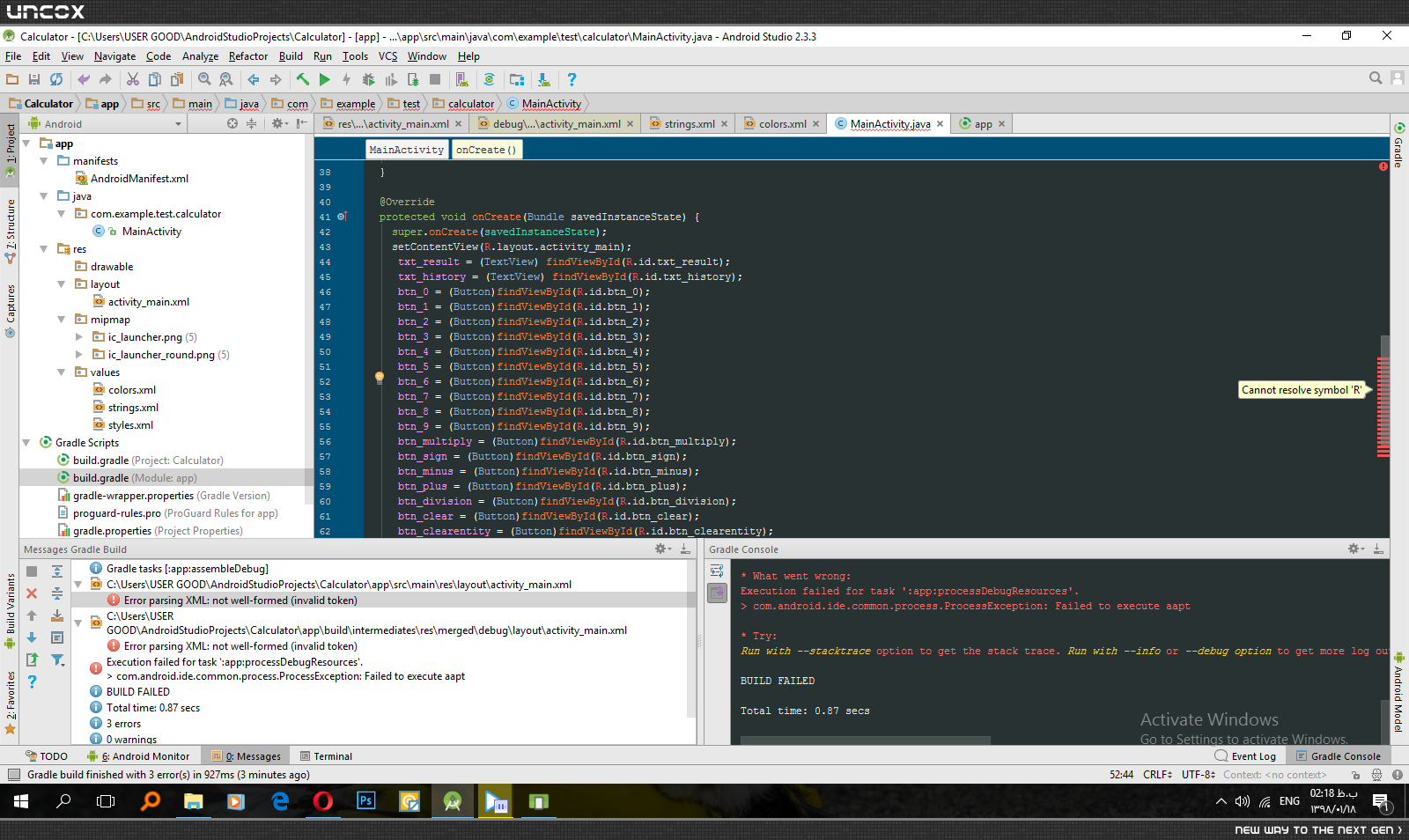
سلام در پروژه ماشین حساب موقع اجرا این ارور رو میگیرم و در فایل اصلی پروژه ارورcannot resolve symvol "R" 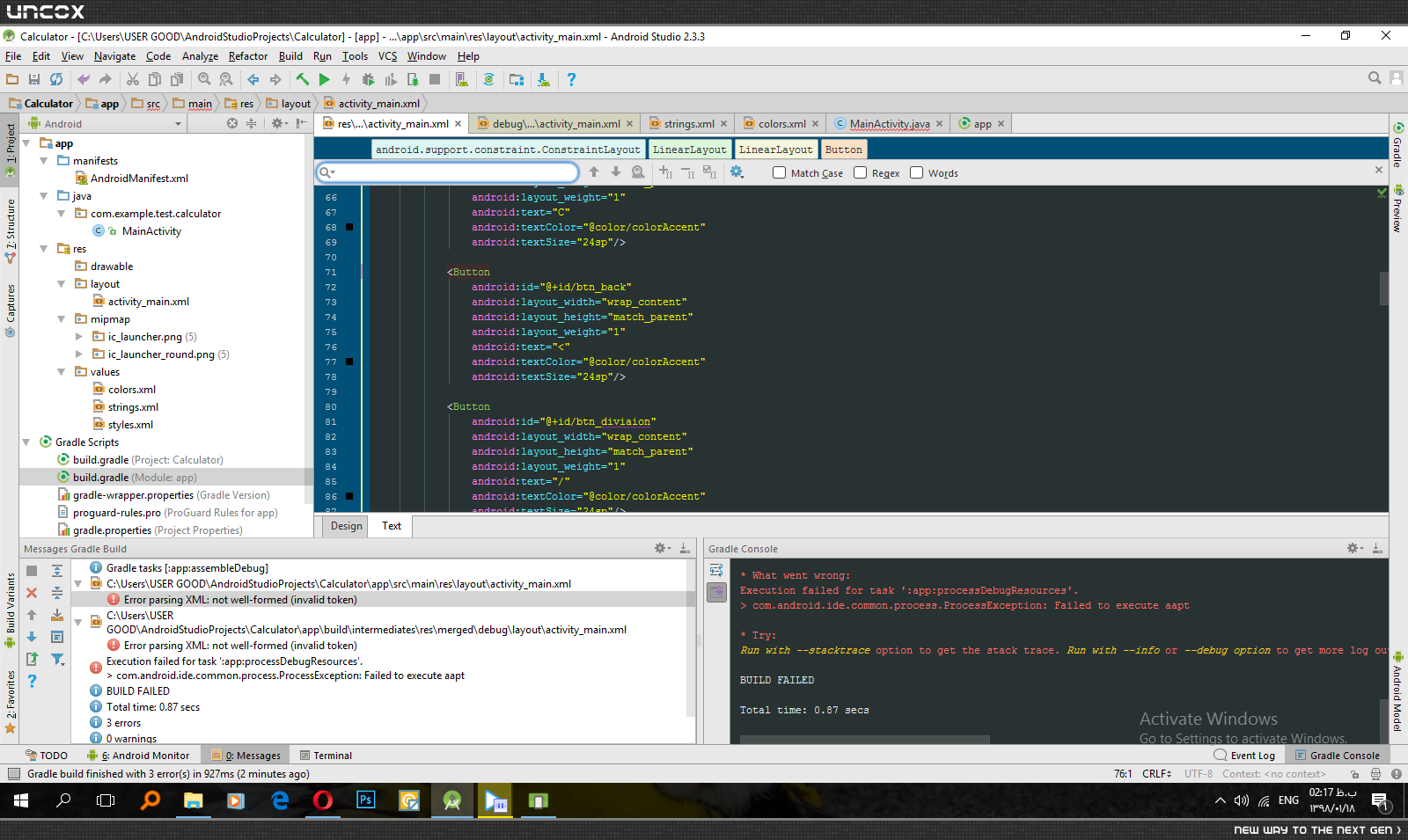
 <?xml version="1.0" encoding="utf-8"?>
<android.support.constraint.ConstraintLayout
 xmlns:android="http://schemas.android.com/apk/res/android"
 xmlns:app="http://schemas.android.com/apk/res-auto"
 xmlns:tools="http://schemas.android.com/tools"
 android:layout_width="match_parent"
 android:layout_height="match_parent"
 tools:context="com.example.test.calculator.MainActivity">

 <LinearLayout
 android:layout_width="0dp"
 android:layout_height="0dp"
 android:orientation="vertical"
 tools:layout_constraintTop_creator="1"
 tools:layout_constraintRight_creator="1"
 tools:layout_constraintBottom_creator="1"
 android:layout_marginStart="8dp"
 app:layout_constraintBottom_toBottomOf="parent"
 android:layout_marginEnd="8dp"
 app:layout_constraintRight_toRightOf="parent"
 android:layout_marginTop="8dp"
 tools:layout_constraintLeft_creator="1"
 android:layout_marginBottom="8dp"
 app:layout_constraintLeft_toLeftOf="parent"
 app:layout_constraintTop_toTopOf="parent"
 android:layout_marginLeft="8dp"
 android:layout_marginRight="8dp">

 <TextView
 android:id="@+id/textView3"
 android:layout_width="match_parent"
 android:layout_height="wrap_content"
 android:gravity="bottom|right"
 android:textColor="@color/colorAccent"
 android:textSize="18sp"/>

 <TextView
 android:id="@+id/txt_result"
 android:layout_width="match_parent"
 android:layout_height="wrap_content"
 android:gravity="bottom|right"
 android:text="0"
 android:textColor="@color/colorAccent"
 android:textSize="30sp"/>

 <LinearLayout
 android:layout_width="match_parent"
 android:layout_height="wrap_content"
 android:layout_weight="0.2"
 android:orientation="horizontal">

 <Button
 android:id="@+id/btn_clearentity"
 android:layout_width="wrap_content"
 android:layout_height="match_parent"
 android:layout_weight="1"
 android:text="CE"
 android:textColor="@color/colorAccent"
 android:textSize="24sp"
 tools:ignore="NestedWeights"/>

 <Button
 android:id="@+id/btn_clear"
 android:layout_width="wrap_content"
 android:layout_height="match_parent"
 android:layout_weight="1"
 android:text="C"
 android:textColor="@color/colorAccent"
 android:textSize="24sp"/>

 <Button
 android:id="@+id/btn_back"
 android:layout_width="wrap_content"
 android:layout_height="match_parent"
 android:layout_weight="1"
 android:text="<"
 android:textColor="@color/colorAccent"
 android:textSize="24sp"/>

 <Button
 android:id="@+id/btn_diviaion"
 android:layout_width="wrap_content"
 android:layout_height="match_parent"
 android:layout_weight="1"
 android:text="/"
 android:textColor="@color/colorAccent"
 android:textSize="24sp"/>
 </LinearLayout>

 <LinearLayout
 android:layout_width="match_parent"
 android:layout_height="wrap_content"
 android:layout_weight="0.2"
 android:orientation="horizontal">

 <Button
 android:id="@+id/btn_7"
 android:layout_width="wrap_content"
 android:layout_height="match_parent"
 android:layout_weight="1"
 android:text="7"
 android:textColor="@color/colorAccent"
 android:textSize="24sp"
 tools:ignore="NestedWeights"/>

 <Button
 android:id="@+id/btn_8"
 android:layout_width="wrap_content"
 android:layout_height="match_parent"
 android:layout_weight="1"
 android:text="8"
 android:textColor="@color/colorAccent"
 android:textSize="24sp"/>

 <Button
 android:id="@+id/btn_9"
 android:layout_width="wrap_content"
 android:layout_height="match_parent"
 android:layout_weight="1"
 android:text="9"
 android:textColor="@color/colorAccent"
 android:textSize="24sp"/>

 <Button
 android:id="@+id/btn_multiply"
 android:layout_width="wrap_content"
 android:layout_height="match_parent"
 android:layout_weight="1"
 android:text="X"
 android:textColor="@color/colorAccent"
 android:textSize="24sp"/>
 </LinearLayout>

 <LinearLayout
 android:layout_width="match_parent"
 android:layout_height="wrap_content"
 android:layout_weight="0.2"
 android:orientation="horizontal">

 <Button
 android:id="@+id/btn_4"
 android:layout_width="wrap_content"
 android:layout_height="match_parent"
 android:layout_weight="1"
 android:text="4"
 android:textColor="@color/colorAccent"
 android:textSize="24sp"
 tools:ignore="NestedWeights"/>

 <Button
 android:id="@+id/btn_5"
 android:layout_width="wrap_content"
 android:layout_height="match_parent"
 android:layout_weight="1"
 android:text="5"
 android:textColor="@color/colorAccent"
 android:textSize="24sp"/>

 <Button
 android:id="@+id/btn_6"
 android:layout_width="wrap_content"
 android:layout_height="match_parent"
 android:layout_weight="1"
 android:text="6"
 android:textColor="@color/colorAccent"
 android:textSize="24sp"/>

 <Button
 android:id="@+id/btn_minus"
 android:layout_width="wrap_content"
 android:layout_height="match_parent"
 android:layout_weight="1"
 android:text="-"
 android:textColor="@color/colorAccent"
 android:textSize="24sp"/>
 </LinearLayout>

 <LinearLayout
 android:layout_width="match_parent"
 android:layout_height="wrap_content"
 android:layout_weight="0.2"
 android:orientation="horizontal">

 <Button
 android:id="@+id/btn_1"
 android:layout_width="wrap_content"
 android:layout_height="match_parent"
 android:layout_weight="1"
 android:text="1"
 android:textColor="@color/colorAccent"
 android:textSize="24sp"
 tools:ignore="NestedWeights"/>

 <Button
 android:id="@+id/btn_2"
 android:layout_width="wrap_content"
 android:layout_height="match_parent"
 android:layout_weight="1"
 android:text="2"
 android:textColor="@color/colorAccent"
 android:textSize="24sp"/>

 <Button
 android:id="@+id/btn_3"
 android:layout_width="wrap_content"
 android:layout_height="match_parent"
 android:layout_weight="1"
 android:text="3"
 android:textColor="@color/colorAccent"
 android:textSize="24sp"/>

 <Button
 android:id="@+id/btn_plus"
 android:layout_width="wrap_content"
 android:layout_height="match_parent"
 android:layout_weight="1"
 android:text="+"
 android:textColor="@color/colorAccent"
 android:textSize="24sp"/>
 </LinearLayout>

 <LinearLayout
 android:layout_width="match_parent"
 android:layout_height="wrap_content"
 android:layout_weight="0.2"
 android:orientation="horizontal">

 <Button
 android:id="@+id/btn_sign"
 android:layout_width="wrap_content"
 android:layout_height="match_parent"
 android:layout_weight="1"
 android:text="-"
 android:textColor="@color/colorAccent"
 android:textSize="24sp"
 tools:ignore="NestedWeights"/>

 <Button
 android:id="@+id/btn_0"
 android:layout_width="wrap_content"
 android:layout_height="match_parent"
 android:layout_weight="1"
 android:text="0"
 android:textColor="@color/colorAccent"
 android:textSize="24sp"/>

 <Button
 android:id="@+id/btn_dot"
 android:layout_width="wrap_content"
 android:layout_height="match_parent"
 android:layout_weight="1"
 android:text="."
 android:textColor="@color/colorAccent"
 android:textSize="24sp"/>

 <Button
 android:id="@+id/btn_equal"
 android:layout_width="wrap_content"
 android:layout_height="match_parent"
 android:layout_weight="1"
 android:text="="
 android:textColor="@color/colorAccent"
 android:textSize="24sp"/>
 </LinearLayout>

 </LinearLayout>
</android.support.constraint.ConstraintLayout>
package com.example.test.calculator;

import android.support.v7.app.AppCompatActivity;
import android.os.Bundle;
import android.view.View;
import android.widget.Button;
import android.widget.TextView;

public class MainActivity extends AppCompatActivity {

  TextView txt_result;
  TextView txt_history;
  Button btn_0;
  Button btn_1;
  Button btn_2;
  Button btn_3;
  Button btn_4;
  Button btn_5;
  Button btn_6;
  Button btn_7;
  Button btn_8;
  Button btn_9;
  Button btn_multiply;
  Button btn_sign;
  Button btn_minus;
  Button btn_plus;
  Button btn_division;
  Button btn_clear;
  Button btn_clearentity;
  Button btn_back;
  Button btn_dot;
  Button btn_equal;

  public void appendNumber(int num){
    String oldValue = txt_result.getText().toString();
    txt_result.setText(oldValue + num);

  }

  @Override
  protected void onCreate(Bundle savedInstanceState) {
    super.onCreate(savedInstanceState);
    setContentView(R.layout.activity_main);
     txt_result = (TextView) findViewById(R.id.txt_result);
     txt_history = (TextView) findViewById(R.id.txt_history);
     btn_0 = (Button)findViewById(R.id.btn_0);
     btn_1 = (Button)findViewById(R.id.btn_1);
     btn_2 = (Button)findViewById(R.id.btn_2);
     btn_3 = (Button)findViewById(R.id.btn_3);
     btn_4 = (Button)findViewById(R.id.btn_4);
     btn_5 = (Button)findViewById(R.id.btn_5);
     btn_6 = (Button)findViewById(R.id.btn_6);
     btn_7 = (Button)findViewById(R.id.btn_7);
     btn_8 = (Button)findViewById(R.id.btn_8);
     btn_9 = (Button)findViewById(R.id.btn_9);
     btn_multiply = (Button)findViewById(R.id.btn_multiply);
     btn_sign = (Button)findViewById(R.id.btn_sign);
     btn_minus = (Button)findViewById(R.id.btn_minus);
     btn_plus = (Button)findViewById(R.id.btn_plus);
     btn_division = (Button)findViewById(R.id.btn_division);
     btn_clear = (Button)findViewById(R.id.btn_clear);
     btn_clearentity = (Button)findViewById(R.id.btn_clearentity);
     btn_back = (Button)findViewById(R.id.btn_back);
     btn_dot = (Button)findViewById(R.id.btn_dot);
     btn_equal = (Button)findViewById(R.id.btn_equal);
     btn_0.setOnClickListener(new View.OnClickListener() {
      @Override
      public void onClick(View view) {
        appendNumber(0);


      }
    });


  }
}
پاسخها 1
alireza099
7 سال پیش
همونظوری که فکر میکردم کد ها مشکلی نداشت تمام این هارو در اندروید استودیو 2.1 اجرا کردم و به صورت درست اجرا شد و کار کرد نمیدونم چه مشکلی با اندروید استودیو 2.3.3 داره
نظرات
 sana ebadi
7 سال پیش
sana ebadi
7 سال پیش
سلام شما همیشه با خرین ابزار و اخرین نسخه ی اندروید استودیو کار کنید . مطمعن باشید که گوگل بیکار نیست الکی نسخه بده بیرون حتما رفع باگ شده و کلی فیچر بهش اضافه شده . شما ارتقا بدید لطفا
پاسخگویی و مشاهده پاسخ های این سوال تنها برای اعضای ویژه سایت امکان پذیر است .
چنانچه تمایل دارید به همه بخش ها دسترسی داشته باشید میتوانید از این بخش لایسنس این آموزش را خریداری نمایید .
ویرایش
پیام
نظرات