


اگه در یک دیالوگ نشون بدید خیلی شیک میشه :) - موفق باشی
بروز خطا
[message]
اشتراک در سوال
رای ها
[dataList]
پرسش و پاسخ
استفاده از HoloColorPicker
مدیریت گفتگو
 Mir Unknown
12 سال پیش
آخرین تغییر: 9 سال پیش
سلام
کسی میتونه واس استفاده کردن این HoloColorPicker کمکم کنه؟!
پاسخها 1
 مجتبی یگانه
12 سال پیش
خیلی خیلی سادست !
1 - پروژه ی اصلی رو دانلود و ایمپورت کنید ، چون پروژه کتابخانه هست ، نمیتونید اجراش کنید !
2- یک پروژه ی جدید ایجاد کنید و در لایه ی اصلی این کد رو وارد کنید
<?xml version="1.0" encoding="utf-8"?>
<LinearLayout xmlns:android="http://schemas.android.com/apk/res/android"
    android:layout_width="match_parent"
    android:layout_height="match_parent"
    android:orientation="vertical" >

    <com.larswerkman.holocolorpicker.ColorPicker
        android:id="@+id/picker"
        android:layout_width="wrap_content"
        android:layout_height="wrap_content" />

    <com.larswerkman.holocolorpicker.SVBar
        android:id="@+id/svbar"
        android:layout_width="wrap_content"
        android:layout_height="wrap_content" />

    <com.larswerkman.holocolorpicker.OpacityBar
        android:id="@+id/opacitybar"
        android:layout_width="wrap_content"
        android:layout_height="wrap_content" />

    <com.larswerkman.holocolorpicker.SaturationBar
        android:id="@+id/saturationbar"
        android:layout_width="wrap_content"
        android:layout_height="wrap_content" />

    <com.larswerkman.holocolorpicker.ValueBar
        android:id="@+id/valuebar"
        android:layout_width="wrap_content"
        android:layout_height="wrap_content" />

    <TextView
        android:id="@+id/txtColor"
        android:layout_width="match_parent"
        android:layout_height="wrap_content"
        android:text="sample Text" />

    <Button
        android:id="@+id/btnSubmit"
        android:layout_width="wrap_content"
        android:layout_height="wrap_content"
        android:text="Button" />

</LinearLayout>
و یک Activty بسازید !
 package ir.negano.holocolorpicker;

import android.app.Activity;
import android.os.Bundle;
import android.view.View;
import android.view.View.OnClickListener;
import android.widget.TextView;
import com.larswerkman.holocolorpicker.ColorPicker;
import com.larswerkman.holocolorpicker.OpacityBar;
import com.larswerkman.holocolorpicker.SVBar;
import com.larswerkman.holocolorpicker.SaturationBar;
import com.larswerkman.holocolorpicker.ValueBar;


public class ActivityMain extends Activity {

    @Override
    protected void onCreate(Bundle savedInstanceState) {
        super.onCreate(savedInstanceState);
        setContentView(R.layout.main);
        final TextView txtSample = (TextView) findViewById(R.id.txtColor);
        final ColorPicker picker = (ColorPicker) findViewById(R.id.picker);
        SVBar svBar = (SVBar) findViewById(R.id.svbar);
        OpacityBar opacityBar = (OpacityBar) findViewById(R.id.opacitybar);
        SaturationBar saturationBar = (SaturationBar) findViewById(R.id.saturationbar);
        ValueBar valueBar = (ValueBar) findViewById(R.id.valuebar);

        picker.addSVBar(svBar);
        picker.addOpacityBar(opacityBar);
        picker.addSaturationBar(saturationBar);
        picker.addValueBar(valueBar);

        findViewById(R.id.btnSubmit).setOnClickListener(new OnClickListener() {

            @Override
            public void onClick(View arg0) {
                String HEX = String.format("#%06X", (0xFFFFFF & picker.getColor()));
                txtSample.setText("the Color value in INT is : " + picker.getColor() + " and in HEX is : " + HEX);
                txtSample.setBackgroundColor(picker.getColor());
            }
        });
    }
}
کتابخانه ای رو که در محیط Eclipse ایمپورت کردید رو به این پروژه اضافه کنید
your project > propertise > android > libraray > add > HoloColorPicker-master
حالا پروژه رو اجرا کنید !
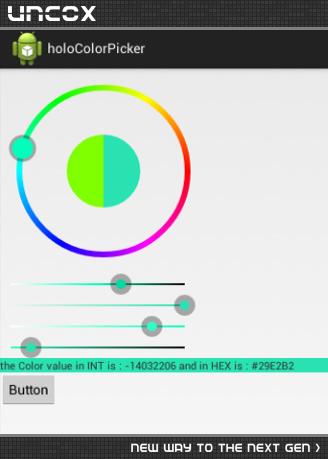
تصویر پروژه :
نظرات
Mir Unknown
12 سال پیش
ایمپورت نمیشه مشکل همینه!
مجتبی یگانه
12 سال پیش
صبر کن الان واست یه ورژن سالم آپلود میکنم
Mir Unknown
12 سال پیش
ممنون بابت وقتی که گذاشتید
مجتبی یگانه
12 سال پیش
میتونید دانلود کنید - لینک به متن پاسخ اضافه شد :)
Mir Unknown
12 سال پیش
ممنون دانلود کردم برم تست کنم
Mir Unknown
12 سال پیش
واس اندروید 2.2 جواب نمیده؟!
مجتبی یگانه
12 سال پیش
تست نکردم ، تست کنید اطلاع بدید
Mir Unknown
12 سال پیش
همین که امپورت کردم این ارور داد [2014-07-26 0529 - HoloColorPicker-master] Unable to resolve target 'android-19'
مجتبی یگانه
12 سال پیش
:(( - چند رو پیش 2 صفحه پاسخ در موردش دادم ، در لیست پاسخ های من تفاوت minsdk و target رو بخونید ، بعد میتونید مشکلتون رو حل کنید
Mir Unknown
12 سال پیش
باشه ممنون
 زنگوئی
12 سال پیش
لینک دانلوووووووووووووووود خرابه
Mir Unknown
12 سال پیش
حذف شده دوباره اپلود کردم اینم لینک
 Hossein Lamei Ramandi
10 سال پیش
لینک دانلود خرابه اگه ممکنه دوباره آپلود کنید
Mir Unknown
10 سال پیش
از اینجا دانلود کنید لینک
Hossein Lamei Ramandi
10 سال پیش
خیلی ممنون
 محمد
9 سال پیش
لینک دانلود حذف شده دوباره
Mir Unknown
9 سال پیش
تو کانال تلگرام گذاشتمش @SourceCod
محمد
9 سال پیش
داخل کانال گشتم پیداش نکردم میشه لطف کنید اینجا بزارید؟
پاسخگویی و مشاهده پاسخ های این سوال تنها برای اعضای ویژه سایت امکان پذیر است .
چنانچه تمایل دارید به همه بخش ها دسترسی داشته باشید میتوانید از این بخش لایسنس این آموزش را خریداری نمایید .
ویرایش
پیام
نظرات