



کدهای آداپتر و اکتیویتی رو هم توی پست بعدی اضافه کنید. شاید از اونا باشه. مطمئنید آداپتر رو درست ست کردید؟
بروز خطا
[message]
اشتراک در سوال
رای ها
[dataList]
پرسش و پاسخ
کار نکردن متد setSelection
مدیریت گفتگو
 mahdiFar77
9 سال پیش
mahdiFar77
9 سال پیش
آخرین تغییر: 9 سال پیش
با سلام خدمت همه دوستان
یک مشکل عجیب غریب پیدا کردم که واقعا خیلی اذیتم کرده که حدود 3 روز درگییرم کرده و ممنون میشم راهنمایی کنین؟
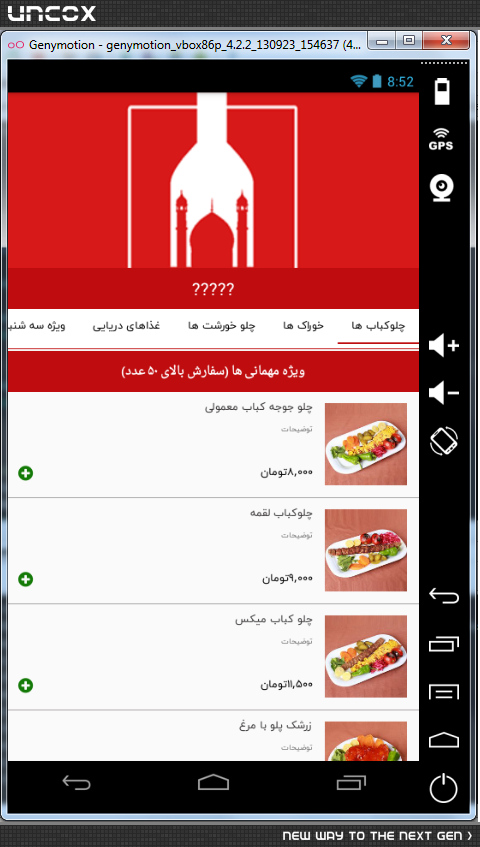
و اما مشکل من یه صفحه دارم که یه کوردینیت لیوت داره که داخل این صفحه یه لیست غذا ها و یه لیست گروه های غذذایی هست که توی لیست ویو معمولی کار میکنه ولی برای اینکه باید دسته ها با عنوان دسته نمایش داده بشن مجبور شدم از ExpandableListView استفاده کنم که متاسفانه وقتی توی ریسایکل ویو روی گروه غذایی که کلیک میکنم متد setSelection کار نمیکنه و اسکرول نمیشه .
expandableListView.setSelection(pos);
-------------------------
<LinearLayout xmlns:android="https://schemas.android.com/apk/res/android"
    xmlns:app="http://schemas.android.com/apk/res-auto"
    xmlns:fresco="http://schemas.android.com/apk/res-auto"
    xmlns:tools="http://schemas.android.com/tools"
    android:layout_width="match_parent"
    android:layout_height="match_parent"
    android:orientation="vertical"
    tools:ignore="HardcodedText">

    <android.support.design.widget.CoordinatorLayout
        android:layout_width="match_parent"
        android:layout_height="match_parent">

        <android.support.design.widget.AppBarLayout
            android:id="@+id/appbar"
            android:layout_width="match_parent"
            android:layout_height="wrap_content"
            android:theme="@style/ThemeOverlay.AppCompat.Dark.ActionBar">

            <android.support.design.widget.CollapsingToolbarLayout
                android:id="@+id/collapsing"
                android:layout_width="match_parent"
                android:layout_height="wrap_content"
                app:layout_scrollFlags="scroll|exitUntilCollapsed|snap">

                <android.support.v4.view.ViewPager
                    android:id="@+id/pager"
                    android:layout_width="match_parent"
                    android:tint="#11000000"
                    android:layout_height="300dp"
                    app:layout_collapseMode="parallax"
                    app:layout_collapseParallaxMultiplier="0.9" />

                <FrameLayout
                    android:id="@+id/framelayout_title"
                    android:layout_width="match_parent"
                    android:layout_height="48dp"
                    android:layout_gravity="bottom|center_horizontal"
                    android:background="@color/colorPrimary"
                    android:orientation="vertical"
                    app:layout_collapseMode="parallax"
                    app:layout_collapseParallaxMultiplier="0.3">

                    <LinearLayout
                        android:id="@+id/linearlayout_title"
                        android:layout_width="match_parent"
                        android:layout_height="wrap_content"
                        android:layout_gravity="center"
                        android:orientation="vertical">

                        <TextView
                            android:layout_width="wrap_content"
                            android:layout_height="wrap_content"
                            android:layout_gravity="center_horizontal"
                            android:gravity="bottom|center"
                            android:text="Grumpy Cat"
                            android:textColor="@android:color/white"
                            android:textSize="25sp"
                            android:id="@+id/txtTitle2" />

                    </LinearLayout>
                </FrameLayout>
            </android.support.design.widget.CollapsingToolbarLayout>
        </android.support.design.widget.AppBarLayout>


        <android.support.v4.widget.NestedScrollView
            android:layout_width="match_parent"
            android:layout_height="match_parent"
            android:scrollbars="none"
            android:layout_marginTop="32dp"
            app:behavior_overlapTop="30dp"
            app:layout_behavior="@string/appbar_scrolling_view_behavior"
            android:id="@+id/scrNested"
            android:fillViewport="true">

            <ir.foodilaa.object.NonScrollExpandableListView
                android:id="@+id/expandableListView"
                android:layout_height="match_parent"
                android:layout_width="match_parent"
                android:groupIndicator="@null"
                android:fillViewport="true"
                android:indicatorLeft="?android:attr/expandableListPreferredItemIndicatorLeft"
                android:divider="@android:color/darker_gray"
                android:dividerHeight="@null" />

        </android.support.v4.widget.NestedScrollView>

        <android.support.v7.widget.Toolbar
            android:id="@+id/toolbar"
            android:layout_width="match_parent"
            android:layout_height="wrap_content"
            android:background="@color/colorPrimary"
            app:layout_anchor="@id/framelayout_title"
            app:contentInsetStart="0dp"
            app:contentInsetEnd="0dp"
            app:title="asd">

            <LinearLayout
                android:layout_width="match_parent"
                android:layout_height="match_parent"
                android:orientation="vertical"
                android:gravity="center">

                <TextView
                    android:id="@+id/txtTitle"
                    android:layout_width="match_parent"
                    android:layout_height="48dp"
                    android:gravity="center"
                    android:text="Grumpy Cat information"
                    android:textColor="@android:color/white"
                    android:textSize="20sp" />

                <android.support.v7.widget.RecyclerView
                    android:id="@+id/lstHeader"
                    android:layout_width="match_parent"
                    android:layout_height="46dp"
                    tools:listitem="@layout/adapter_rest_header"
                    android:background="#fff" />

            </LinearLayout>

        </android.support.v7.widget.Toolbar>


    </android.support.design.widget.CoordinatorLayout>
</LinearLayout>
پاسخها 2
mahdiFar77
9 سال پیش
انجام دادم ولی بازم جواب نمیده لاگ رو نشون میده ولی setSelection کار نمیکنه
public static void gotoListview(final int pos)
{
    expandableListView.post(new Runnable() {
        @Override
        public void run() {
            expandableListView.setSelection(pos);
        }
    });
    Log.d(G.TAG,"pos3:"+pos+"->"+G.foods.get(pos).catName);
}
نظرات
mahdiFar77
9 سال پیش
بله درست ست کردم .از اینجا مطمئن میشم که وقتی تبدیل به لیست ویو میکنم کار میکنه ولی لیست رو کامل اسکرول نمیکنه.بله امشب قرار میدم
mahdiFar77
9 سال پیش
/**
 * Created by fasav on 2/19/2017.
 */
public class ActivitySplash2 extends AppCompatActivity{
    public static ExpandableListView expandableListView;
    static ExpandableListAdapter expandableListAdapter;
    List<String> expandableListTitle;
    HashMap<String, List<StructFoodsItems>> expandableListDetail;
    //-------------------------------------
    public static ArrayList<String> image;
    public static ArrayList<String> title;
    private ViewPager pager;
    private ImagePagerAdapter adapter;
    private int currentPage=0;
    ProgressDialog progressDialog;
    OnGetDataListener listener;
    int pos=0;
    public static RecyclerView recyclerView;
    public static AdapterRestHeader adapterRestHeader;
    //-------------------------------------
    private static final float PERCENTAGE_TO_SHOW_TITLE_AT_TOOLBAR  = 0.9f;
    private static final float PERCENTAGE_TO_HIDE_TITLE_DETAILS     = 0.3f;
    private static final int ALPHA_ANIMATIONS_DURATION              = 200;

    private boolean mIsTheTitleVisible          = false;
    private boolean mIsTheTitleContainerVisible = false;

    private AppBarLayout appbar;
    private CollapsingToolbarLayout collapsing;
    private FrameLayout framelayoutTitle;
    private LinearLayout linearlayoutTitle;
    private Toolbar toolbar;
    private TextView txtTitle,txtTitle2;

    /**
     * Find the Views in the layout
     * Auto-created on 2016-03-03 11:32:38 by Android Layout Finder
     * (http://www.buzzingandroid.com/tools/android-layout-finder)
     */
    private void findViews() {
        appbar = (AppBarLayout)findViewById( R.id.appbar );
        collapsing = (CollapsingToolbarLayout)findViewById( R.id.collapsing );
        pager = (ViewPager) findViewById( R.id.pager);
        framelayoutTitle = (FrameLayout)findViewById( R.id.framelayout_title );
        linearlayoutTitle = (LinearLayout)findViewById( R.id.linearlayout_title );
        toolbar = (Toolbar)findViewById( R.id.toolbar );
        txtTitle = (TextView)findViewById( R.id.txtTitle );
        txtTitle2 = (TextView)findViewById( R.id.txtTitle2 );
        image=new ArrayList<>();
        title=new ArrayList<>();

    }


    @Override
    protected void onCreate(Bundle savedInstanceState) {
        super.onCreate(savedInstanceState);
        setContentView(R.layout.activity_splash2);
        findViews();
        G.currentActivity=this;
        toolbar.setTitle("?????");
        appbar.addOnOffsetChangedListener(new AppBarLayout.OnOffsetChangedListener() {
            @Override
            public void onOffsetChanged(AppBarLayout appBarLayout, int offset) {
                int maxScroll = appBarLayout.getTotalScrollRange();
                float percentage = (float) Math.abs(offset) / (float) maxScroll;

                handleAlphaOnTitle(percentage);
                handleToolbarTitleVisibility(percentage);
            }
        });
        setSupportActionBar(toolbar);
        startAlphaAnimation(txtTitle, 0, View.VISIBLE);
        LinearLayoutManager layoutManager= new LinearLayoutManager(ActivitySplash2.this, LinearLayoutManager.HORIZONTAL, false);
        layoutManager.setReverseLayout(true);
        recyclerView = (RecyclerView)findViewById(R.id.lstHeader);
        recyclerView.setLayoutManager(layoutManager);
        recyclerView.setItemAnimator(new DefaultItemAnimator());
        recyclerView.setAdapter(adapterRestHeader);
        progressDialog=new ProgressDialog(ActivitySplash2.this);
        progressDialog.setTitle("?? ??? ?????? ???????");
        progressDialog.show();
        initialize();
        txtTitle.setText("?????");
        txtTitle2.setText("?????");
        Command.getResturant(248,listener);
        expandableListView = (ExpandableListView) findViewById(R.id.expandableListView);
        expandableListDetail = new HashMap<String, List<StructFoodsItems>>();

//        expandableListView.setOnGroupClickListener(new ExpandableListView.OnGroupClickListener() {
//            @Override
//            public boolean onGroupClick(ExpandableListView parent, View v,
//                                        int groupPosition, long id) {
//                return true; // This way the expander cannot be collapsed
//            }
//        });
        expandableListView.setOnScrollListener(new AbsListView.OnScrollListener() {
            @Override
            public void onScrollStateChanged(AbsListView view, int scrollState) {

            }

            @Override
            public void onScroll(AbsListView view, int firstVisibleItem, int visibleItemCount, int totalItemCount) {
                Log.d(G.TAG,"firstVisibleItem:"+firstVisibleItem);
                Log.d(G.TAG,"visibleItemCount:"+visibleItemCount);
                Log.d(G.TAG,"totalItemCount:"+totalItemCount);
                if(firstVisibleItem!=pos)
                {
                    pos=firstVisibleItem;
                    for (int i=0;i<G.foods.size();i++)
                    {
                        G.foods.get(i).isSelect=false;
                    }
                    G.foods.get(pos).isSelect=true;
                    adapterRestHeader.notifyDataSetChanged();
                    recyclerView.scrollToPosition(pos);
                }
            }
        });

    }

    private void handleToolbarTitleVisibility(float percentage) {
        if (percentage >= PERCENTAGE_TO_SHOW_TITLE_AT_TOOLBAR) {

            if(!mIsTheTitleVisible) {
                startAlphaAnimation(txtTitle, ALPHA_ANIMATIONS_DURATION, View.VISIBLE);
                mIsTheTitleVisible = false;
            }

        } else {

            if (mIsTheTitleVisible) {
                startAlphaAnimation(txtTitle, ALPHA_ANIMATIONS_DURATION, View.VISIBLE);
                mIsTheTitleVisible = false;
            }
        }
    }

    private void handleAlphaOnTitle(float percentage) {
        if (percentage >= PERCENTAGE_TO_HIDE_TITLE_DETAILS) {
            if(mIsTheTitleContainerVisible) {
                startAlphaAnimation(linearlayoutTitle, ALPHA_ANIMATIONS_DURATION, View.VISIBLE);
                mIsTheTitleContainerVisible = false;
            }

        } else {

            if (!mIsTheTitleContainerVisible) {
                startAlphaAnimation(linearlayoutTitle, ALPHA_ANIMATIONS_DURATION, View.VISIBLE);
                mIsTheTitleContainerVisible = false;
            }
        }
    }

    public static void startAlphaAnimation (View v, long duration, int visibility) {
        AlphaAnimation alphaAnimation = (visibility == View.VISIBLE)
                ? new AlphaAnimation(0f, 1f)
                : new AlphaAnimation(1f, 0f);

        alphaAnimation.setDuration(duration);
        alphaAnimation.setFillAfter(true);
        v.startAnimation(alphaAnimation);
    }
    private void initialize()
    {
        listener=new OnGetDataListener() {
            @Override
            public void onDownloadComplete(boolean complate, String result) {
                progressDialog.dismiss();
                if (complate) {
                    for(int i = 0; i< G.postGallery.size(); i++)
                    {
                        image.add(G.postGallery.get(i));
                        title.add("");
                    }
                    adapter = new ImagePagerAdapter(image,title);
                    pager.setAdapter(adapter);
                    G.foods.get(0).isSelect=true;
                    adapterRestHeader= new AdapterRestHeader(G.foods);
                    recyclerView.setAdapter(adapterRestHeader);
                    for (int i=0;i<G.foods.size();i++)
                    {
                        List<StructFoodsItems> cricket = new ArrayList<>();
                        for(int k=0;k<G.foods.get(i).items.size();k++){
                            cricket.add(G.foods.get(i).items.get(k));
                        }
                        expandableListDetail.put(G.foods.get(i).catName, cricket);
                    }
                    expandableListTitle = new ArrayList<>(expandableListDetail.keySet());
                    expandableListAdapter = new CustomExpandableListAdapter(ActivitySplash2.this, expandableListTitle, expandableListDetail);
                    expandableListView.setAdapter(expandableListAdapter);
                    for ( int i = 0; i < expandableListTitle.size(); i++ ) {
                        expandableListView.expandGroup(i);
                    }
                }
            }
        };
    }
    public static void gotoListview(final int pos)
    {
        expandableListView.post(new Runnable() {
            @Override
            public void run() {
                expandableListView.setSelection(pos);
            }
        });
        Log.d(G.TAG,"pos3:"+pos+"->"+G.foods.get(pos).catName);
    }
}
---------------------------------------این هم آداپتورش
/**
 * Created by fasav on 3/1/2017.
 */
public class AdapterRestHeader  extends RecyclerView.Adapter<AdapterRestHeader.MyViewHolder> {

    private List<StructFoods> Cats;

    public class MyViewHolder extends RecyclerView.ViewHolder {
        public TextView txtLine;
        public TextView txtTitle;

        public MyViewHolder(View view) {
            super(view);
            txtTitle= (TextView) view.findViewById(R.id.txtTitle);
            txtLine= (TextView) view.findViewById(R.id.txtLine);
            txtTitle.setTypeface(G.defaultFont);
        }
    }


    public AdapterRestHeader(List<StructFoods> cats) {
        this.Cats = cats;
    }

    @Override
    public MyViewHolder onCreateViewHolder(ViewGroup parent, int viewType) {
        View itemView = LayoutInflater.from(parent.getContext())
                .inflate(R.layout.adapter_rest_header, parent, false);

        return new MyViewHolder(itemView);
    }

    @Override
    public void onBindViewHolder(final MyViewHolder holder, final int position) {
        StructFoods cat = Cats.get(position);
        holder.txtTitle.setText(cat.catName);
        if(cat.isSelect)
            holder.txtLine.setBackgroundColor(G.currentActivity.getResources().getColor(R.color.colorPrimary));
        else
            holder.txtLine.setBackgroundColor(Color.WHITE);
        holder.txtTitle.setOnClickListener(new View.OnClickListener() {
            @Override
            public void onClick(View v) {
                for (int i=0;i<G.foods.size();i++)
                {
                    G.foods.get(i).isSelect=false;
                }
                G.foods.get(position).isSelect=true;
//                ActivitySplash2.gotoListview(position);
                FragmentRest.gotoListview(position);
                notifyDataSetChanged();
            }
        });
    }
    @Override
    public int getItemCount() {
        return Cats.size();
    }
}
نظرات
mahdiFar77
9 سال پیش
آقای حاج حسینی نظری ندارین؟
پاسخگویی و مشاهده پاسخ های این سوال تنها برای اعضای ویژه سایت امکان پذیر است .
چنانچه تمایل دارید به همه بخش ها دسترسی داشته باشید میتوانید از این بخش لایسنس این آموزش را خریداری نمایید .
ویرایش
پیام
نظرات