


بروز خطا
[message]
اشتراک در سوال
رای ها
[dataList]
علت کرش کردن fileoutputstream

0
0
با عرض سلام به تمامی دوستانم
من در فصل پروژه مارکت هستم قسمت 4 روم قرار دادن تصویر روی logo موقعی پروژه اجرا میکنم باید از سرور خوانده شد و درون SDCART ذخیره شود ولی در ادامه پروژه از fileoutputstream کرش میکند کسی میدونه دلیلش چی هست ؟ کلافه شدم دیگه
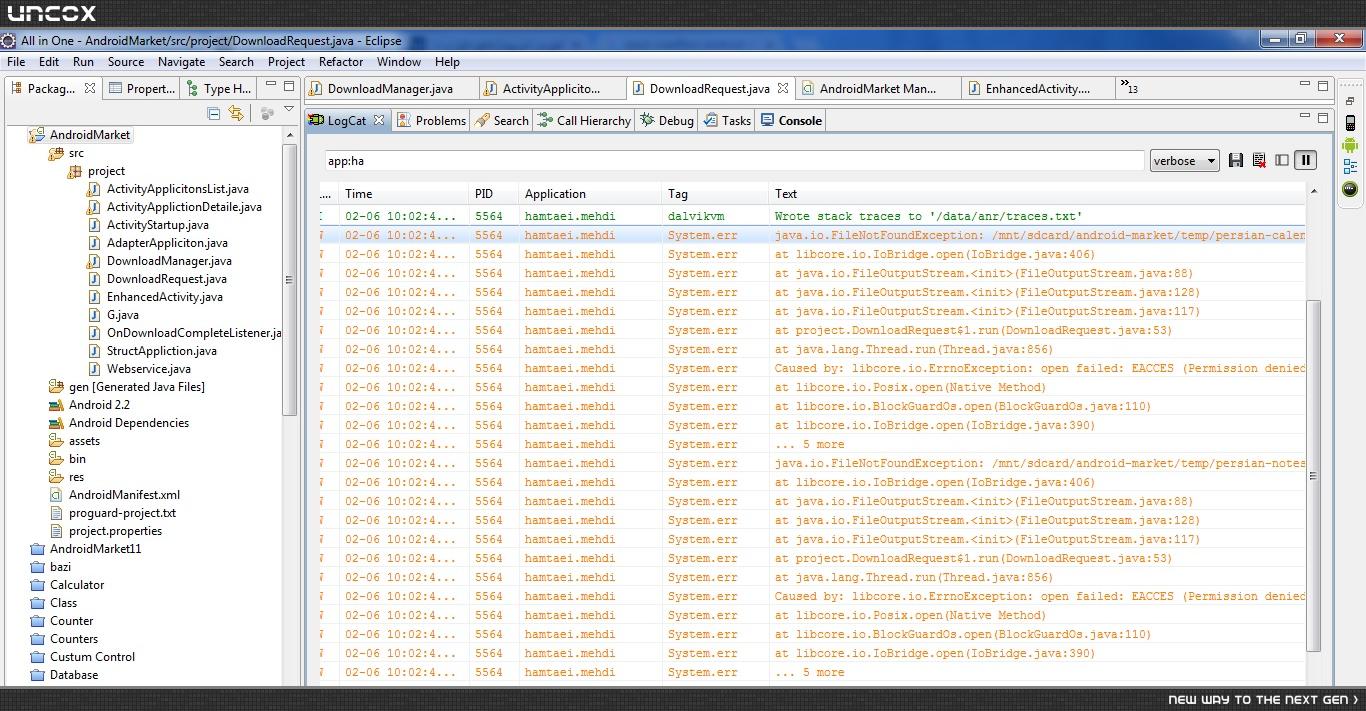
اینم کدهای دانلودم
 package project;

import java.io.File;
import java.io.FileOutputStream;
import java.io.IOException;
import java.io.InputStream;
import java.net.HttpURLConnection;
import java.net.MalformedURLException;
import java.net.URL;


public class DownloadRequest {

 private int downloadedSize;
 private int totalSize;
 private int percent;


 public int getDownloadedSize() {
 return downloadedSize;
 }


 public int getTotalSize() {
 return totalSize;
 }


 public int getPercent() {
 return percent;
 }


 public DownloadRequest download() {
 Thread thread = new Thread(new Runnable() {

 @Override
 public void run() {
 try {
 URL url = new URL(downloadPath);
 HttpURLConnection connection = (HttpURLConnection) url.openConnection();
 connection.setRequestMethod("GET");
 connection.setDoOutput(true);
 connection.connect();

 totalSize = connection.getContentLength();

 File file = new File(filepath);
 if (file.exists()) {
 file.delete();
 }

 FileOutputStream outputStream = new FileOutputStream(filepath);

 InputStream inputStream = connection.getInputStream();
 byte[] buffer = new byte[G.DOWNLOAD_BUFFER_SIZE];
 int len = 0;
 while ((len = inputStream.read(buffer)) > 0) {
 outputStream.write(buffer, 0, len);
 downloadedSize += len;

 percent = (int) (100.0f * (float) downloadedSize / totalSize);
 if (percent == 100 && listener != null) {

 G.HANDLER.post(new Runnable() {

 @Override
 public void run() {
 listener.onDownloadComplete(downloadPath, filepath);
 }
 });
 }

 if (simulate) {
 try {
 Thread.sleep(100);
 }
 catch (InterruptedException e) {
 e.printStackTrace();
 }
 }
 }

 outputStream.close();
 }
 catch (MalformedURLException e) {
 e.printStackTrace();
 }
 catch (IOException e) {
 e.printStackTrace();
 }
 }
 });

 thread.start();

 return this;
 }

 private String downloadPath;
 private String filepath;
 private OnDownloadCompleteListener listener;
 private boolean simulate;


 public DownloadRequest downloadPath(String value) {
 downloadPath = value;
 return this;
 }


 public DownloadRequest filepath(String value) {
 filepath = value;
 return this;
 }


 public DownloadRequest listener(OnDownloadCompleteListener value) {
 listener = value;
 return this;
 }


 public DownloadRequest simulate(boolean value) {
 simulate = value;
 return this;
 }
}package project;

import java.io.File;
import java.io.FileOutputStream;
import java.io.IOException;
import java.io.InputStream;
import java.net.HttpURLConnection;
import java.net.MalformedURLException;
import java.net.URL;


public class DownloadRequest {

 private int downloadedSize;
 private int totalSize;
 private int percent;


 public int getDownloadedSize() {
 return downloadedSize;
 }


 public int getTotalSize() {
 return totalSize;
 }


 public int getPercent() {
 return percent;
 }


 public DownloadRequest download() {
 Thread thread = new Thread(new Runnable() {

 @Override
 public void run() {
 try {
 URL url = new URL(downloadPath);
 HttpURLConnection connection = (HttpURLConnection) url.openConnection();
 connection.setRequestMethod("GET");
 connection.setDoOutput(true);
 connection.connect();

 totalSize = connection.getContentLength();

 File file = new File(filepath);
 if (file.exists()) {
 file.delete();
 }

 FileOutputStream outputStream = new FileOutputStream(filepath);

 InputStream inputStream = connection.getInputStream();
 byte[] buffer = new byte[G.DOWNLOAD_BUFFER_SIZE];
 int len = 0;
 while ((len = inputStream.read(buffer)) > 0) {
 outputStream.write(buffer, 0, len);
 downloadedSize += len;

 percent = (int) (100.0f * (float) downloadedSize / totalSize);
 if (percent == 100 && listener != null) {

 G.HANDLER.post(new Runnable() {

 @Override
 public void run() {
 listener.onDownloadComplete(downloadPath, filepath);
 }
 });
 }

 if (simulate) {
 try {
 Thread.sleep(100);
 }
 catch (InterruptedException e) {
 e.printStackTrace();
 }
 }
 }

 outputStream.close();
 }
 catch (MalformedURLException e) {
 e.printStackTrace();
 }
 catch (IOException e) {
 e.printStackTrace();
 }
 }
 });

 thread.start();

 return this;
 }

 private String downloadPath;
 private String filepath;
 private OnDownloadCompleteListener listener;
 private boolean simulate;


 public DownloadRequest downloadPath(String value) {
 downloadPath = value;
 return this;
 }


 public DownloadRequest filepath(String value) {
 filepath = value;
 return this;
 }


 public DownloadRequest listener(OnDownloadCompleteListener value) {
 listener = value;
 return this;
 }


 public DownloadRequest simulate(boolean value) {
 simulate = value;
 return this;
 }
}
برای این سوال 2 پاسخ وجود دارد.

پاسخ به سوال
Amir
9 سال پیش
0
0
پرمیشن زیر رو به منیفست اضافه کنید (اگه از اندروید ۶ استفاده میکنید ران تایم هم بگیریدش):
<uses-permission android:name="android.permission.WRITE_EXTERNAL_STORAGE">
0
0
از پرمیشن استغاده کردم اما باز مشکل داره (9 سال پیش)

پاسخ به سوال
Hajhosseini
9 سال پیش
0
0
یادش به خیر، حدود 2-3 سال پیش بود (دقیق یادم نیست) که این مشکل خیلی وقتمون رو گرفت.
باید از AsyncTask استفاده کنی دوست عزیز. توی انجمن آموزشها و روش های استفاده زیادی هست یه سرچ کنی مطالب خوبی پیدا میکنی.
0
0
داداش چه طور میتونم استفاده کنم هر چی سرچ کردم نفهمیدم
(9 سال پیش)
0
0
این کد چه طور میتونم AsyncTask استفاده کنم
(9 سال پیش)
0
0
اررورتون رو دوباره نگاه کردم. اگر داری از اندروید 6 و بالاتر استفاده میکنی باید حتما RunTimePermission رو چک کنی. اگر نه که توی منیفست رو چک کن. اگر اونم اوکی بود آدرس فایل رو اشتباه ست میکنی. البته این موارد رو دوستان گفته بودن برای همین من لاگ کت رو چک نکرده بودم. (9 سال پیش)
0
0
اون AsyncTask رو ممکنه بعدا لازم داشته باشی. ولی در حال حاضر ارروری که میگیری از اون نیست. هنوز به اونجا نرسیدی که بخوای پروگرس نشون بدی... (9 سال پیش)
0
0
ادرس فایل درسته و باز هم همین مشکل داره (9 سال پیش)
پاسخگویی و مشاهده پاسخ های این سوال تنها برای اعضای ویژه سایت امکان پذیر است .
چنانچه تمایل دارید به همه بخش ها دسترسی داشته باشید میتوانید از این بخش لایسنس این آموزش را خریداری نمایید .

mntرو بهstorageتغییر بدید و همینطورsdcardرو بهsdcard0احتمالا درست میشه. (9 سال پیش)