


بروز خطا
[message]
اشتراک در سوال
رای ها
[dataList]
پرسش و پاسخ
SeekBar سفارشی زیبا (آموزش)
مدیریت گفتگو
 FSR
9 سال پیش
FSR
9 سال پیش
آخرین تغییر: 9 سال پیش
سلام
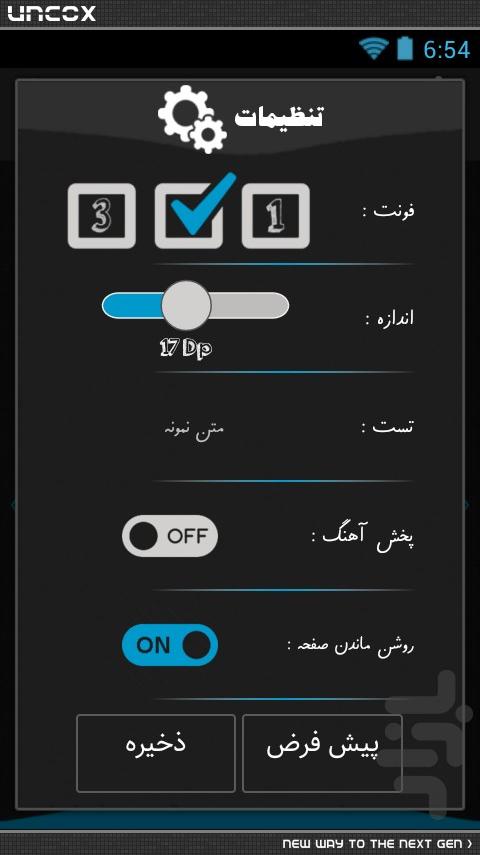
بعد از آموزش پروگرس بار سفارشی طبق قولی که بهتون دادم قراره امروز آموزش ساخت SeekBar سفارشی رو یادتون بدم امیدوارم که خوشتون بیاد.
کدها خیلی واضح هستش پس نیازی به توضیح نیست در پست آخر هم سورس برنامه رو قرار میدم فقط اگه سوالی داشتید به صورت نظر درج کنید.
با تشکر
این عکس برای یکی از برنامه های که ساختم هستش قراره فقط قسمت SeekBar رو آموزش بدم
پاسخها 2
FSR
9 سال پیش
کلاس CustomSeekBar :
 public class CustomSeekBar extends ImageView {

 Paint paintLine1;
 Paint paintLine2;
 Paint paintLine3;
 Paint paintCircle;
 Paint paintCircle2;
 Paint paintText;

 float move = 100;
 float x = 100;
 private int width = 0;
 private int heigth = 0;

 float left = 0;
 float rigth = 0;

 int percent = 0;
 int seekBar = 23;
 private boolean isCheckt = true;
 private String vahed = "Dip";
 int min = 0;
 int max = 100 - min;
 private Typeface font;


 public CustomSeekBar(Context context, AttributeSet attrs, int defStyle) {
 super(context, attrs, defStyle);
 font = Typeface.createFromAsset(context.getAssets(), "orange juice.ttf");
 intialize();
 }


 public CustomSeekBar(Context context, AttributeSet attrs) {
 super(context, attrs);
 font = Typeface.createFromAsset(context.getAssets(), "orange juice.ttf");
 intialize();

 }


 public CustomSeekBar(Context context) {
 super(context);
 font = Typeface.createFromAsset(context.getAssets(), "orange juice.ttf");
 intialize();

 }


 @Override
 protected void onLayout(boolean changed, int left, int top, int right, int bottom) {
 super.onLayout(changed, left, top, right, bottom);
 width = getWidth();
 heigth = getHeight();
 }


 public void setValue(int seekBarValue, int minValue, int maxValue, String vahedValue) {
 min = minValue;
 max = maxValue - min;
 vahed = vahedValue;
 if (seekBarValue >= min && seekBarValue <= max) {
 seekBar = seekBarValue;
 isCheckt = true;
 invalidate();
 }

 }


 public void setStart(int seekBarValue, int minValue, int maxValue, String vahedValue) {
 min = minValue;
 max = maxValue - min;
 vahed = vahedValue;
 if (seekBarValue >= min && seekBarValue <= max) {
 seekBar = seekBarValue;
 isCheckt = true;
 invalidate();
 }
 }


 public void set(int v) {
 seekBar = v;
 invalidate();
 }


 private void intialize() {

 paintLine1 = new Paint();
 paintLine1.setAntiAlias(true);
 paintLine1.setColor(Color.parseColor("#bfbdbb"));
 paintLine1.setStyle(Style.FILL);

 paintLine2 = new Paint();
 paintLine2.setAntiAlias(true);
 paintLine2.setColor(Color.parseColor("#ecebeb"));
 paintLine2.setStyle(Style.STROKE);
 paintLine2.setStrokeWidth(G.convertDpToPixel(1));

 paintLine3 = new Paint();
 paintLine3.setAntiAlias(true);
 paintLine3.setColor(Color.parseColor("#0099cc"));
 paintLine3.setStyle(Style.FILL);

 paintCircle = new Paint();
 paintCircle.setAntiAlias(true);
 paintCircle.setColor(Color.parseColor("#d2d0ce"));
 paintCircle.setStyle(Style.FILL_AND_STROKE);

 paintCircle2 = new Paint();
 paintCircle2.setAntiAlias(true);
 paintCircle2.setColor(Color.parseColor("#565654"));
 paintCircle2.setStyle(Style.STROKE);
 paintCircle2.setStrokeWidth(G.convertDpToPixel(1));

 paintText = new Paint();
 paintText.setAntiAlias(true);
 paintText.setColor(Color.parseColor("#ffffff"));
 paintText.setStyle(Style.FILL);
 paintText.setTextAlign(Align.CENTER);
 paintText.setTypeface(font);
 //565654
 }


 @Override
 protected void onDraw(Canvas canvas) {
 super.onDraw(canvas);

 float top = heigth / 4;
 float bottom = 2 * heigth / 4;
 left = 1.5f * top;
 rigth = width - (1.5f * top);
 float rx = heigth / 6;
 float ry = heigth / 6;
 float midY = (top + bottom) / 2f;
 float textY = 3.5f * heigth / 4;
 float x = rigth - left;

 if (isCheckt) {
 move = (seekBar - min) * x / (max) + left;
 isCheckt = false;
 }

 float moveX = move - left;
 percent = (int) Math.round((moveX * max / x) + min);
 RectF rectF = new RectF(left, top, rigth, bottom);
 RectF rectF2 = new RectF(left, top, move, bottom);
 canvas.drawRoundRect(rectF, rx, ry, paintLine1);
 canvas.drawRoundRect(rectF2, rx, ry, paintLine3);
 canvas.drawRoundRect(rectF, rx, ry, paintLine2);
 canvas.drawCircle(move, midY, top, paintCircle);
 canvas.drawCircle(move, midY, top, paintCircle2);
 paintText.setTextSize(top);
 canvas.drawText(percent + " " + vahed, move, textY, paintText);

 }


 @Override
 public boolean onTouchEvent(MotionEvent event) {
 super.onTouchEvent(event);
 switch (event.getAction()) {
 case MotionEvent.ACTION_MOVE:

 move = event.getX();

 if (move >= rigth) {
 move = rigth;
 invalidate();
 } else if (move <= left) {
 move = left;
 invalidate();
 } else {
 invalidate();
 }

 break;
 case MotionEvent.ACTION_DOWN:
 move = event.getX();
 if (move >= left && move <= rigth) {
 invalidate();
 }
 break;
 }
 return true;
 }


 public int getPercent() {
 return percent;

 }

}
کلاس G :
 public class G extends Application {

 public static Context context;


 @Override
 public void onCreate() {
 super.onCreate();
 context = getApplicationContext();
 }


 public static float convertDpToPixel(float dp) {
 Resources resources = G.context.getResources();
 DisplayMetrics metrics = resources.getDisplayMetrics();
 float px = dp * ((float) metrics.densityDpi / DisplayMetrics.DENSITY_DEFAULT);
 return px;
 }


 public static float convertPixelsToDp(float px) {
 Resources resources = G.context.getResources();
 DisplayMetrics metrics = resources.getDisplayMetrics();
 float dp = px / ((float) metrics.densityDpi / DisplayMetrics.DENSITY_DEFAULT);
 return dp;
 }

}
کلاس اصلی :
 public class Startup extends Activity {

 CustomSeekBar cusDialogSize;
 TextView txtTest;
 Handler handler;
 Typeface font;
 int size;


 @Override
 public void onCreate(Bundle savedInstanceState) {
 super.onCreate(savedInstanceState);
 setContentView(R.layout.main);

 handler = new Handler();
 cusDialogSize = (CustomSeekBar) findViewById(R.id.customSeekBar1);
 txtTest = (TextView) findViewById(R.id.txtTest);
 font = Typeface.createFromAsset(G.context.getAssets(), "Mj_Faraz.TTF");

 /*
 * 12---> مقدار اولیه سایز
 * 8----> min
 * 32---> max
 * Dp---> text
 */
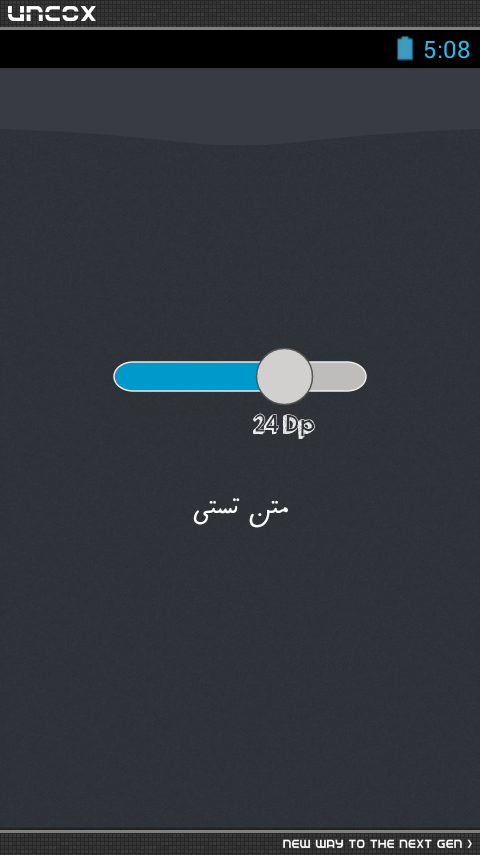
 cusDialogSize.setValue(12, 8, 32, "Dp");
 size = cusDialogSize.getPercent();

 txtTest.setTypeface(font);
 txtTest.setTextSize(12);

 cusDialogSize.setOnTouchListener(new OnTouchListener() {

 public boolean onTouch(View v, MotionEvent event) {
 size = cusDialogSize.getPercent();
 txtTest.setTextSize(size);

 handler.postDelayed(new Runnable() {

 public void run() {
 txtTest.setTextSize(size);
 }
 }, 1);

 return false;
 }
 });
 }
}
تویه کلاس اصلی توضیح کوتاهی دادم که فقط دونستن این موضوع برای بکار بردن SeekBar داخل برنامه کفایت میکنه ولی بازم اگه جایی از کدهارو متوجه نشدید سوالتون رو به صورت نظر درج کنید تا جواب بدم بهتون.
نظرات
پاسخگویی و مشاهده پاسخ های این سوال تنها برای اعضای ویژه سایت امکان پذیر است .
چنانچه تمایل دارید به همه بخش ها دسترسی داشته باشید میتوانید از این بخش لایسنس این آموزش را خریداری نمایید .
ویرایش
پیام
نظرات