

ایجاد آلرت عدم کانکت به اینترنت در یک فرگمنت

سلام
من در منو اپلیکیشنم یک باتن دارم که با کلیک روی اون یک صفحه وب در مرورگر داخلی اپ بازمیشه.
من میخوام وقتی به نت دسترسی ندارم یک هشدار ظاهربشه
و وقتی نت هست بدون هشدر وارد مرورگربشه

توی onClick باتن کد زیر رو اضافه کنید:
ConnectivityManager connectivityManager = (ConnectivityManager) getApplicationContext().getSystemService(Context.CONNECTIVITY_SERVICE);
NetworkInfo netInfo = connectivityManager.getActiveNetworkInfo();
if (netInfo == null) {
    Toast.makeText(getApplicationContext(), "No Connection", Toast.LENGTH_LONG).show();
    return;
}
این پرمیشن ها رو هم به منیفست اضافه کنید:
<uses-permission android:name="android.permission.ACCESS_NETWORK_STATE" />
این کد منه:
 package soft.kaziwa.com.nab;

import android.app.AlertDialog;
import android.content.Context;
import android.content.DialogInterface;
import android.content.Intent;
import android.os.Bundle;
import android.support.design.widget.NavigationView;
import android.support.v4.widget.DrawerLayout;
import android.support.v7.app.ActionBarDrawerToggle;
import android.support.v7.app.AppCompatActivity;
import android.support.v7.widget.Toolbar;
import android.view.Gravity;
import android.view.Menu;
import android.view.MenuItem;
import android.view.View;
import android.widget.Button;
import android.widget.Toast;

import sliding_tabhost.Tab1;


public class Navigation_View1 extends AppCompatActivity {


    private Toolbar toolbar;
    private NavigationView navigationView;
    private DrawerLayout drawerLayout;
    ActionBarDrawerToggle mDrawerToggle;

    //کلاس تشخیص اتصال


    @Override
    protected void onCreate(Bundle savedInstanceState) {
        super.onCreate(savedInstanceState);
        setContentView(R.layout.activity_main_activity2);


        toolbar = (Toolbar) findViewById(R.id.toolbar);
        setSupportActionBar(toolbar);


        //Initializing NavigationView
        navigationView = (NavigationView) findViewById(R.id.navigation_view);

        //Setting Navigation View Item Selected Listener to handle the item click of the navigation menu
        navigationView.setNavigationItemSelectedListener(new NavigationView.OnNavigationItemSelectedListener() {


            // This method will trigger on item Click of navigation menu
            @Override
            public boolean onNavigationItemSelected(MenuItem menuItem) {


                //Checking if the item is in checked state or not, if not make it in checked state
                if(menuItem.isChecked()) menuItem.setChecked(false);
                else menuItem.setChecked(true);


                    drawerLayout.closeDrawers();


                switch (menuItem.getItemId()){


                    //Replacing the  content with ContentFragment Which is our Inbox View;
                    case R.id.web:
                        Toast.makeText(getApplicationContext(), "ورود به صفحه سایت", Toast.LENGTH_SHORT).show();
                        Tab1 fragment1 = new Tab1();
                        android.support.v4.app.FragmentTransaction fragmentTransaction1 = getSupportFragmentManager().beginTransaction();
                        fragmentTransaction1.replace(R.id.frame,fragment1);
                        fragmentTransaction1.commit();
                        return true;

                    default:
                        Toast.makeText(getApplicationContext(),"Somethings Wrong",Toast.LENGTH_SHORT).show();
                        return true;

                }
            }
        });


        // Initializing Drawer Layout and ActionBarToggle
        drawerLayout = (DrawerLayout) findViewById(R.id.drawer);
        mDrawerToggle = new ActionBarDrawerToggle(this,drawerLayout,null,R.string.openDrawer, R.string.closeDrawer){

            @Override
            public boolean onOptionsItemSelected(MenuItem item) {
                if (item != null && item.getItemId() == R.id.drawer) {
                    if (drawerLayout.isDrawerOpen(Gravity.RIGHT)) {
                        drawerLayout.closeDrawer(Gravity.RIGHT);
                    } else {
                        drawerLayout.openDrawer(Gravity.RIGHT);
                    }
                }
                return false;
            }
            @Override
            public void onDrawerClosed(View drawerView) {
                // Code here will be triggered once the drawer closes as we dont want anything to happen so we leave this blank
                super.onDrawerClosed(drawerView);


            }

            @Override
            public void onDrawerOpened(View drawerView) {
                // Code here will be triggered once the drawer open as we dont want anything to happen so we leave this blank

                super.onDrawerOpened(drawerView);

            }
        };

        //Setting the actionbarToggle to drawer layout
        drawerLayout.setDrawerListener(mDrawerToggle);

        //calling sync state is necessay or else your hamburger icon wont show up
        mDrawerToggle.syncState();


    }

    @SuppressWarnings("deprecation")
    public void showAlertDialog(Context context, String title, String message, Boolean status) {

        AlertDialog alertDialog = new AlertDialog.Builder(context).create();

        //عنوان پنجره هشدار
        alertDialog.setTitle(title);

        //پیام پنجره هشدار
        alertDialog.setMessage(message);

        //آیکن پنجره هشدار
        alertDialog.setIcon((status) ? R.drawable.success : R.drawable.fail);

        //دکمه OK
        alertDialog.setButton("OK", new DialogInterface.OnClickListener() {
            public void onClick(DialogInterface dialog, int which) {
            }
        });

        // نمایش هشدار
        alertDialog.show();
    }


    @Override
    public boolean onCreateOptionsMenu(Menu menu) {
        // Inflate the menu; this adds items to the action bar if it is present.
        getMenuInflater().inflate(R.menu.menu_main, menu);
        return true;
    }

    @Override
    public boolean onOptionsItemSelected(MenuItem item) {
        // Handle action bar item clicks here. The action bar will
        // automatically handle clicks on the Home/Up button, so long
        // as you specify a parent activity in AndroidManifest.xml.
        if (mDrawerToggle.onOptionsItemSelected(item)) {
            return true;
        }
        //noinspection SimplifiableIfStatement
        int id = item.getItemId();

        //noinspection SimplifiableIfStatement
        if (id == R.id.action_settings) {
            return true;
        }

        return super.onOptionsItemSelected(item);
    }


}
این کاری که گفتی کجاش بذارم؟
خب من اینجا کانکت نمیشم
منتقل میشم به یه فرگمنت
این دستور رو ببین:
case R.id.web:
Toast.makeText(getApplicationContext(),"ورود به صفحه سایت",Toast.LENGTH_SHORT).show();Tab1 fragment1 =newTab1();
     android.support.v4.app.FragmentTransaction fragmentTransaction1 = getSupportFragmentManager().beginTransaction();
     fragmentTransaction1.replace(R.id.frame,fragment1);
     fragmentTransaction1.commit();returntrue;default:Toast.makeText(getApplicationContext(),"Somethings Wrong",Toast.LENGTH_SHORT).show();returntrue;
میرم به فرگمنت Tab1
کدهای فرگمنت Tab1 اینه:
 package sliding_tabhost;

import android.os.Bundle;
import android.support.annotation.Nullable;
import android.support.v4.app.Fragment;
import android.view.LayoutInflater;
import android.view.View;
import android.view.ViewGroup;
import android.webkit.WebView;
import android.webkit.WebViewClient;

import soft.kaziwa.com.nab.R;

public class Tab1 extends Fragment {

    @Override
    public View onCreateView(LayoutInflater inflater, @Nullable ViewGroup container, @Nullable Bundle savedInstanceState) {

        View v =inflater.inflate(R.layout.activity_search,container,false);
        WebView webView=(WebView) v.findViewById(R.id.webView11);
        webView.getSettings().setJavaScriptEnabled(true);
        webView.setWebViewClient(new WebViewClient());
        webView.loadUrl("http://google.com");
        return v;
    }


}
ممنون از راهنمایی های خوب و بموقت اما توضیحاتت ی مقدار واسم گنگه.
اگه میتونی کد رو جایگذاری کنی ممنونت میشوم
@Override
public View onCreateView(LayoutInflater inflater, @Nullable ViewGroup container, @Nullable Bundle savedInstanceState) {
    View v =inflater.inflate(R.layout.activity_search,container,false);

    ConnectivityManager connectivityManager = (ConnectivityManager) getApplicationContext().getSystemService(Context.CONNECTIVITY_SERVICE);
    NetworkInfo netInfo = connectivityManager.getActiveNetworkInfo();

    if (netInfo == null) {
        Toast.makeText(getApplicationContext(), "No Connection", Toast.LENGTH_LONG).show();
    } else {
        WebView webView=(WebView) v.findViewById(R.id.webView11);
        webView.getSettings().setJavaScriptEnabled(true);
        webView.setWebViewClient(new WebViewClient());
        webView.loadUrl("http://google.com");
    }
    return v;
}
پرمیشن رو هم یادتون نره.
یک مشکل دیگه درست شد:
تصویر رو ببین
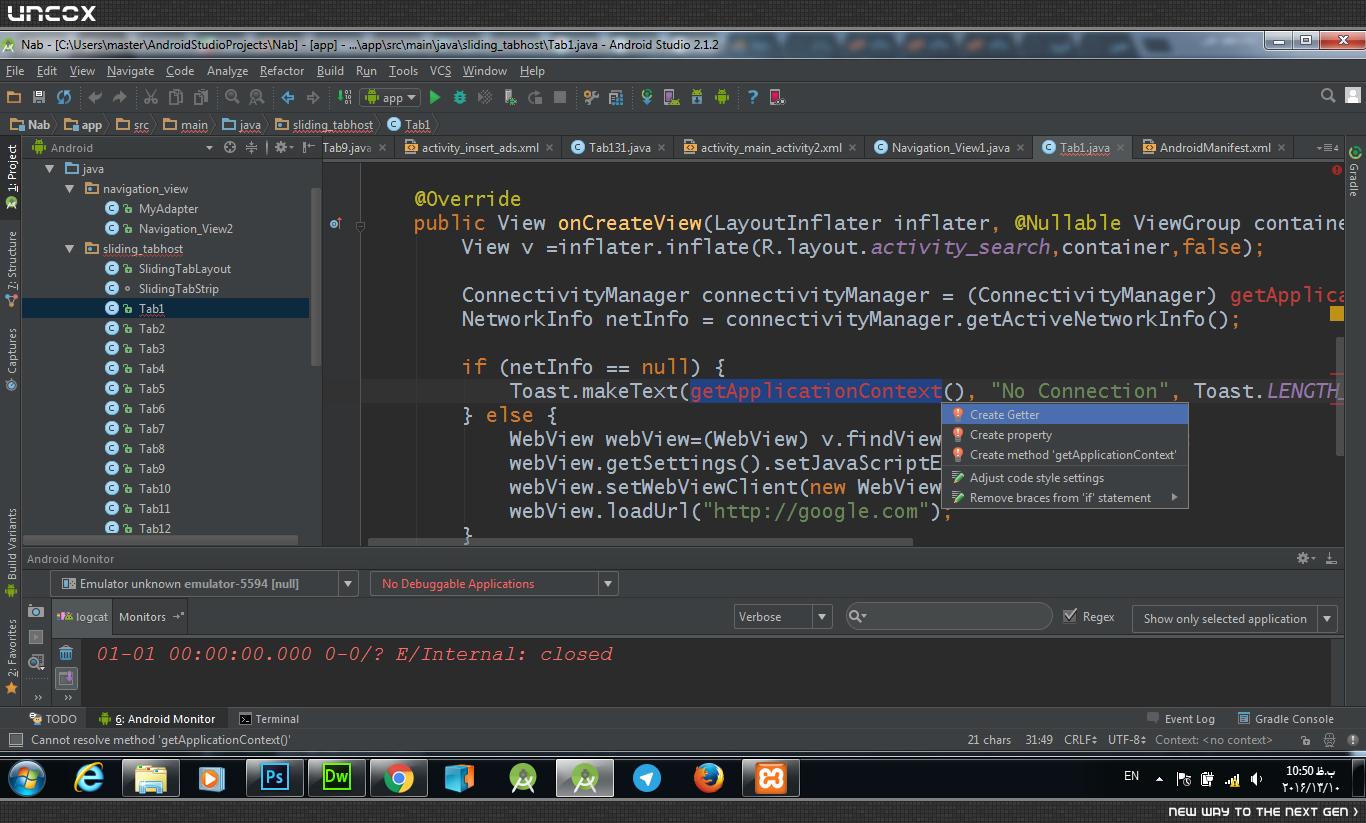
داداش میشه خودت یه کلاس نمونه بدی؟؟؟من هم از همون آموزشای استاد جلو رفتم.اما نمیدونم چرا اینطوری میشه-من بشدت آماتورم-کمکم کنی دعات میکنم
من الآن کدشو بهتون میدم ولی مطمئن باشید اینجوری نمیتونید ادامه بدید. پیشنهاد میکنم دوباره آموزش ها رو ببینید.
یه کلاس بسازید و اسمشو بزارید G و هر کدی که داره رو پاک و کدهای زیر رو توش کپی کنید:
package com.app.test; // اینجا اسم پکیجتون رو بدید

import android.app.Activity;
import android.app.Application;
import android.content.Context;


public class G extends Application {

    public static Context  context;


    @Override
    public void onCreate() {
        super.onCreate();

        context = this;
    }
}
بعد به AndroidManifest برید و کدی که این پایین مشخص کردم رو توی تگ application اضافه کنید:
<application
    android:name=".G" // فقط این خط رو اضافه کنید
    android:icon="@drawable/ic_launcher"
    android:label="@string/app_name" >
حالا به جای getApplicationContext بنویسید G.contex
برای اینکه نظم انجمن حفظ بشه بهتره برای تشکر کردن لایک کنید. ممنون
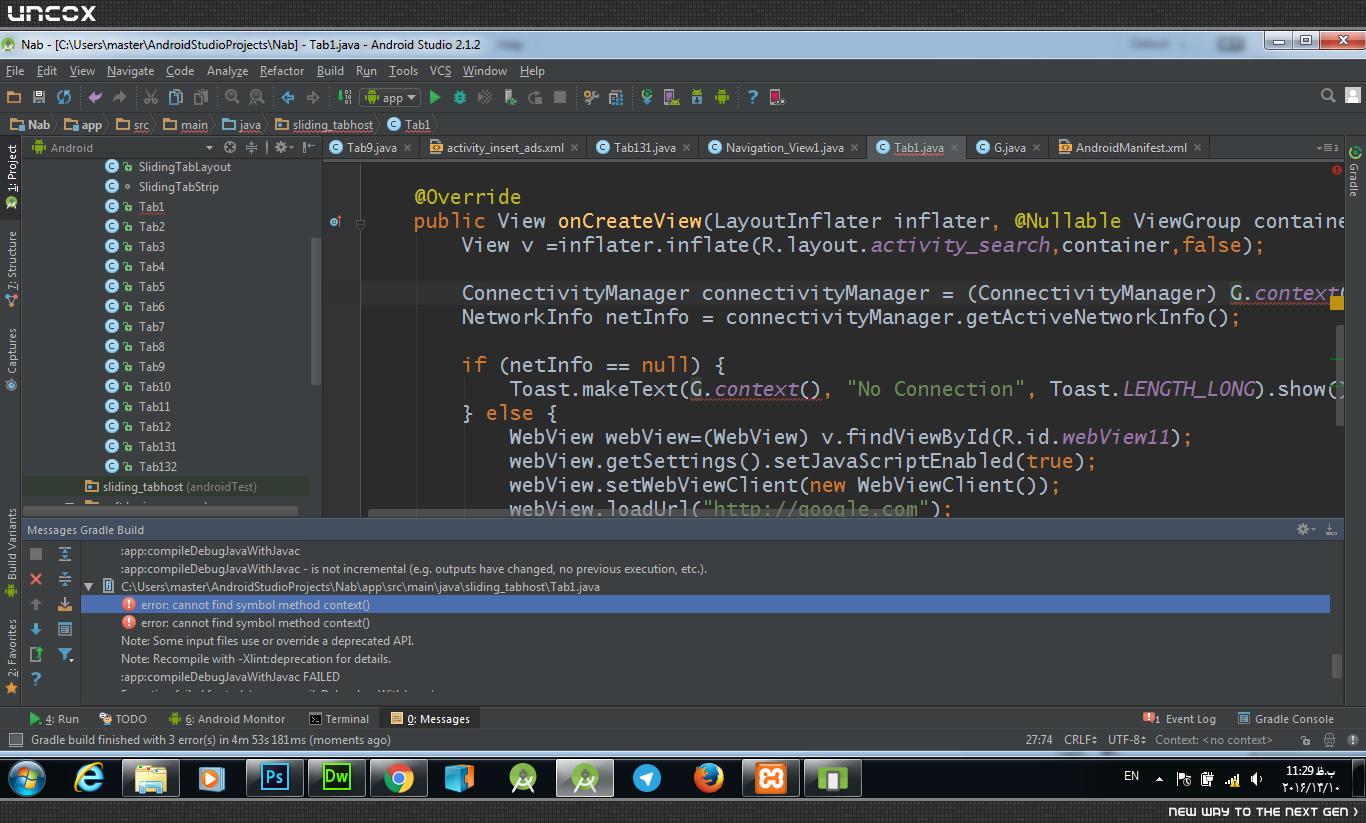
این ارور چیه؟
خب-دوست عزیز وقتی روی دکمه مدنظرم کلیک میکنم هیچ اروری نمیده-فقط برنامه قطع میشه و میاد بیرون
داخل اندروید استودیو و بخش اندروید مانیتور این خطاها ظاهر شد
10-14 12:02:37.726 6389-6389/soft.kaziwa.com.nab E/AndroidRuntime: FATAL EXCEPTION: main
Process: soft.kaziwa.com.nab, PID: 6389
java.lang.NullPointerException: Attempt to invoke virtual method 'java.lang.Object android.content.Context.getSystemService(java.lang.String)' on a null object reference
at sliding_tabhost.Tab1.onCreateView(Tab1.java:24)
at android.support.v4.app.Fragment.performCreateView(Fragment.java:1974)
at android.support.v4.app.FragmentManagerImpl.moveToState(FragmentManager.java:1067)
at android.support.v4.app.FragmentManagerImpl.moveToState(FragmentManager.java:1252)
at android.support.v4.app.BackStackRecord.run(BackStackRecord.java:742)
at android.support.v4.app.FragmentManagerImpl.execPendingActions(FragmentManager.java:1617)
at android.support.v4.app.FragmentManagerImpl$1.run(FragmentManager.java:517)
at android.os.Handler.handleCallback(Handler.java:739)
at android.os.Handler.dispatchMessage(Handler.java:95)
at android.os.Looper.loop(Looper.java:135)
at android.app.ActivityThread.main(ActivityThread.java:5257)
at java.lang.reflect.Method.invoke(Native Method)
at java.lang.reflect.Method.invoke(Method.java:372)
at com.android.internal.os.ZygoteInit$MethodAndArgsCaller.run(ZygoteInit.java:903)
at com.android.internal.os.ZygoteInit.main(ZygoteInit.java:698)
 package sliding_tabhost;

import android.content.Context;
import android.net.ConnectivityManager;
import android.net.NetworkInfo;
import android.os.Bundle;
import android.support.annotation.Nullable;
import android.support.v4.app.Fragment;
import android.view.LayoutInflater;
import android.view.View;
import android.view.ViewGroup;
import android.webkit.WebView;
import android.webkit.WebViewClient;
import android.widget.Toast;

import soft.kaziwa.com.nab.R;


public class Tab1 extends Fragment {

    @Override
    public View onCreateView(LayoutInflater inflater, @Nullable ViewGroup container, @Nullable Bundle savedInstanceState) {
        View v =inflater.inflate(R.layout.activity_search,container,false);
        ConnectivityManager connectivityManager = (ConnectivityManager) G.context.getSystemService(Context.CONNECTIVITY_SERVICE);
        NetworkInfo netInfo = connectivityManager.getActiveNetworkInfo();

        if (netInfo == null) {
            Toast.makeText(G.context, "No Connection", Toast.LENGTH_LONG).show();
        } else {
            WebView webView=(WebView) v.findViewById(R.id.webView11);
            webView.getSettings().setJavaScriptEnabled(true);
            webView.setWebViewClient(new WebViewClient());
            webView.loadUrl("http://google.com");
        }
        return v;
    }


}
خط 24:
ConnectivityManager connectivityManager = (ConnectivityManager) G.context.getSystemService(Context.CONNECTIVITY_SERVICE);
این دکمه باتن من
case R.id.search:
    Toast.makeText(getApplicationContext(), "ورود به صفحه جستجو", Toast.LENGTH_SHORT).show();
Tab1 fragment1 = new Tab1();
android.support.v4.app.FragmentTransaction fragmentTransaction1 = getSupportFragmentManager().beginTransaction();
fragmentTransaction1.replace(R.id.frame,fragment1);
fragmentTransaction1.commit();
    return true;
به این صورتم تغییر دادم.اما بازم خارج شد:
case R.id.search:
    Toast.makeText(G.Context, "ورود به صفحه جستجو", Toast.LENGTH_SHORT).show();
Tab1 fragment1 = new Tab1();
android.support.v4.app.FragmentTransaction fragmentTransaction1 = getSupportFragmentManager().beginTransaction();
fragmentTransaction1.replace(R.id.frame,fragment1);
fragmentTransaction1.commit();
    return true;
اینم کلاس G
package sliding_tabhost;
import android.app.Application;
import android.content.Context;


public class G extends Application {

    public static Context  context;


@Override
public void onCreate() {
        super.onCreate();

context = this;
}


}
خودت دادی بهم
اینم منیفیست
<?xml version="1.0" encoding="utf-8"?>
<manifest xmlns:android="http://schemas.android.com/apk/res/android"
package="soft.kaziwa.com.nab" >
    <uses-permission android:name="android.permission.INTERNET" />
    <uses-permission android:name="android.permission.ACCESS_NETWORK_STATE" />
    <uses-permission android:name="android.permission.ACCESS_WIFI_STATE" />
    <uses-permission android:name="android.permission.SEND_SMS" />
    <uses-permission android:name="android.permission.CALL_PHONE"/>

    <application
android:allowBackup="true"
android:icon="@drawable/icon"
android:label="@string/app_name"
android:theme="@style/AppTheme" >
        <application
android:name=".G"
/>
<!--<activity-->
            <!--android:name=".SplashScreen"-->
            <!--android:configChanges="orientation|keyboardHidden"-->
            <!--android:screenOrientation="portrait" >-->
            <!--<intent-filter>-->
                <!--<action android:name="android.intent.action.MAIN" />-->

                <!--<category android:name="android.intent.category.LAUNCHER" />-->
            <!--</intent-filter>-->
        <!--</activity>-->

<activity
android:name=".MainActivity"
android:configChanges="orientation|keyboardHidden"
android:label="@string/app_name"
android:screenOrientation="portrait" >
            <intent-filter>
                <action android:name="android.intent.action.MAIN" />

                <category android:name="android.intent.category.LAUNCHER" />
            </intent-filter>
        </activity>
        <activity
android:name=".Navigation_View1"
android:label="@string/title_activity_main_activity2" >
        </activity>

        <activity
android:name="navigation_view.Navigation_View2"
android:label="@string/title_activity_main_activity2" >
        </activity>
        <activity
android:name="sliding_tabhost.Tab12"
android:label="@string/all_string" >
        </activity>
        <fragment
android:name="G"
android:label="@string/all_string" >
        </fragment>

    </application>

</manifest>
کامل
توی اندروید منیفست شما یک تگ اپلیکیشن دیگه هم درست کردی خداییش یکم دقت کنید منم که نمی تونم هی کدهای شما رو تصحیح کنید. هر چی توی اندروید منیفست نوشتی رو پاک کن و کدهای زیر رو بجاش بزار:
 <?xml version="1.0"encoding="utf-8"?>
<manifest xmlns:android="http://schemas.android.com/apk/res/android"
package="soft.kaziwa.com.nab" >
    <uses-permission android:name="android.permission.INTERNET" />
    <uses-permission android:name="android.permission.ACCESS_NETWORK_STATE" />
    <uses-permission android:name="android.permission.ACCESS_WIFI_STATE" />
    <uses-permission android:name="android.permission.SEND_SMS" />
    <uses-permission android:name="android.permission.CALL_PHONE"/>

    <application
android:name=".G"
android:allowBackup="true"
android:icon="@drawable/icon"
android:label="@string/app_name"
android:theme="@style/AppTheme" >

<!--<activity-->
            <!--android:name=".SplashScreen"-->
            <!--android:configChanges="orientation|keyboardHidden"-->
            <!--android:screenOrientation="portrait" >-->
            <!--<intent-filter>-->
                <!--<action android:name="android.intent.action.MAIN" />-->

                <!--<category android:name="android.intent.category.LAUNCHER" />-->
            <!--</intent-filter>-->
        <!--</activity>-->

<activity
android:name=".MainActivity"
android:configChanges="orientation|keyboardHidden"
android:label="@string/app_name"
android:screenOrientation="portrait" >
            <intent-filter>
                <action android:name="android.intent.action.MAIN" />

                <category android:name="android.intent.category.LAUNCHER" />
            </intent-filter>
        </activity>
        <activity
android:name=".Navigation_View1"
android:label="@string/title_activity_main_activity2" >
        </activity>

        <activity
android:name="navigation_view.Navigation_View2"
android:label="@string/title_activity_main_activity2" >
        </activity>
        <activity
android:name="sliding_tabhost.Tab12"
android:label="@string/all_string" >
        </activity>
        <fragment
android:name="G"
android:label="@string/all_string" >
        </fragment>

    </application>

</manifest>
داداش بازم نشد-پروژه رو بهت بدم؟؟؟؟
حوصله داری روش کار کنی؟؟؟
بخدا منم قطع امید کردم
یه جای دیگه ی منیفست هم ایراد داره. این قطعه کد رو کلا از منیفست پاک کنید:
<fragment
android:name="G"
android:label="@string/all_string">
</fragment>
بازم خارج شد.این ارور ها رو هم داد:
Process: soft.kaziwa.com.nab, PID: 6955
java.lang.NullPointerException: Attempt to invoke virtual method 'java.lang.Object android.content.Context.getSystemService(java.lang.String)' on a null object reference
at sliding_tabhost.Tab1.onCreateView(Tab1.java:24)
at android.support.v4.app.Fragment.performCreateView(Fragment.java:1974)
at android.support.v4.app.FragmentManagerImpl.moveToState(FragmentManager.java:1067)
at android.support.v4.app.FragmentManagerImpl.moveToState(FragmentManager.java:1252)
at android.support.v4.app.BackStackRecord.run(BackStackRecord.java:742)
at android.support.v4.app.FragmentManagerImpl.execPendingActions(FragmentManager.java:1617)
at android.support.v4.app.FragmentManagerImpl$1.run(FragmentManager.java:517)
at android.os.Handler.handleCallback(Handler.java:739)
at android.os.Handler.dispatchMessage(Handler.java:95)
at android.os.Looper.loop(Looper.java:135)
at android.app.ActivityThread.main(ActivityThread.java:5257)
at java.lang.reflect.Method.invoke(Native Method)
at java.lang.reflect.Method.invoke(Method.java:372)
at com.android.internal.os.ZygoteInit$MethodAndArgsCaller.run(ZygoteInit.java:903)
at com.android.internal.os.ZygoteInit.main(ZygoteInit.java:698)
بازم خارج شد.این ارور ها رو هم داد.
به گمان من مشکل در G هستش
Process: soft.kaziwa.com.nab, PID: 6955
java.lang.NullPointerException: Attempt to invoke virtual method 'java.lang.Object android.content.Context.getSystemService(java.lang.String)' on a null object reference
at sliding_tabhost.Tab1.onCreateView(Tab1.java:24)
at android.support.v4.app.Fragment.performCreateView(Fragment.java:1974)
at android.support.v4.app.FragmentManagerImpl.moveToState(FragmentManager.java:1067)
at android.support.v4.app.FragmentManagerImpl.moveToState(FragmentManager.java:1252)
at android.support.v4.app.BackStackRecord.run(BackStackRecord.java:742)
at android.support.v4.app.FragmentManagerImpl.execPendingActions(FragmentManager.java:1617)
at android.support.v4.app.FragmentManagerImpl$1.run(FragmentManager.java:517)
at android.os.Handler.handleCallback(Handler.java:739)
at android.os.Handler.dispatchMessage(Handler.java:95)
at android.os.Looper.loop(Looper.java:135)
at android.app.ActivityThread.main(ActivityThread.java:5257)
at java.lang.reflect.Method.invoke(Native Method)
at java.lang.reflect.Method.invoke(Method.java:372)
at com.android.internal.os.ZygoteInit$MethodAndArgsCaller.run(ZygoteInit.java:903)
at com.android.internal.os.ZygoteInit.main(ZygoteInit.java:698)
مشکل حل شد:
عزیزجان کلا اشتباه اومدیم راه رو.
ما باید دستور توست رو داخل منو بکار میبردیم
همین
ممنون که وقت گذاشتی و کمکم کردی
پاسخگویی و مشاهده پاسخ های این سوال تنها برای اعضای ویژه سایت امکان پذیر است .
چنانچه تمایل دارید به همه بخش ها دسترسی داشته باشید میتوانید از این بخش لایسنس این آموزش را خریداری نمایید .
