


بروز خطا
[message]
اشتراک در سوال
رای ها
[dataList]
انتخاب یک برنامه دیفالت برای کراپ کردن تصویر بعد از انتخابش

0
0
سلام.
انتخاب یک برنامه دیفالت برای کراپ کردن تصویر بعد از انتخابش چجوریه؟
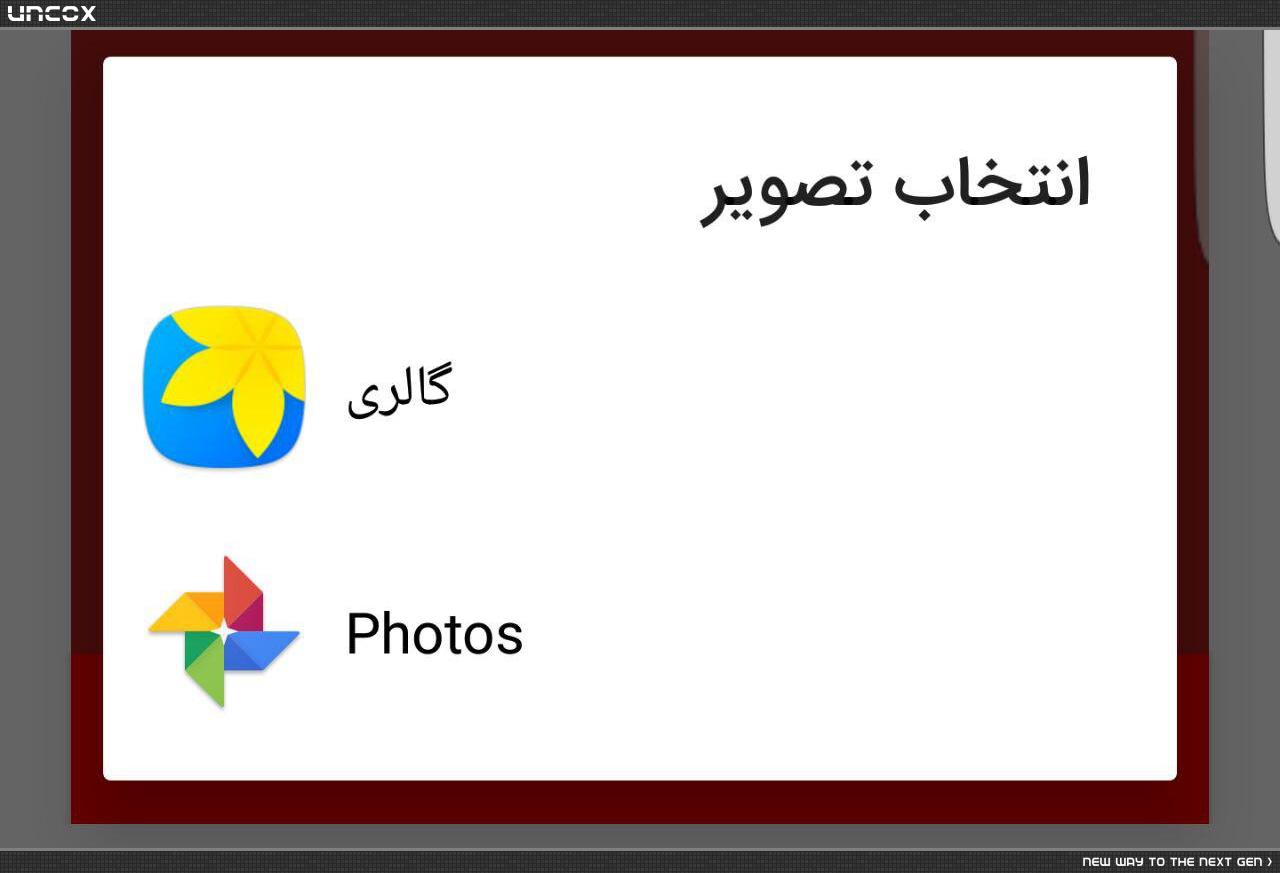
الان بعد این که تصویر انتخاب شد یک دیالوگ باز میشه و لیتسی از برنامه هایی که میشه باهاشون اون عکس رو کراپ کرد رو میاره اما من میخوام همونی که به صورت دیفالت رو هر گوشی نصب هستش بیاد و دیگه امکان انتخاب نداشته باشه.
 private void CropingIMG() {
    //final ArrayList cropOptions = new ArrayList();
    final ArrayList<CropingOption> cropOptions = new ArrayList();
    Intent intent = new Intent("com.android.camera.action.CROP");
    intent.setType("image/*");
    // List list = getPackageManager().queryIntentActivities( intent, 0 );
    ArrayList<ResolveInfo> list = (ArrayList<ResolveInfo>) getPackageManager().queryIntentActivities( intent, 0 );
    int size = list.size();
    if (size == 0) {
      Toast.makeText(this, "Cann't find image croping app", Toast.LENGTH_SHORT).show();
      return;
    } else {
      intent.setData(mImageCaptureUri);
      intent.putExtra("outputX", 450);
      intent.putExtra("outputY", 300);
      intent.putExtra("aspectX", 6);
      intent.putExtra("aspectY", 4);
      intent.putExtra("scale", true);
      //TODO: don't use return-data tag because it's not return large image data and crash not given any message
      //intent.putExtra("return-data", true);
      //Create output file here
      intent.putExtra(MediaStore.EXTRA_OUTPUT, Uri.fromFile(outPutFile));
      if (size == 1) {
        Intent i   = new Intent(intent);
        ResolveInfo res = (ResolveInfo) list.get(0);
        i.setComponent( new ComponentName(res.activityInfo.packageName, res.activityInfo.name));
        startActivityForResult(i, CROPING_CODE);
      }
      else {
        for (ResolveInfo res : list) {
          final CropingOption co = new CropingOption();
          co.title  = getPackageManager().getApplicationLabel(res.activityInfo.applicationInfo);
          co.icon  = getPackageManager().getApplicationIcon(res.activityInfo.applicationInfo);
          co.appIntent= new Intent(intent);
          co.appIntent.setComponent( new ComponentName(res.activityInfo.packageName, res.activityInfo.name));
          cropOptions.add(co);
        }
        CropingOptionAdapter adapter = new CropingOptionAdapter(getApplicationContext(), cropOptions);
        AlertDialog.Builder builder = new AlertDialog.Builder(this);
        builder.setTitle("انتخاب تصویر");
        builder.setCancelable(false);
        builder.setAdapter( adapter, new DialogInterface.OnClickListener() {
          public void onClick( DialogInterface dialog, int item ) {
            // startActivityForResult( (Intent) cropOptions.get(item), CROPING_CODE);
            startActivityForResult(  cropOptions.get(item).appIntent, CROPING_CODE);
          }
        });

        builder.setOnCancelListener( new DialogInterface.OnCancelListener() {
          @Override
          public void onCancel( DialogInterface dialog ) {
            if (mImageCaptureUri != null ) {
              getContentResolver().delete(mImageCaptureUri, null, null );
              mImageCaptureUri = null;
            }
          }
        } );

        AlertDialog alert = builder.create();
        alert.show();
      }
    }
  }
0
0

توصیه میکنم برای کراپ کردن از لایبراری uCrop استفاده کنید که خود گوگل هم تاییدش کرده و لایبراری قوی هست. (9 سال پیش)
برای این سوال 1 پاسخ وجود دارد.

پاسخ به سوال
Amir
9 سال پیش
0
0
اول ببینید که پکیج نیم برنامه دیفالت که فک کنم برای همه ی گوشی ها یکسانه چیه. بعد برای اینتنت کد زیر رو اضافه کنید:
intent.setPackage("package_name");
البته تست نکردم و فقط حدث میزنم.
پاسخگویی و مشاهده پاسخ های این سوال تنها برای اعضای ویژه سایت امکان پذیر است .
چنانچه تمایل دارید به همه بخش ها دسترسی داشته باشید میتوانید از این بخش لایسنس این آموزش را خریداری نمایید .
