


بروز خطا
[message]
اشتراک در سوال
رای ها
[dataList]
کرش لیست ویوی داخل tabhost (توی اندروید 2.2 درست کار میکنه ولی توی 4 نه!)

0
0
سلام. وقتتون بخیر
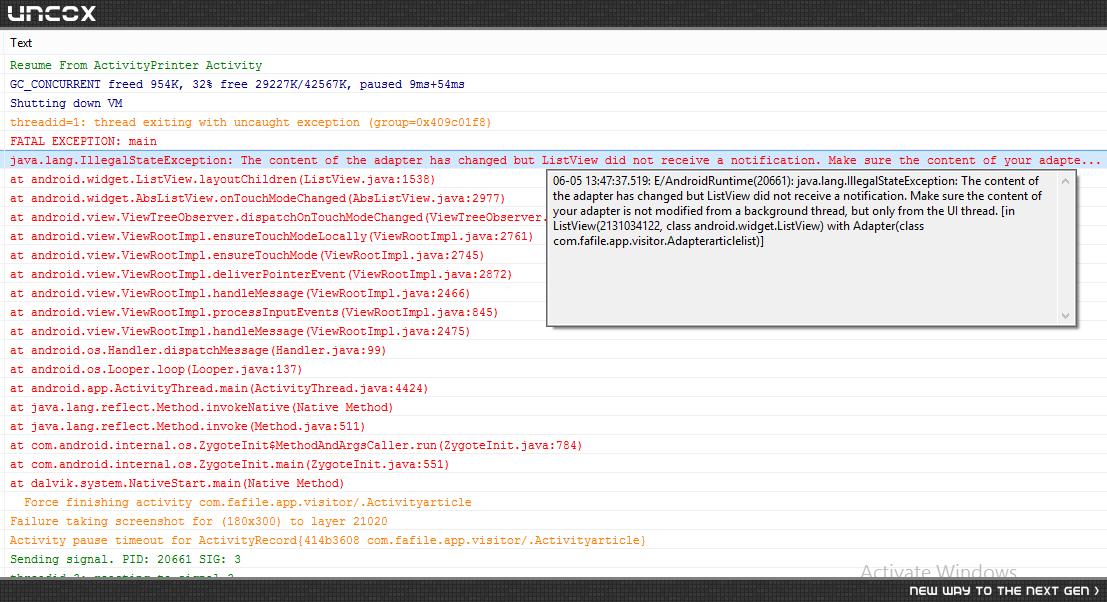
من چند تا لیست ویو دارم که سه تاشون درست کار میکنن ولی بقیشون کرش میکنن. الان که با امولاتور نسخه 2.2 تستش کردم بدون خطا کار میکرد ولی با امولاتور نسخه 4 کرش میکنه. با گوشی هم همینطور. ادپتر همشون یکیه، سورس کدشون تقریبا یکسانه. یعنی فایل xmlشون متغیره. اینم عکس کرش:
0
0

از یه handler استفاده کن احتمال قوی مشکل حل میشه. آموزش handler هم تو بحث thread ها موجوده (12 سال پیش)
0
0
من handler گذاشتم ولی بازم کار نمیکنه. احتمال 100% ایراد از handlerی هست که گذاشتم. یعنی نمیدونستم کجا بذارمش منم گذاشتمش توی اداپتری که لیست ویو ها بهش وصلن. حالا لیست ویو هایی که کار میکردن هم کرش میکنن (12 سال پیش)
0
0
من نمیدونم کدهاتون رو چطوری نوشتید ولی ظاهرا باید اون جایی که میخواید اطلاعات لیست ویو رو تغییر بدید و یا هر تغییری توی صفحه بدید، از handler استفاده کنید. (12 سال پیش)
برای این سوال 2 پاسخ وجود دارد.
پاسخ به سوال
احسان منصوری
12 سال پیش
0
0
این کل کد اداپتر منه. من handler رو گذاشتم وقتی که دکمه btnsend کلیک میشه. چون که وقتی اون دکمه کلیک میشه کرش میکنه
package com.fafile.app.visitor;

import java.util.ArrayList;
import android.database.Cursor;
import android.util.Log;
import android.view.View;
import android.view.View.OnClickListener;
import android.view.ViewGroup;
import android.widget.ArrayAdapter;
import android.widget.Button;
import android.widget.EditText;
import android.widget.TextView;
import android.widget.Toast;


public class Adapterarticlelist extends ArrayAdapter {

    public Adapterarticlelist(ArrayList array) {
        super(G.context, R.layout.adapter_articlelist, array);
    }


    private static class ViewHolder {

        //  public ViewGroup layoutarticleroot;
        public TextView txtarticlebrand;
        public TextView txtarticlemodel;
        public Button   btnbuy;
        public Button   btnsend;
        public EditText txtvalue;
        public TextView txtselectedbuy;
        public TextView txtarticletype;
        public TextView txtarticleid;


        public ViewHolder(View view) {
            //     layoutarticleroot = (ViewGroup) view.findViewById(R.id.layoutroot);
            txtselectedbuy = (TextView) view.findViewById(R.id.txtselectedbuy);
            txtarticletype = (TextView) view.findViewById(R.id.txtarticletype);
            txtvalue = (EditText) view.findViewById(R.id.txtvalue);
            txtarticlebrand = (TextView) view.findViewById(R.id.txtarticlebrand);
            btnsend = (Button) view.findViewById(R.id.btnsend);
            btnbuy = (Button) view.findViewById(R.id.btnbuy);
            txtarticlemodel = (TextView) view.findViewById(R.id.txtarticlemodel);
            txtarticleid = (TextView) view.findViewById(R.id.txtarticleid);
        }


        public void fill(final ArrayAdapter adapter, final StructNote item, final int position) {
            txtselectedbuy.setVisibility(View.GONE);
            btnsend.setVisibility(View.GONE);
            txtvalue.setVisibility(View.INVISIBLE);
            txtvalue.setText(item.articlevalue);
            txtarticletype.setText(item.articletype);
            txtarticlebrand.setText(item.articlebrand);
            txtarticlemodel.setText(item.articlemodel);
            txtarticleid.setText(item.articleid);

            Cursor cursorArticleid = G.database.rawQuery("select * FROM article_select WHERE article_id  LIKE   '%" + item.articleid + "%'", null);
            if (cursorArticleid != null) {

                while (cursorArticleid.moveToNext()) {
                    String valueUserid = cursorArticleid.getString(cursorArticleid.getColumnIndex("person_id"));
                    String valueArticleid = cursorArticleid.getString(cursorArticleid.getColumnIndex("article_id"));

                    Log.i("", "valueUserid: " + valueUserid);
                    Log.i("", "valueArticleid: " + valueArticleid);

                    if (valueArticleid.equals(item.articleid) && valueUserid.equals(G.currentCustomerId)) {
                        txtvalue.setVisibility(View.GONE);
                        btnbuy.setVisibility(View.GONE);
                        btnsend.setVisibility(View.GONE);
                        txtselectedbuy.setVisibility(View.VISIBLE);
                        txtselectedbuy.setText("خریداری شده!");

                    }
                }
            }

            btnbuy.setOnClickListener(new OnClickListener() {

                @Override
                public void onClick(View arg0) {
                    txtvalue.setVisibility(View.VISIBLE);
                    btnbuy.setVisibility(View.GONE);
                    btnsend.setVisibility(View.VISIBLE);

                }
            });
            G.handler.post(new Runnable() {

                @Override
                public void run() {

                    btnsend.setOnClickListener(new OnClickListener() {

                        @Override
                        public void onClick(View arg0) {
                            if (txtvalue.length() <= 0) {
                                Toast.makeText(G.currentActivity, "لطفا تعداد را وارد کنید", Toast.LENGTH_LONG).show();
                            }
                            else {
                                G.database.execSQL("INSERT INTO article_select (article_id,article_model,article_brand,article_type,article_value,person_id) VALUES ('" + item.articleid + "', '" + item.articlemodel + "','" + item.articlebrand + "','" + item.articletype + "','" + txtvalue.getText() + "','" + G.currentCustomerId + "');");
                                txtvalue.setVisibility(View.GONE);
                                btnsend.setVisibility(View.GONE);
                                txtselectedbuy.setVisibility(View.VISIBLE);
                                txtselectedbuy.setText("خریداری شده!");

                            }

                        }
                    });
                }
            });

        }
    }


    @Override
    public View getView(int position, View convertView, ViewGroup parent) {
        ViewHolder holder;
        StructNote item = getItem(position);
        if (convertView == null) {
            convertView = G.inflater.inflate(R.layout.adapter_articlelist, parent, false);
            holder = new ViewHolder(convertView);
            convertView.setTag(holder);
        } else {
            holder = (ViewHolder) convertView.getTag();
        }
        holder.fill(this, item, position);
        return convertView;
    }

}
0
0
علت کرش رو همون خطوطیه که روشون handler زدی؟ اگه آره handler رو ببر داخل onClick بنویس ببین مشکل حل میشه؟ (12 سال پیش)
0
0
آره (12 سال پیش)
0
0
بازم کرش میکنه. (12 سال پیش)
0
0
عجیبه! من الان رو یه پروژه ام که listView داشت، تست کردم ، اصلا بدون handler هم کار میکرد . میشد اجزا رو gone کرد! نمیدونم شاید مشکل از جای دیگه ای باشه. دقیقا به کدوم خط گیر میده؟ به txtValue ؟ (12 سال پیش)
0
0
یه مشکل عجیب توش پیدا کردم که ربطی به handler هم نداره. توی اکتیویتی اولم که اسمش mouse هست و درست کار میکنه، وقتی فایل xml اکتیویتی هایی که کرش میکنه رو به جای فایل xml خودش وارد میکنم، اکتیویتی که کرش میکنه درست کار میکنه! (12 سال پیش)
0
0

نیازی هم نداشتی n تا xml مثل هم داشته باشی. تو ساختار پروژت کد تکراری اینچنینی زیاد هست که قطعا نگهداری پروژه رو سخت میکنه (12 سال پیش)
0
0
آقای حسین زاده نمیدونم چرا، هرشب یه مشکل جدید پیش میاد. فایل xml هارو حذف کردم. حق با شماست. همشون شبیه هم بودن. علتش مربوط میشه به tabhostی که گذاشتم براش. فقط تب های اول و دوم و سوم کار میکنن (12 سال پیش)
پاسخ به سوال
محمد حسین زاده
12 سال پیش
+2
0
یه نمونه کد برای کمتر کردن کد های تکراری با ساختار شبیه به برنامه خودت آماده کردم. بررسیش کن دانلود
0
0
ممنونم لطف کردین. یه چیزایی دسگیرم شد (12 سال پیش)
0
0
کد قبلی رو با این کد مقایسه کن : لینک (12 سال پیش)
0
0
ممنونم لطف کردین (12 سال پیش)
پاسخگویی و مشاهده پاسخ های این سوال تنها برای اعضای ویژه سایت امکان پذیر است .
چنانچه تمایل دارید به همه بخش ها دسترسی داشته باشید میتوانید از این بخش لایسنس این آموزش را خریداری نمایید .
