


مشکل گرافیکی در CheckBox

سلام
چطور میشه بین مربع CkeckBox و محدوده خودش ( از چپ ) ، یه فاصله ایجاد کرد ؟
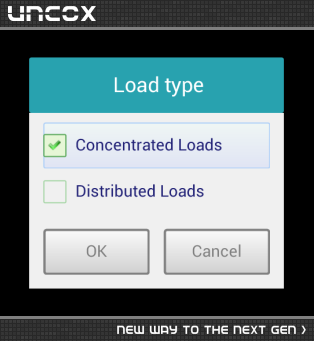
padding جواب نمیده ، margin هم که برای فاصله خارجیه و جواب نمیده . اینم بگم که این چک باکس سفارشی هست که اینطوری به چپ میچسبه و چک باکس معمولی خودش یه فاصله داره . این فاصله رو برای هنگام کلیک میخوام ( مثل گزینه اول که کلیک شده ) که دور گزینه pressed شده رو در بر بگیره .

از یک چک باکس بدون متن در کنار یک textView استفاده کنید
 <LinearLayout
android:orientation="horizontal"
android:layout_width="0dp"
android:layout_height="match_parent"
android:layout_weight="1" >

    <CheckBox
android:layout_width="wrap_content"
android:layout_height="wrap_content"
android:id="@+id/chkMaleM"
android:checked="true" />

    <TextView
android:layout_width="wrap_content"
android:layout_height="wrap_content"
android:text="@string/male"
android:id="@+id/textView87" />
</LinearLayout>

طبق تصویر زیر این آیتم هارو باید داشته باشید

فولدر drawable رو هم بصورت زیر یک فایل xml قرار بدید <
 <?xml version="1.0" encoding="UTF-8"?>

<!-- Copyright (C) 2011 The Android Open Source Project Licensed under the Apache License, Version 2.0 (the "License"); you may not use this file except in compliance with the License. You may obtain a copy of the License at http://www.apache.org/licenses/LICENSE-2.0 Unless required by applicable law or agreed to in writing, software distributed under the License is distributed on an "AS IS" BASIS, WITHOUT WARRANTIES OR CONDITIONS OF ANY KIND, either express or implied. See the License for the specific language governing permissions and limitations under the License. -->

-<selector xmlns:android="http://schemas.android.com/apk/res/android">

<!-- Enabled states -->


<item android:drawable="@drawable/apptheme_btn_check_on_holo_light" android:state_enabled="true" android:state_window_focused="false" android:state_checked="true"/>

<item android:drawable="@drawable/apptheme_btn_check_off_holo_light" android:state_enabled="true" android:state_window_focused="false" android:state_checked="false"/>

<item android:drawable="@drawable/apptheme_btn_check_on_pressed_holo_light" android:state_enabled="true" android:state_checked="true" android:state_pressed="true"/>

<item android:drawable="@drawable/apptheme_btn_check_off_pressed_holo_light" android:state_enabled="true" android:state_checked="false" android:state_pressed="true"/>

<item android:drawable="@drawable/apptheme_btn_check_on_focused_holo_light" android:state_enabled="true" android:state_checked="true" android:state_focused="true"/>

<item android:drawable="@drawable/apptheme_btn_check_off_focused_holo_light" android:state_enabled="true" android:state_checked="false" android:state_focused="true"/>

<item android:drawable="@drawable/apptheme_btn_check_off_holo_light" android:state_enabled="true" android:state_checked="false"/>

<item android:drawable="@drawable/apptheme_btn_check_on_holo_light" android:state_enabled="true" android:state_checked="true"/>

<!-- Disabled states -->


<item android:drawable="@drawable/apptheme_btn_check_on_disabled_holo_light" android:state_window_focused="false" android:state_checked="true"/>

<item android:drawable="@drawable/apptheme_btn_check_off_disabled_holo_light" android:state_window_focused="false" android:state_checked="false"/>

<item android:drawable="@drawable/apptheme_btn_check_on_disabled_focused_holo_light" android:state_checked="true" android:state_focused="true"/>

<item android:drawable="@drawable/apptheme_btn_check_off_disabled_focused_holo_light" android:state_checked="false" android:state_focused="true"/>

<item android:drawable="@drawable/apptheme_btn_check_off_disabled_holo_light" android:state_checked="false"/>

<item android:drawable="@drawable/apptheme_btn_check_on_disabled_holo_light" android:state_checked="true"/>

</selector>
بعدش این لایه XML رو ست کنید به ChekBox
<CheckBox android:layout_width="wrap_content"
 android:layout_height="wrap_content"
 android:text="new checkbox"
 android:background="@drawable/checkbox_background"
 android:button="@drawable/checkbox"/>
برای بهتر متوجه شدن موضوع از این آدرس Resurce مربوط به ChekBox رو دانلود کنید و فایل های موجود در res رو ببینید
برای تغییر در متن هم میتونید SetColor و setBackground کنید ، باتوجه به کلیک لیستنر های مربوطه
پاسخگویی و مشاهده پاسخ های این سوال تنها برای اعضای ویژه سایت امکان پذیر است .
چنانچه تمایل دارید به همه بخش ها دسترسی داشته باشید میتوانید از این بخش لایسنس این آموزش را خریداری نمایید .
