


خوب شما اول به ازای هر عکس ، یک لی اوت تعریف کن. به لی اوت ها وزن بده .سپس هر عکس رو داخل یک لی اوت بنداز. اینجوری دیگه به هم نمیریزه
بروز خطا
[message]
اشتراک در سوال
رای ها
[dataList]
پرسش و پاسخ
یک برنامه کامل نوشتم آمادست ، فقط توی گرافیکش مشکل دارم!
مدیریت گفتگو
 oMiD4gApp
10 سال پیش
oMiD4gApp
10 سال پیش
آخرین تغییر: 10 سال پیش
مجددا سلام
دوستان بنده بعد کلی جون کندن یه برنامه رو کامل کردم و گرافیکش(که فقط اضافه کردن چندتا عکس هست)منو درگیر کرده
برنامه ای که نوشتم یه اکتیوینی اصلی داره که توی این اکتیویتی تعدادی باتن ایمیج وجود داره و با کلیک هر کدوم به اکتیویتیش میری
الان من نمیدونم چطوری باتن ایمیج یا عکس قابل کلیک درست کنم که مشکلی نداشته باشه...هر کاری میکنم تو صفحات مختلف بهم میریزه
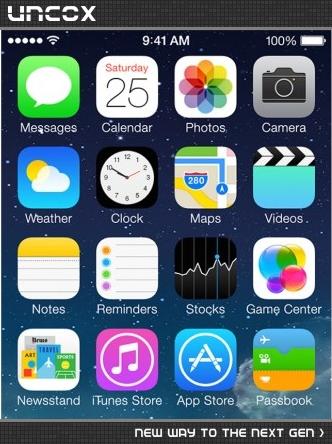
دقیقا اکتیویتی اولم میخوام اینطوری باشه و با کلیک روی هر کدوم بریم تو اکتیویتی موردنظر :(
خستم کرده
پاسخها 2
oMiD4gApp
10 سال پیش
این درست من عرضون رو درست میکنم اما توی ارتفاعشون توی گوشی های مختلف سرجاشون میمونه !؟
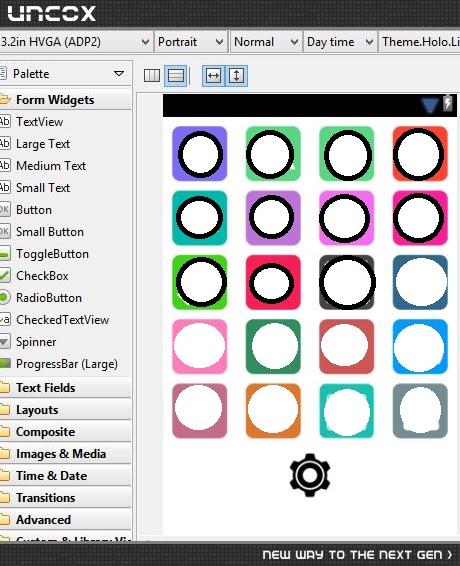
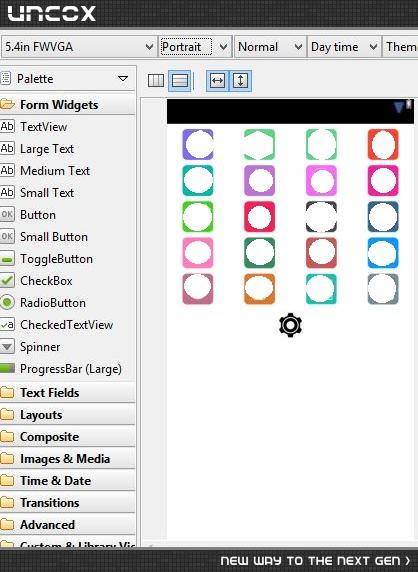
عکس اول که صفحه کوچیک هست همه چی درسته اما عکس دوم که صفحه بزرگ هست اینشکلی میشه
نظرات
 fanta
10 سال پیش
fanta
10 سال پیش
< ?xml versi encoding="utf-8"?>
fanta
10 سال پیش
<?xml version="1.0" encoding="utf-8"?>
<LinearLayout xmlns:android="http://schemas.android.com/apk/res/android"
android:layout_width="match_parent"
android:layout_height="match_parent"
android:orientation="vertical" >
<LinearLayout
android:layout_width="match_parent"
android:layout_height="0dip" android:layout_gravity="center" android:layout_weight=".2">
<LinearLayout
android:layout_width="0dip"
android:layout_height="match_parent" android:layout_weight=".25" android:gravity="center">
<ImageView
android:id="@+id/imageView1"
android:layout_width="wrap_content"
android:layout_height="wrap_content"
android:src="@drawable/ic_launcher" />
</LinearLayout>
<LinearLayout
android:layout_width="0dip"
android:layout_height="match_parent" android:layout_weight=".25" android:gravity="center">
<ImageView
android:id="@+id/imageView2"
android:layout_width="wrap_content"
android:layout_height="wrap_content"
android:src="@drawable/ic_launcher" />
</LinearLayout>
<LinearLayout
android:layout_width="0dip"
android:layout_height="match_parent" android:layout_weight=".25" android:gravity="center">
<ImageView
android:id="@+id/imageView3"
android:layout_width="wrap_content"
android:layout_height="wrap_content"
android:src="@drawable/ic_launcher" />
</LinearLayout>
<LinearLayout
android:layout_width="0dip"
android:layout_height="match_parent" android:layout_weight=".25" android:gravity="center">
<ImageView
android:id="@+id/imageView4"
android:layout_width="wrap_content"
android:layout_height="wrap_content"
android:src="@drawable/ic_launcher" />
</LinearLayout>
</LinearLayout>
<LinearLayout
android:layout_width="match_parent"
android:layout_height="0dip"
android:layout_gravity="center"
android:layout_weight=".2" >
<LinearLayout
android:layout_width="0dip"
android:layout_height="match_parent"
android:layout_weight=".25"
android:gravity="center" >
<ImageView
android:id="@+id/ImageView01"
android:layout_width="wrap_content"
android:layout_height="wrap_content"
android:src="@drawable/ic_launcher" />
</LinearLayout>
<LinearLayout
android:layout_width="0dip"
android:layout_height="match_parent"
android:layout_weight=".25"
android:gravity="center" >
<ImageView
android:id="@+id/ImageView02"
android:layout_width="wrap_content"
android:layout_height="wrap_content"
android:src="@drawable/ic_launcher" />
</LinearLayout>
<LinearLayout
android:layout_width="0dip"
android:layout_height="match_parent"
android:layout_weight=".25"
android:gravity="center" >
<ImageView
android:id="@+id/ImageView03"
android:layout_width="wrap_content"
android:layout_height="wrap_content"
android:src="@drawable/ic_launcher" />
</LinearLayout>
<LinearLayout
android:layout_width="0dip"
android:layout_height="match_parent"
android:layout_weight=".25"
android:gravity="center" >
<ImageView
android:id="@+id/ImageView04"
android:layout_width="wrap_content"
android:layout_height="wrap_content"
android:src="@drawable/ic_launcher" />
</LinearLayout>
</LinearLayout>
<LinearLayout
android:layout_width="match_parent"
android:layout_height="0dip"
android:layout_gravity="center"
android:layout_weight=".2" >
<LinearLayout
android:layout_width="0dip"
android:layout_height="match_parent"
android:layout_weight=".25"
android:gravity="center" >
<ImageView
android:id="@+id/ImageView05"
android:layout_width="wrap_content"
android:layout_height="wrap_content"
android:src="@drawable/ic_launcher" />
</LinearLayout>
<LinearLayout
android:layout_width="0dip"
android:layout_height="match_parent"
android:layout_weight=".25"
android:gravity="center" >
<ImageView
android:id="@+id/ImageView06"
android:layout_width="wrap_content"
android:layout_height="wrap_content"
android:src="@drawable/ic_launcher" />
</LinearLayout>
<LinearLayout
android:layout_width="0dip"
android:layout_height="match_parent"
android:layout_weight=".25"
android:gravity="center" >
<ImageView
android:id="@+id/ImageView07"
android:layout_width="wrap_content"
android:layout_height="wrap_content"
android:src="@drawable/ic_launcher" />
</LinearLayout>
<LinearLayout
android:layout_width="0dip"
android:layout_height="match_parent"
android:layout_weight=".25"
android:gravity="center" >
<ImageView
android:id="@+id/ImageView08"
android:layout_width="wrap_content"
android:layout_height="wrap_content"
android:src="@drawable/ic_launcher" />
</LinearLayout>
</LinearLayout>
<LinearLayout
android:layout_width="match_parent"
android:layout_height="0dip"
android:layout_gravity="center"
android:layout_weight=".2" >
<LinearLayout
android:layout_width="0dip"
android:layout_height="match_parent"
android:layout_weight=".25"
android:gravity="center" >
<ImageView
android:id="@+id/ImageView09"
android:layout_width="wrap_content"
android:layout_height="wrap_content"
android:src="@drawable/ic_launcher" />
</LinearLayout>
<LinearLayout
android:layout_width="0dip"
android:layout_height="match_parent"
android:layout_weight=".25"
android:gravity="center" >
<ImageView
android:id="@+id/ImageView10"
android:layout_width="wrap_content"
android:layout_height="wrap_content"
android:src="@drawable/ic_launcher" />
</LinearLayout>
<LinearLayout
android:layout_width="0dip"
android:layout_height="match_parent"
android:layout_weight=".25"
android:gravity="center" >
<ImageView
android:id="@+id/ImageView11"
android:layout_width="wrap_content"
android:layout_height="wrap_content"
android:src="@drawable/ic_launcher" />
</LinearLayout>
<LinearLayout
android:layout_width="0dip"
android:layout_height="match_parent"
android:layout_weight=".25"
android:gravity="center" >
<ImageView
android:id="@+id/ImageView12"
android:layout_width="wrap_content"
android:layout_height="wrap_content"
android:src="@drawable/ic_launcher" />
</LinearLayout>
</LinearLayout>
<LinearLayout
android:layout_width="match_parent"
android:layout_height="0dip"
android:layout_gravity="center"
android:layout_weight=".2" >
<LinearLayout
android:layout_width="0dip"
android:layout_height="match_parent"
android:layout_weight=".25"
android:gravity="center" >
<ImageView
android:id="@+id/ImageView13"
android:layout_width="wrap_content"
android:layout_height="wrap_content"
android:src="@drawable/ic_launcher" />
</LinearLayout>
<LinearLayout
android:layout_width="0dip"
android:layout_height="match_parent"
android:layout_weight=".25"
android:gravity="center" >
<ImageView
android:id="@+id/ImageView14"
android:layout_width="wrap_content"
android:layout_height="wrap_content"
android:src="@drawable/ic_launcher" />
</LinearLayout>
<LinearLayout
android:layout_width="0dip"
android:layout_height="match_parent"
android:layout_weight=".25"
android:gravity="center" >
<ImageView
android:id="@+id/ImageView15"
android:layout_width="wrap_content"
android:layout_height="wrap_content"
android:src="@drawable/ic_launcher" />
</LinearLayout>
<LinearLayout
android:layout_width="0dip"
android:layout_height="match_parent"
android:layout_weight=".25"
android:gravity="center" >
<ImageView
android:id="@+id/ImageView16"
android:layout_width="wrap_content"
android:layout_height="wrap_content"
android:src="@drawable/ic_launcher" />
</LinearLayout>
</LinearLayout>
</LinearLayout>
نظرات
fanta
10 سال پیش
دوست عزیز این کد رو توی xml کپی کن.خودم درست کردم واست.فقط شما عکسا رو جایگزین کن
oMiD4gApp
10 سال پیش
بسیار سپاسگذار..عالی بود
فقط یه مسله ای ، من سایز عکس ها رو الان 120 پیکسل درست کردم فقط گذاشتم تو xhdpi ..این سایز خوبه یا بزرگترش کنم و توی بقیه پوشه ها چه سایزی بذارم؟ نیاز به پوشه xxhdpi هست؟
چون روی امولیتور کلا کیفیت پایین هست مشخص نمیشه عکسا کیفیتشون خوب نشون میده یا نه
oMiD4gApp
10 سال پیش
و یک سوال دیگه....چیکار کنیم که بعد کلیک روی هر عکس شبیه دکمه که کلیک میشه یه حالت فشاری روش نمایش بده...با onsetclick , onsettouch نشد :/
fanta
10 سال پیش
در مورد سوال اول ، روی گوشی تست بگیر اگه کیفیتش خوب بود که هیچ ،اگه نه از عکس های با کیفیت بالاتر استفاده کن.
fanta
10 سال پیش
در مورد سوال دوم هم ،کار پیچیده میشه و توضیح دادنش اینجا خیلی سخته
پاسخگویی و مشاهده پاسخ های این سوال تنها برای اعضای ویژه سایت امکان پذیر است .
چنانچه تمایل دارید به همه بخش ها دسترسی داشته باشید میتوانید از این بخش لایسنس این آموزش را خریداری نمایید .
ویرایش
پیام
نظرات