

مشکل در تمرین بخش اول - طراحی لایه های پیچیده

سلام دوستان من تازه برنامه نویسی اندروید شروع کردم و در قسمت تمرین طراحی لایه های پیچیده به مشکل برخوردم.
من تمام قسمت هارو درست طراحی کردم ولی نمیتونم مستطیل های آبی رنگ رو هماهنگ کنم با مستطیل های سبز منظورم اینکه وفتی مستطیل های آبی کیپی میکنم ارتفاع مستطیل های سبز با آبی همانگ و یکسان نمیشه و گزینه های match_parent و wrap_content رو دقیق چک کردم و همه مدل حالت هارو چک کردم واقعا نمیدونم مشکل چیه.
یه Print Screen و سورس فایلمو براتون گزاشتم ، خیلی ممنون میشم بهم جواب بدین و مشکلمو بگین یا اگه فقط سورسو دارین بهم بدین تا از روی نمونه بفهمم مشکلم چیه.
خیلی ممنون از تمامی دوستان و استاد محترم.
داخل فایل main.xml سورس اصلی هستش main 2 , 3 گوشه ای از حالت هایی بود ک چک کردم شاید اونطوری درست شه.
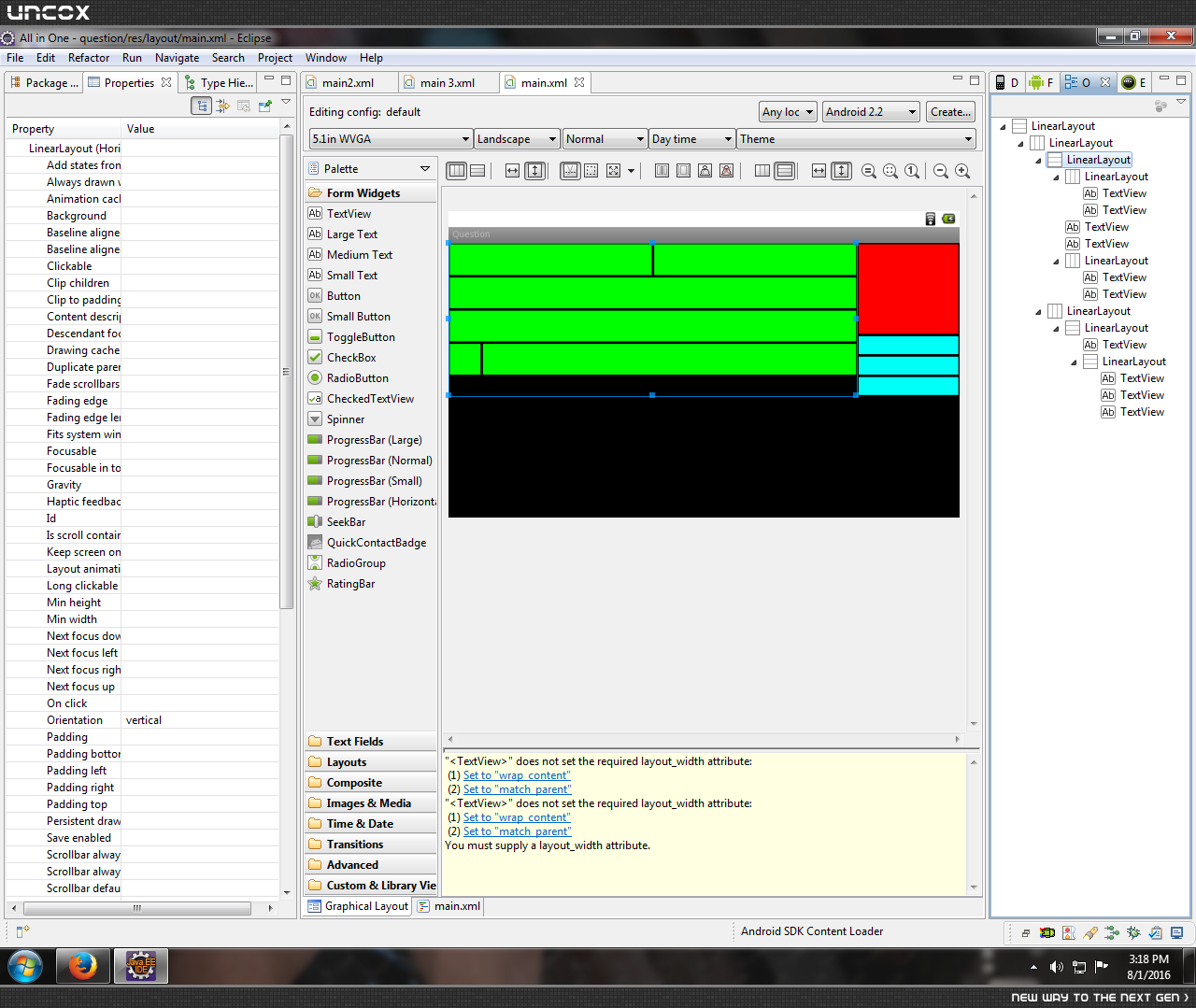

خب ببین شما مقدار ارتفاع هرکودوم از سبزارو دستی 48dip دادی و هرکودم هم 2dip margin دارن که مجموعا میشه این ارتفاع:
48 * 4 + 6 = 196dip --> ertefa samte chap
و از اونطرف مستطیل قرمز رنگ رو 140dip و آبی هارو 28dip دادی که مجموعا میشه اینطوری:
140 + (28 * 3) = 282dip --> ertefae samte rast!
برای همین تفاوت ارتفاع ایجاد شده که برای رفع مشکل دو راه داری!
اول اینکه: مقدار ارتفاع تمام مستطیل های سبز رو از 48dip به 56dip تغییر بدی که میشه دستی و داینامیک نیست!
دوم اینکه: مستطیل های سبز رو وزن دهی کنی به این صورت:((فایل xml هست ...کافیه کپی پیست کنی!))
 <?xml version="1.0" encoding="utf-8"?>
<LinearLayout xmlns:android="http://schemas.android.com/apk/res/android"
    android:layout_width="fill_parent"
    android:layout_height="fill_parent"
    android:orientation="vertical" >


    <LinearLayout
        android:layout_width="fill_parent"
        android:layout_height="wrap_content" >


        <LinearLayout
            android:layout_width="0dip"
            android:layout_height="match_parent"
            android:orientation="vertical" android:layout_weight="0.8">

            <LinearLayout
                android:layout_width="match_parent"
                android:layout_height="0dip"
                android:layout_weight=".25">

                <TextView
                    android:layout_height="match_parent"
                    android:layout_margin="2dip"
                    android:background="#00ff00" android:layout_weight="1"
                    android:layout_width="match_parent" />

                <TextView
                    android:layout_height="match_parent"
                    android:layout_margin="2dip"
                    android:background="#00ff00" android:layout_weight="1"
                    android:layout_width="match_parent" />
            </LinearLayout>

            <TextView
                android:layout_width="fill_parent"
                android:layout_height="0dip"
                android:layout_margin="2dip"
                android:background="#00ff00"
                android:layout_weight=".25" />

            <TextView
                android:layout_width="fill_parent"
                android:layout_height="0dip"
                android:layout_margin="2dip"
                android:background="#00ff00"
                android:layout_weight=".25" />

            <LinearLayout
                android:layout_width="match_parent"
                android:layout_height="0dip"
                android:layout_weight=".25">

                <TextView
                    android:layout_width="48dip"
                    android:layout_height="match_parent"
                    android:layout_margin="2dip"
                    android:layout_weight="0"
                    android:background="#00ff00" />

                <TextView
                    android:layout_width="0dip"
                    android:layout_height="match_parent"
                    android:layout_margin="2dip"
                    android:background="#00ff00" android:layout_weight="1"/>
            </LinearLayout>

        </LinearLayout>

        <LinearLayout
            android:layout_width="0dip"
            android:layout_height="match_parent" android:layout_weight="0.2">

            <LinearLayout
                android:layout_width="fill_parent"
                android:layout_height="wrap_content"
                android:orientation="vertical" >

                <TextView
                    android:layout_width="fill_parent"
                    android:layout_height="140dp"
                    android:layout_margin="2dip"
                    android:background="#ff0000" />


                <LinearLayout
                    android:layout_width="fill_parent"
                    android:layout_height="wrap_content"
                    android:orientation="vertical" >

                    <TextView
                        android:layout_width="fill_parent"
                        android:layout_height="28dip"
                        android:layout_margin="2dip"
                        android:background="#00fff7" />

                    <TextView
                        android:layout_width="fill_parent"
                        android:layout_height="28dip"
                        android:layout_margin="2dip"
                        android:background="#00fff7" />

                    <TextView
                        android:layout_width="fill_parent"
                        android:layout_height="28dip"
                        android:layout_margin="2dip"
                        android:background="#00fff7" />

                </LinearLayout>

            </LinearLayout>

        </LinearLayout>
    </LinearLayout>

</LinearLayout>
امیدوارم مشکلت حل شع :)
پاسخگویی و مشاهده پاسخ های این سوال تنها برای اعضای ویژه سایت امکان پذیر است .
چنانچه تمایل دارید به همه بخش ها دسترسی داشته باشید میتوانید از این بخش لایسنس این آموزش را خریداری نمایید .
