


حالت انتظار در Horizontal Progress Bar

سلام
دیدید تو برنامه های مثل بازار یه برنامه ای تو صف انتظار هست ، پروگرس بار یه حالت خاصی داره ؟ من دیدم :)) چطوری میشه ایجادش کرد ؟
پروگرس بار پیفرض اندروید این حالت رو داره یا بشینم بنویسم ؟!



اول عکس های زیر را دانلود کنید ... از برنامه بازار پاتک کردم:
حالا یه پوشه تو فایل res به نام anim و فایل download.xml زیر را توش درست کنید:
 <?xml version="1.0" encoding="utf-8"?>
<animation-list xmlns:android="http://schemas.android.com/apk/res/android">

    <item android:drawable="@drawable/progressbar_indeterminate_holo1" android:duration="30"/>
    <item android:drawable="@drawable/progressbar_indeterminate_holo2" android:duration="30"/>
    <item android:drawable="@drawable/progressbar_indeterminate_holo3" android:duration="30"/>
    <item android:drawable="@drawable/progressbar_indeterminate_holo4" android:duration="30"/>
    <item android:drawable="@drawable/progressbar_indeterminate_holo5" android:duration="30"/>
    <item android:drawable="@drawable/progressbar_indeterminate_holo6" android:duration="30"/>
    <item android:drawable="@drawable/progressbar_indeterminate_holo7" android:duration="30"/>
    <item android:drawable="@drawable/progressbar_indeterminate_holo8" android:duration="30"/>

</animation-list>
بعد باید تو layout هر جا که خواستین یه imageview بزارین و src را این فایل انیمیشن قرار بدین :
         <ImageView
            android:id="@+id/imageView2"
            android:layout_width="wrap_content"
            android:layout_height="wrap_content"
            android:layout_alignParentLeft="true"
            android:layout_below="@+id/imageView1"
            android:layout_marginLeft="10dp"
            android:layout_marginRight="10dp"
            android:src="@anim/download"/>
بعد تو کلاس بعد از تعریف imageview کد نمایش انیمیشن را قرار میدید :
     AnimationDrawable animation = (AnimationDrawable) anim.getDrawable();
     animation.start();
هر جا هم که خواستید بایسته :
animation.stop();
البته شما استاد هستید ... من این توضیحات را کامل دادم که اگر کاربر دیگری خواست ازش استفاده کنه راحت باشه
این ارور رو میده :
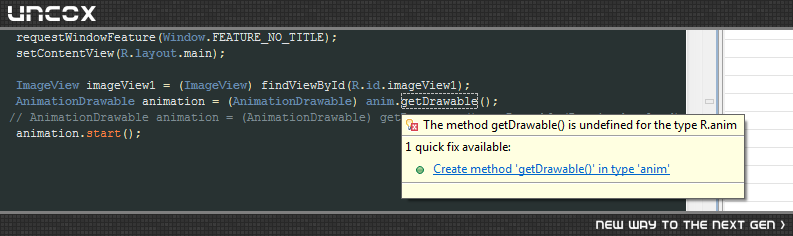
و نمیتونم animation رو تعریف کنم
از طریق زیر تونستم تعریفش کنم ولی انیمیشن اجرا نشد :
AnimationDrawable animation = (AnimationDrawable) getResources().getDrawable(R.anim.download);
با این کد حل شد :
  ImageView imageView1 = (ImageView) findViewById(R.id.imageView1);
        final AnimationDrawable animation = (AnimationDrawable) getResources().getDrawable(R.anim.download);

        imageView1.setBackgroundDrawable(animation);
        imageView1.post(new Runnable() {

            @Override
            public void run() {
                animation.start();
            }
        });
بازم ممنون حامد و مجتبی جان
اینطوری هم میتونی بنویسی:
 final ImageView anim = (ImageView) findViewById(R.id.imageview1);
 anim.setBackgroundResource(R.anim.download);
 anim.setOnClickListener (new OnClickListener() {

             @Override
             public void OnClick (View v) {
                    AnimationDrawable animation = anim.getBackground();
                    animation.start();
                    }
             });
همینجا فایل download را تعریف کردم و از getBackground استفاده کردم
اینطوری هم میتونیم بنویسیم !
AnimationDrawable animation = (AnimationDrawable) imageview.getBackground();
animation.start();
فقط باید قلبش background اون imageview رو برابر اون فایل xml قرار بدید
پاسخگویی و مشاهده پاسخ های این سوال تنها برای اعضای ویژه سایت امکان پذیر است .
چنانچه تمایل دارید به همه بخش ها دسترسی داشته باشید میتوانید از این بخش لایسنس این آموزش را خریداری نمایید .
