


این لیوتی که شما معرفی کردی حتی نتونستم پیداش کنم خواهشن بیشتر راهنمایی کنین
بروز خطا
[message]
اشتراک در سوال
رای ها
[dataList]
پرسش و پاسخ
طراحی پیچیده در xml
مدیریت گفتگو
 sun.of.god.7
10 سال پیش
sun.of.god.7
10 سال پیش
آخرین تغییر: 10 سال پیش
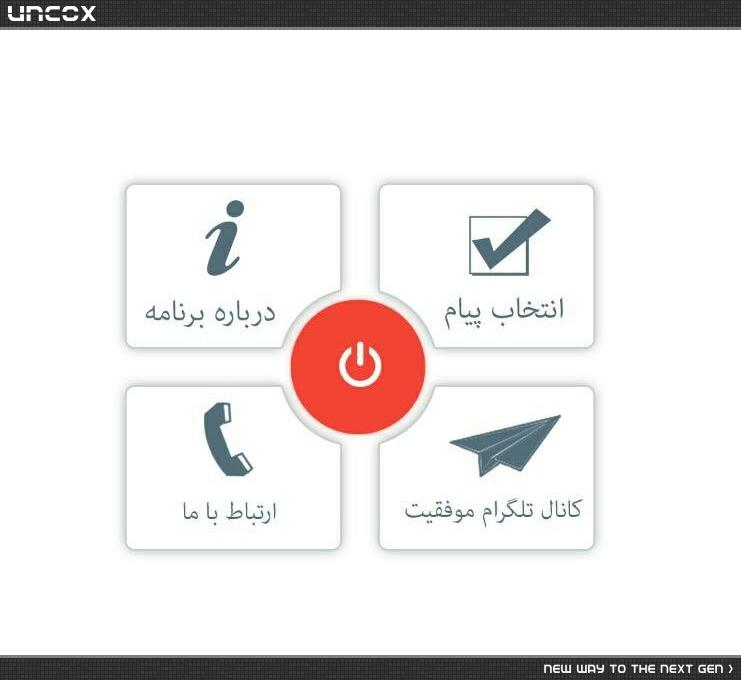
سلام خدمت همه ی دوستان یه طرحی تو فتو شاپ اماده شده ولی هیچجوره نمیتونم تو ایکس ام ال پیادش کنم
طرح زیر رو نگاه کنین میخوام به این شکل 4 تا باتن دور دکمه قرمز باشن اما ازونجایی که همه ی ویجت ها 4 گوش دارن نمیشه انقدر نزدیکشون کردو فاصلشون زیاد میشه میخوام بدونم اصلا راهی برای پیاده کردن این هست ؟؟ اگه نیست من وقتمو تلف نکنم برم سراغ یه طرح دگه
ممنون میشم کمک کنین
پاسخها 3
 amir Alu
10 سال پیش
amir Alu
10 سال پیش
شما واسه ای این که طراحت دقیق در بیاد به نظر من از AbslotLayout استقاده کن و ۵ تا لینیر بهش بده که هر کدوم شامل یک باتن باشه.
خیلی راحت میشه این رو ساخت
نظرات
 Ali
10 سال پیش
Ali
10 سال پیش
stackoverflow.com/questions/26683094/android-absolute-layout-with-different-screen-size
 آرمان
10 سال پیش
آرمان
10 سال پیش
یه همچین چیزی باید پیاده سازی کنی، به Outline دقت کن که چطور چیده شدن ...
حالا من Button گذاشتم، تو میتونی ImageButton بذاری
اگر برات واضح نبود بگو تا توضیح بدم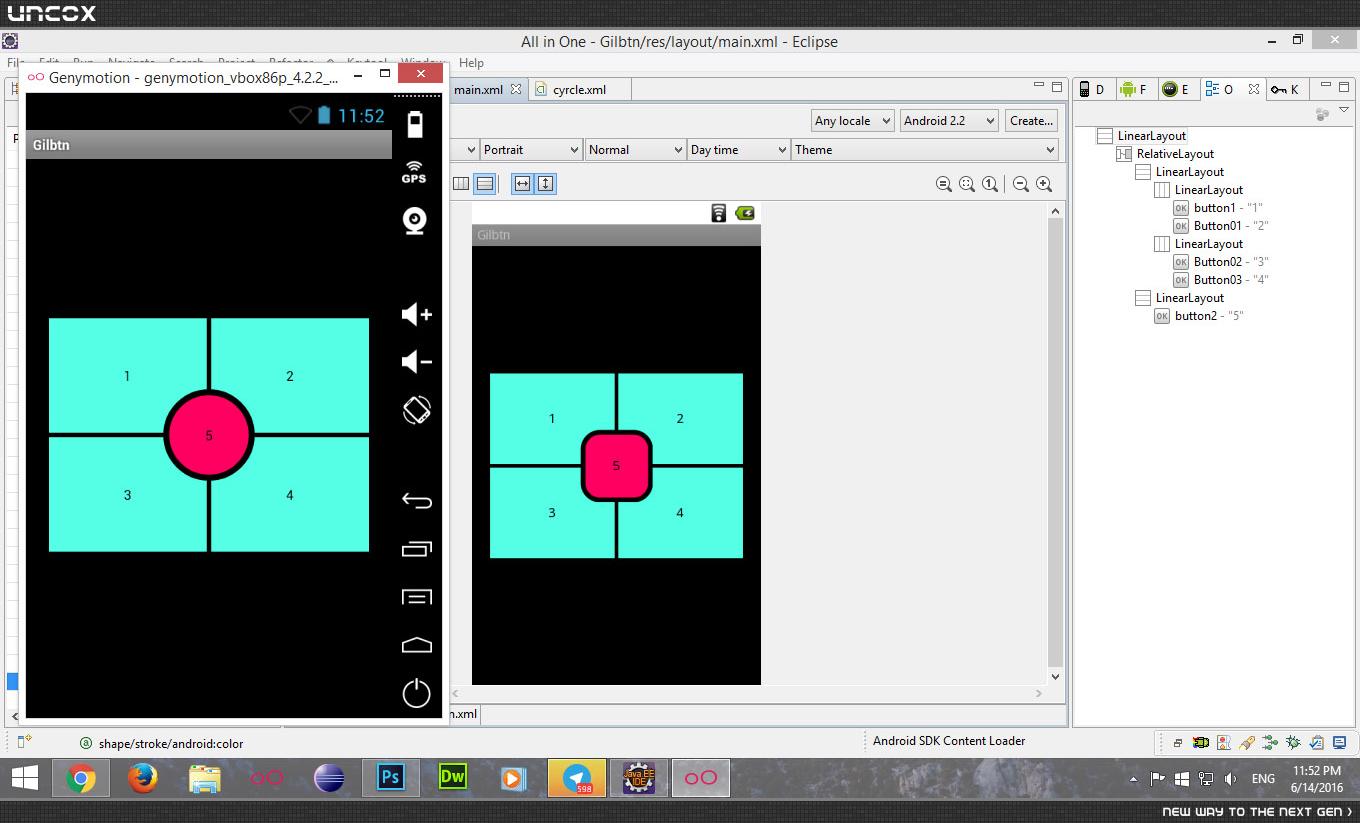
نظرات
sun.of.god.7
10 سال پیش
اگه میشه کامل توضیح بده یا xml کاملشو بفرست برام که دگ خیالم راحت شه
آرمان
10 سال پیش
جواب رو پایین گذاشتم واست
sun.of.god.7
10 سال پیش
من هیچجوره نمیتونم این لایه هارو کنترل کنم که انقدر دقیق چیده بشن
آرمان
10 سال پیش
کد xml رو پایین واست گذاشتم دیگه، همون رو کپی کن ...
آرمان
10 سال پیش
این کد xml
 <?xml version="1.0" encoding="utf-8"?>
<LinearLayout xmlns:android="http://schemas.android.com/apk/res/android"
    android:layout_width="fill_parent"
    android:layout_height="fill_parent"
    android:gravity="center"
    android:orientation="vertical" >

    <RelativeLayout
        android:layout_width="fill_parent"
        android:layout_height="fill_parent"
        android:gravity="center" >

        <LinearLayout
            android:layout_width="fill_parent"
            android:layout_height="fill_parent"
            android:orientation="vertical" >

            <LinearLayout
                android:layout_width="fill_parent"
                android:layout_height="0dip"
                android:layout_marginBottom="2dip"
                android:layout_weight="1"
                android:gravity="bottom|center" >

                <Button
                    android:id="@+id/button1"
                    android:layout_width="0dip"
                    android:layout_height="100dip"
                    android:layout_marginLeft="20dip"
                    android:layout_marginRight="2dip"
                    android:layout_weight="1"
                    android:background="#54ffe5"
                    android:text="1" />

                <Button
                    android:id="@+id/Button01"
                    android:layout_width="0dip"
                    android:layout_height="100dip"
                    android:layout_marginLeft="2dip"
                    android:layout_marginRight="20dip"
                    android:layout_weight="1"
                    android:background="#54ffe5"
                    android:text="2" />
            </LinearLayout>

            <LinearLayout
                android:layout_width="fill_parent"
                android:layout_height="0dip"
                android:layout_marginTop="2dip"
                android:layout_weight="1" >

                <Button
                    android:id="@+id/Button02"
                    android:layout_width="0dip"
                    android:layout_height="100dip"
                    android:layout_marginLeft="20dip"
                    android:layout_marginRight="2dip"
                    android:layout_weight="1"
                    android:background="#54ffe5"
                    android:text="3" />

                <Button
                    android:id="@+id/Button03"
                    android:layout_width="0dip"
                    android:layout_height="100dip"
                    android:layout_marginLeft="2dip"
                    android:layout_marginRight="20dip"
                    android:layout_weight="1"
                    android:background="#54ffe5"
                    android:text="4" />
            </LinearLayout>
        </LinearLayout>

        <LinearLayout
            android:layout_width="fill_parent"
            android:layout_height="fill_parent"
            android:gravity="center"
            android:orientation="vertical" >

            <Button
                android:id="@+id/button2"
                android:layout_width="80dip"
                android:layout_height="80dip"
                android:background="@drawable/cyrcle"
                android:padding="30dip"
                android:text="5" />
        </LinearLayout>
    </RelativeLayout>

</LinearLayout>
و بعد واسه اون دکمه وسط اگر میخوای دایره شکل بشه باید یه پوشه توی res درست کنی و اسمش رو drawable بذاری بعد یه فایل xml جدید از نوع shape تو پوشه drawable بسازی بعد این کدی که تو عکس گذاشتم رو توش بنویسی بعدش هم background اون دکمه رو باهاش ست بکنی(عکس دومی)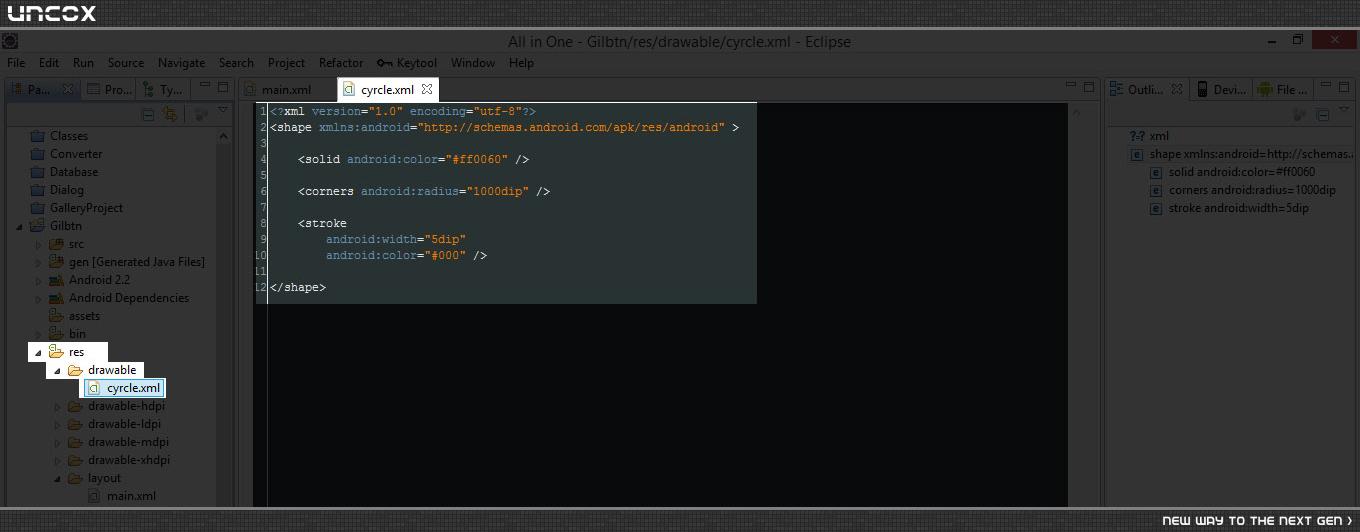
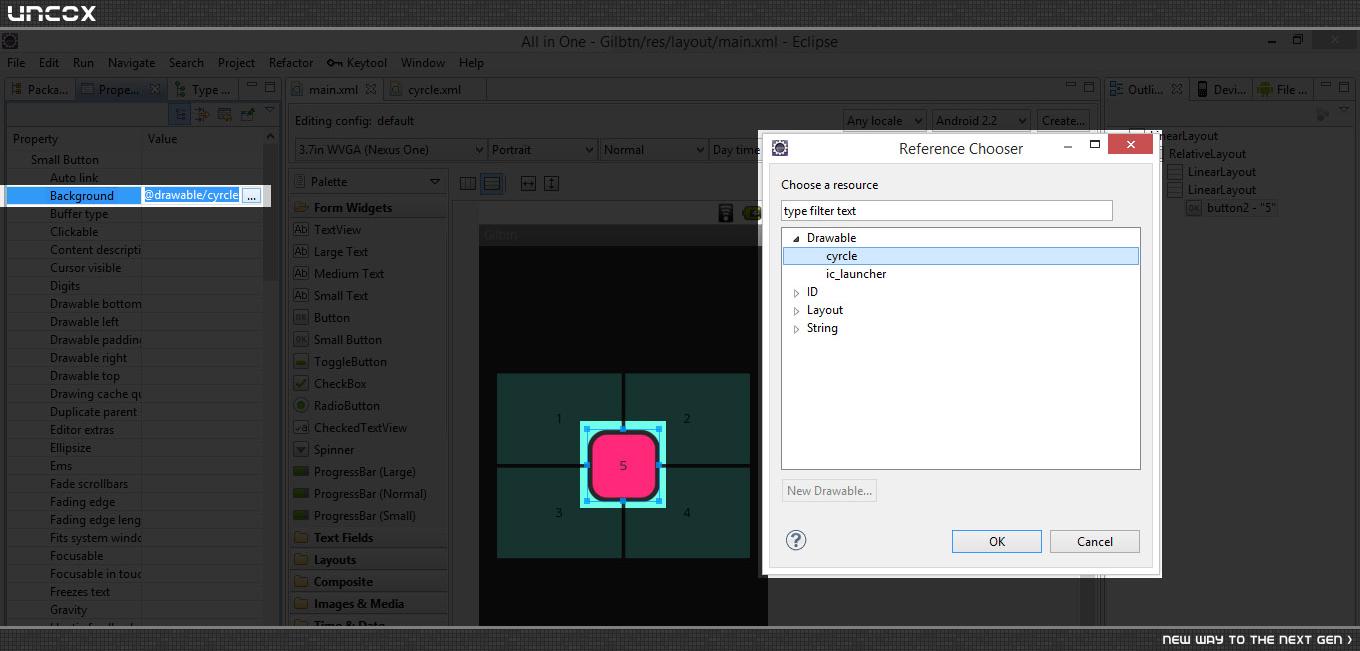
برو حالشو ببر داش ♥
نظرات
sun.of.god.7
10 سال پیش
مرسی داداش خیلی اقایی جواب داد
ایشالا جبران کنم
آرمان
10 سال پیش
^_^ فدای تو، خوشحال شدم جواب داد - اگر بازم سوالی بود در خدمتم ♥
پاسخگویی و مشاهده پاسخ های این سوال تنها برای اعضای ویژه سایت امکان پذیر است .
چنانچه تمایل دارید به همه بخش ها دسترسی داشته باشید میتوانید از این بخش لایسنس این آموزش را خریداری نمایید .
ویرایش
پیام
نظرات