

بروز خطا
[message]
اشتراک در سوال
رای ها
[dataList]
طراحی لایه کاربری نرم افزار

0
0
سلام
لایه زیر رو قصد دارم طراحی کنم ولی هرچی سعی می کنم درست در نمیاد. کسی می تونه راهنمایی کنه.
در ضمن این لایه نارنجی بالایی عکس است. و لایه پایین یک TextView
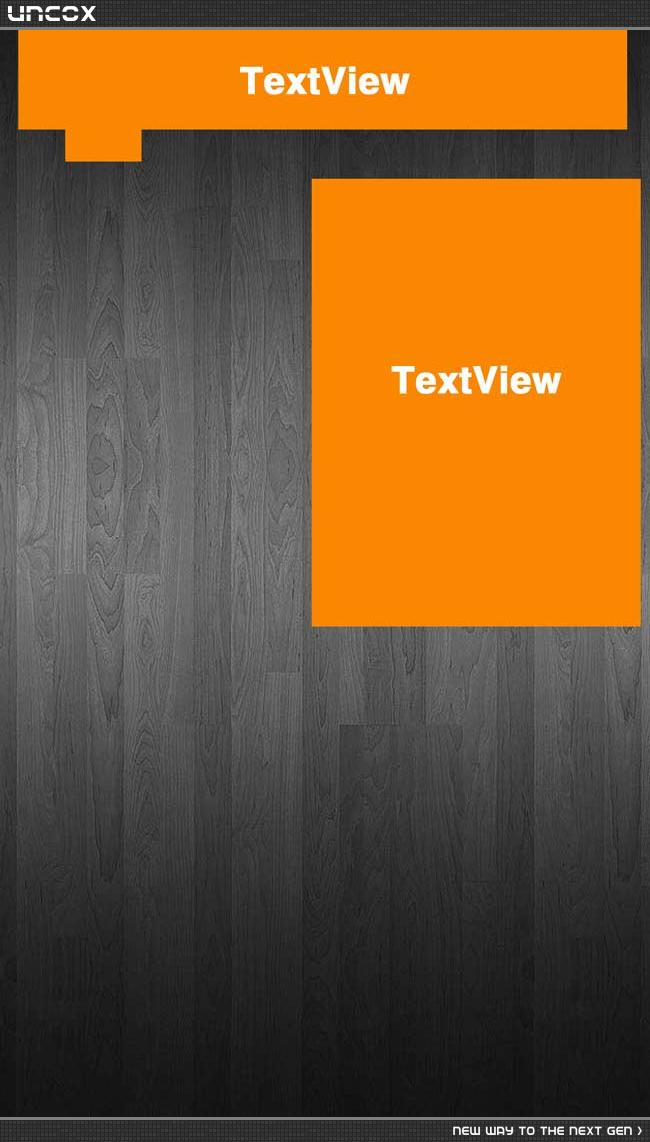
+1
0

پیشنهاد میکنم این بخش هم مطالعه کنی (حتی طراحی لایه های پیچیده!) لینک (10 سال پیش)
برای این سوال 1 پاسخ وجود دارد.
پاسخ به سوال
Plumber
10 سال پیش
+3
0
سلام!
اینطوری ینی؟
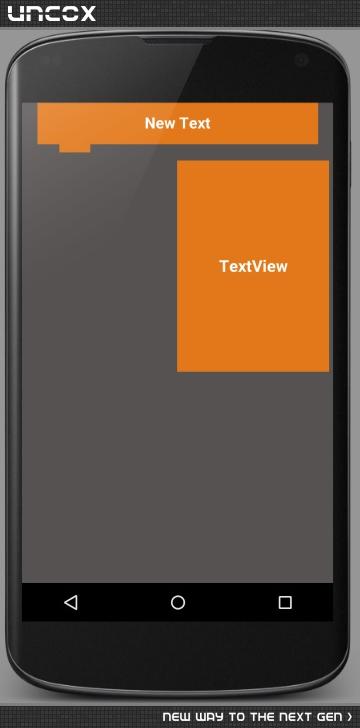
کد xml:
 <LinearLayout xmlns:android="http://schemas.android.com/apk/res/android"
    android:layout_width="match_parent"
    android:layout_height="match_parent">

    <LinearLayout
        android:orientation="vertical"
        android:layout_width="match_parent"
        android:layout_height="match_parent"
        android:background="#565252">

        <LinearLayout
            android:orientation="horizontal"
            android:layout_width="match_parent"
            android:layout_height="wrap_content">

            <LinearLayout
                android:orientation="horizontal"
                android:layout_width="0dip"
                android:layout_height="match_parent"
                android:layout_weight=".05" />

            <TextView
                android:layout_width="0dip"
                android:layout_height="52dip"
                android:text="New Text"
                android:id="@+id/textView58"
                android:layout_weight=".9"
                android:gravity="center"
                android:background="#e3781a"
                android:textSize="19dip"
                android:textStyle="bold"
                android:textColor="#ffffff" />

            <LinearLayout
                android:orientation="horizontal"
                android:layout_width="0dip"
                android:layout_height="match_parent"
                android:layout_weight=".05"></LinearLayout>

        </LinearLayout>

        <LinearLayout
            android:orientation="horizontal"
            android:layout_width="fill_parent"
            android:layout_height="wrap_content">

            <LinearLayout
                android:orientation="horizontal"
                android:layout_width="0dip"
                android:layout_height="wrap_content"
                android:layout_weight=".12" />

            <TextView
                android:layout_width="0dip"
                android:layout_height="10dip"
                android:id="@+id/textView59"
                android:layout_weight=".1"
                android:gravity="center"
                android:background="#e3781a" />

            <LinearLayout
                android:orientation="horizontal"
                android:layout_width="0dip"
                android:layout_height="wrap_content"
                android:layout_weight=".78" />
        </LinearLayout>

        <LinearLayout
            android:orientation="horizontal"
            android:layout_width="match_parent"
            android:layout_height="0dip"
            android:layout_marginTop="10dip"
            android:layout_marginRight="6dip"
            android:layout_marginLeft="4dip"
            android:layout_weight=".5">

            <LinearLayout
                android:orientation="horizontal"
                android:layout_width="0dip"
                android:layout_height="wrap_content"
                android:layout_weight=".5" />

            <TextView
                android:layout_width="0dip"
                android:layout_height="fill_parent"
                android:id="@+id/textView60"
                android:layout_weight=".5"
                android:gravity="center"
                android:background="#e3781a"
                android:text="TextView"
                android:textColor="#ffffff"
                android:textSize="20dip"
                android:textStyle="bold" />

        </LinearLayout>

        <LinearLayout
            android:orientation="horizontal"
            android:layout_width="match_parent"
            android:layout_height="0dip"
            android:layout_weight=".5"></LinearLayout>
    </LinearLayout>

</LinearLayout>
پاسخگویی و مشاهده پاسخ های این سوال تنها برای اعضای ویژه سایت امکان پذیر است .
چنانچه تمایل دارید به همه بخش ها دسترسی داشته باشید میتوانید از این بخش لایسنس این آموزش را خریداری نمایید .
