

بروز خطا
[message]
اشتراک در سوال
رای ها
[dataList]
قرار گرفتن Buttonدر مکان نامناسب

0
0
چرا دکمه بجای اینکه بالای فوتر باشه روی فوتر قرار میگیره ؟؟؟؟
 <ScrollView
  xmlns:android="http://schemas.android.com/apk/res/android"

  android:layout_width="fill_parent"
  android:layout_height="fill_parent"
  android:fillViewport="true">
  <RelativeLayout

        android:layout_width="fill_parent"
        android:layout_height="wrap_content" android:background="@drawable/bg">

        <!--  Header  Starts-->
        <LinearLayout android:id="@+id/header"
                android:layout_width="fill_parent"
                android:layout_height="wrap_content"
                android:background="@layout/header_gradient"
                android:paddingTop="5dip"
                android:paddingBottom="5dip">
                <!-- Logo Start-->
                <ImageView android:src="@drawable/logo"
                            android:layout_width="wrap_content"
                            android:layout_height="wrap_content"
                            android:layout_marginLeft="10dip"/>
                <!-- Logo Ends -->
        </LinearLayout>
        <!--  Header Ends -->
        <!-- Footer Start -->
        <com.JabizParda.TellReport.Footer_Repeat
            android:id="@+id/footerRepeat1"
            android:layout_width="wrap_content"
            android:layout_height="wrap_content"
            android:layout_alignParentBottom="true"
             >
        </com.JabizParda.TellReport.Footer_Repeat>
        <!-- Footer Ends -->

        <!-- Login Form -->

        <LinearLayout
            xmlns:android="http://schemas.android.com/apk/res/android"
            android:layout_width="match_parent"
            android:layout_height="wrap_content"
            android:layout_below="@id/header"
             android:orientati
            android:padding="10dip" >

            <!-- Email Label -->

            <ListView
                android:id="@+id/lstContent"
                android:layout_width="match_parent"
                android:layout_height="match_parent"
                android:layout_marginBottom="100dip"
                android:layout_weight="0.2"
                android:divider="@null"
                android:dividerHeight="0dip" >
                  <!-- Preview: listitem=@layout/adapter_nextrequestamar-->
            </ListView>
              <LinearLayout
            xmlns:android="http://schemas.android.com/apk/res/android"
            android:layout_width="match_parent"
            android:layout_height="match_parent"
            android:layout_above="@+id/footerRepeat1"
             android:orientati
            android:padding="10dip" >

            <Button
              android:id="@+id/btnNext"
              android:layout_width="fill_parent"
              android:layout_height="wrap_content"
               android:
              android:background="@drawable/button"

             android:layout_below="@+id/footerRepeat1"
              android:layout_above="@id/lstContent"

              android:text="مرحله بعد" android:gravity="center_vertical|center" android:layout_gravity="center" />
         </LinearLayout>

 </LinearLayout>

  </RelativeLayout>
</ScrollView>
0
0

من به شخصه با relative layout ها خیلی کار نکردم ولی ساختن این چیزی که میخواید با linear layout خیلی ساده تره. دلیل خاصی داره که از linear استفاده نمیکنید؟. درضمن عنوان سوال اصلاح شد. لطفا عنوان رو طوری انتخاب کنید که بعدا با جستجو ، دوستان دیگه بتونن جواب سوالشون رو پیدا کنن (12 سال پیش)
0
0
مرسی ازاینکه عنوان رو اصلاح کردین ...
راستش من از روی آموزشهای استاد این کار رو کردم وگرنه دلیل خاصی نداره
اگر شما میتونید بهم کمک کنید
متشکرم من یه ذره بیشتر عجله دارم (12 سال پیش)
برای این سوال 6 پاسخ وجود دارد.
پاسخ به سوال
sadeghbarout
12 سال پیش
+1
0
این تقریبا چیزیه که میخواید
یه صفحه که یه header و یه footer داره و وسط این دوتا یه listview هست:
 <?xml version="1.0" encoding="utf-8"?>
<LinearLayout xmlns:android="http://schemas.android.com/apk/res/android"
    android:layout_width="match_parent"
    android:layout_height="match_parent"
    android:orientation="vertical" >


    <LinearLayout
        android:id="@+id/Header"
        android:layout_width="match_parent"
        android:layout_height="wrap_content"
        android:background="#afafaf"
        android:orientation="vertical" >

        <TextView
            android:id="@+id/textView1"
            android:layout_width="wrap_content"
            android:layout_height="wrap_content"
            android:text="header title"
            android:textSize="20dip" />
    </LinearLayout>

    <ListView
        android:id="@+id/listView1"
        android:layout_width="match_parent"
        android:layout_height="0dip"
        android:layout_weight="1" >
    </ListView>


    <LinearLayout
        android:id="@+id/Footer"
        android:layout_width="match_parent"
        android:layout_height="wrap_content"
        android:background="#efefef"
        android:orientation="vertical" >

        <Button
            android:id="@+id/button1"
            android:layout_width="match_parent"
            android:layout_height="wrap_content"
            android:text="Button in footer" />

    </LinearLayout>

</LinearLayout>
0
0
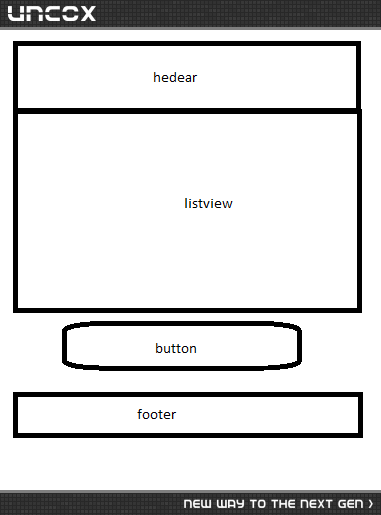
من میخوام دگمه درست در انتهای لیست ویو و بالای فوتر باشه نه داخل فوتر کد خودم هم که همین مشکل را داشت (12 سال پیش)
0
0
خب یه linear دیگه اون پایین لیست ویو بذارید. این که دیگه مشکلی نداره. درضمن هدر و فوتر اینجا 2 تا linear layout هستن و میتونید توشون هرچی خواستید با هر چینشی خواستید بذارید. اگه بازم به نظرت اون چیزی نیست که میخوای، شاید من سوالتو اشتباه فهمیدم! یه عکس از اون چیزی که مد نظرته بذار(مثلا با paint بکش). اما با توجه به اون کدی که اول دادی ، باید همین بهت جواب بده (12 سال پیش)
پاسخ به سوال
sara
12 سال پیش
+1
0
دوست عزیز مشکل من همچنان پا برجاست .... من میخوام صفحم به این شکل باشه (امیدوارم واضح باشه )

0
0

پیشنهاد میکنم برای فوتر و باتن Layoutجدا گونه بزارید شاید مشکل حل شد (12 سال پیش)
0
0
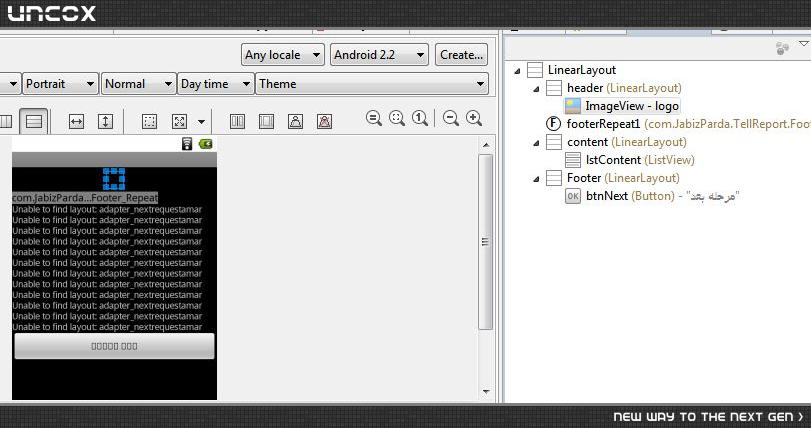
من همه اجزای صفحه رو توی layout های جداگانه همانطور که دوستمون sadeghbarout گفته بود گذاشتم اما خروجی که گرفتم لیست ویو اصلا دیده نشد . (12 سال پیش)
0
0
باید به مقادیر fill_parent و wrap_content هم اجزای داخلی Layout ها و هم خود Layout ها دقت کنید
حدس میزنم مشکل از همین باشه (12 سال پیش)
0
0

اول اینکه اون button رو از توی لایه اخری (فوتر)بیرون بیارید و بالاش قرار بدین. و به فوتر ارتفاع بدین. مشکل حل میشه. متاسفانه هنوز قسمت درج کد مشکل داره (12 سال پیش)
پاسخ به سوال
sara
12 سال پیش
0
0
کدم رو میزارم لطفا بگید کجا اشتباه کردم .متشکرم
 <?xml version="1.0" encoding="utf-8"?>
<LinearLayout xmlns:android="http://schemas.android.com/apk/res/android"
    android:layout_width="match_parent"
    android:layout_height="match_parent"
    android:background="@drawable/bg"
    android:orientation="vertical" >


    <LinearLayout
        android:id="@+id/header"
        android:layout_width="match_parent"
        android:layout_height="wrap_content"
         android:background="@layout/header_gradient"
        android:orientation="vertical"
        android:paddingTop="5dip"
        android:paddingBottom="5dip"> >

      <!-- Logo Start-->
        <ImageView android:src="@drawable/logo"
                            android:layout_width="wrap_content"
                            android:layout_height="wrap_content"
                            android:layout_marginLeft="10dip" android:layout_marginRight="10dip" android:layout_gravity="center"/>
        <!-- Logo Ends -->
    </LinearLayout>
     <!-- Footer Start -->

        <com.JabizParda.TellReport.Footer_Repeat
            android:id="@+id/footerRepeat1"
            android:layout_width="wrap_content"
            android:layout_height="wrap_content"

            android:layout_alignParentBottom="true"
             >
        </com.JabizParda.TellReport.Footer_Repeat>
        <!-- Footer Ends -->
        <LinearLayout
        android:id="@+id/content"
        android:layout_width="match_parent"
        android:layout_height="wrap_content"
       android:orientation="vertical" >

 <!-- <CheckBox
            android:id="@+id/chkDone"
            android:layout_width="wrap_content"
            android:layout_height="wrap_content" /> -->

    <ListView
        android:id="@+id/lstContent"
        android:layout_width="match_parent"
        android:divider="@null"
        android:layout_height="0dip"
        android:layout_weight="1" >
           <!-- Preview: listitem=@layout/adapter_nextrequestamar-->
    </ListView>

</LinearLayout>
    <LinearLayout
        android:id="@+id/Footer"
        android:layout_width="match_parent"
        android:layout_height="wrap_content"
       android:orientation="vertical" >

        <Button
            android:id="@+id/btnNext"
            android:layout_width="match_parent"
            android:layout_height="wrap_content"
           android:text="مرحله بعد"
             android:onClick="onClick" />

    </LinearLayout>

</LinearLayout>
0
0
کد رو ادیت کردم.ببینید منظورتون اینه لینک اگه یوزر خواست Mariot رو وارد کنید (12 سال پیش)
0
0
بازم درست نشد (12 سال پیش)
پاسخ به سوال
sara
12 سال پیش
+1
0
دوستان از همگی متشکرم ، مشکلم رو حل کردم :
 <ScrollView
  xmlns:android="http://schemas.android.com/apk/res/android"

  android:layout_width="fill_parent"
  android:layout_height="fill_parent"
  android:fillViewport="true">
  <RelativeLayout

        android:layout_width="fill_parent"
        android:layout_height="wrap_content" android:background="@drawable/bg">

        <!--  Header  Starts-->
        <LinearLayout android:id="@+id/header"
                android:layout_width="fill_parent"
                android:layout_height="wrap_content"
                android:background="@layout/header_gradient"
                android:paddingTop="5dip"
                android:paddingBottom="5dip">
                <!-- Logo Start-->
                <ImageView android:src="@drawable/logo"
                            android:layout_width="wrap_content"
                            android:layout_height="wrap_content"
                            android:layout_marginLeft="10dip"/>
                <!-- Logo Ends -->
        </LinearLayout>
        <!--  Header Ends -->
        <!-- Footer Start -->
        <com.JabizParda.TellReport.Footer_Repeat
            android:id="@+id/footerRepeat1"
            android:layout_width="wrap_content"
            android:layout_height="wrap_content"
            android:layout_alignParentBottom="true"
             >
        </com.JabizParda.TellReport.Footer_Repeat>
        <!-- Footer Ends -->

        <!-- Login Form -->
        <LinearLayout
          xmlns:android="http://schemas.android.com/apk/res/android"
          android:orientation="vertical"
          android:layout_width="match_parent"
          android:layout_height="wrap_content"
          android:padding="10dip"
          android:layout_below="@id/header">

    <ListView
        android:id="@+id/lstContent"
        android:layout_width="match_parent"

        android:layout_height="250dip" android:dividerHeight="0dip" android:divider="@null">
        <!-- Preview: listitem=@layout/adapter_requestamar-->
    </ListView>
     <Button
              android:id="@+id/btnNext"
              android:layout_width="fill_parent"
              android:layout_height="wrap_content"
              android:layout_marginTop="10dip"
              android:onClick="onClick"
              android:background="@drawable/button"

              style="@style/button_text"
              android:text="مرحله بعد" android:gravity="center_vertical|center" android:layout_gravity="right"/>
</LinearLayout>


  </RelativeLayout>
</ScrollView>
پاسخ به سوال
sadeghbarout
12 سال پیش
+1
0
من واقعا تعجب میکنم. کدی که داده بودم همین چیزیه که شما میخواید ولی توی فوترش فقط 1 دکمه هست. حالا شما 20تا دکمه یا هرچی میخواید به جاش بذارید.
اینم کدی که 1 دکمه و 1 text داره توی فوتر. اینا هم توی 2 تا linear جدا به نامهای footer1 و footer2 گذاشتم که کاملا جدا باشن
     <?xml version="1.0" encoding="utf-8"?>
<LinearLayout xmlns:android="http://schemas.android.com/apk/res/android"
    android:layout_width="match_parent"
    android:layout_height="match_parent"
    android:orientation="vertical" >


    <LinearLayout
        android:id="@+id/Header"
        android:layout_width="match_parent"
        android:layout_height="wrap_content"
        android:background="#afafaf"
        android:orientation="vertical" >

        <TextView
            android:id="@+id/TextView01"
            android:layout_width="wrap_content"
            android:layout_height="wrap_content"
            android:text="header title"
            android:textColor="#000000"
            android:textSize="20dip" />

    </LinearLayout>

    <ListView
        android:id="@+id/listView1"
        android:layout_width="match_parent"
        android:layout_height="0dip"
        android:layout_weight="1" >
    </ListView>


    <LinearLayout
        android:id="@+id/Footer1"
        android:layout_width="match_parent"
        android:layout_height="wrap_content"
        android:background="#efefef"
        android:orientation="vertical" >

        <Button
            android:id="@+id/button1"
            android:layout_width="match_parent"
            android:layout_height="wrap_content"
            android:text="Button in footer" />

    </LinearLayout>


    <LinearLayout
        android:id="@+id/footer2"
        android:layout_width="match_parent"
        android:layout_height="wrap_content"
        android:background="#efefef"
        android:orientation="vertical" >

        <TextView
            android:id="@+id/TextView02"
            android:layout_width="wrap_content"
            android:layout_height="wrap_content"
            android:text="footer title"
            android:textColor="#000000"
            android:textSize="20dip" />

    </LinearLayout>

</LinearLayout>
0
0
اشتباه شما اینه که من یه فوتر دارم می خوام دکمه بالای فوتر باشه نه داخل فوتر به قول Criss کد هام هیچ مشکلی نداشت ولی با LinearLayout جواب نگرفتم ولی با ترکیب RelativeLayout با LinearLayout درست شد بازم از شما متشکرم (12 سال پیش)
0
0
فوتر فقط یه اسمه. شما بگو قرمه سبزی. من یه دکمه تو قسمت قرمه سبزی گذاشتم(لایه footer1) یه متن هم توی قسمت آخر صفحه (footer2) گذاشتم و دقیقا همین شکلیه که کشیدی. به هرحال خوشحالم که کارت راه افتاد. موفق باشی (12 سال پیش)
پاسخگویی و مشاهده پاسخ های این سوال تنها برای اعضای ویژه سایت امکان پذیر است .
چنانچه تمایل دارید به همه بخش ها دسترسی داشته باشید میتوانید از این بخش لایسنس این آموزش را خریداری نمایید .
