


چرا کد ها انقدر بد نمایش داده میشه :|
بروز خطا
[message]
اشتراک در سوال
رای ها
[dataList]
پرسش و پاسخ
دانلود عکس Gif و نمایش آن در برنامه
مدیریت گفتگو
 SaeiD-as
10 سال پیش
SaeiD-as
10 سال پیش
آخرین تغییر: 9 سال پیش
سلام دوستان
چطوری میتونم عکس با فرمت Gif رو از وب دانلود کنم و داخل برنامه نشونش بدم؟
خیلی راه هارو امتحان کردم ولی هنوز به نتیجه ای نرسیدم، از کتابخانه ion هم خواستم استفاده کنم ولی باز هم نشد، لطفا راهنمایی کنید
پاسخها 5
 AAA
10 سال پیش
AAA
10 سال پیش
سلام دوست عزیز
دانلود کردن اون که کار سختی نیست و مثل هر فایل یا تصویر دیگه ایه اما برای نمایش اون به صورت زیر عمل کنید:
اول فایل های Gif تون رو درون پوشه ی Asset کپی کنید و در نهایت از کد های زیر استفاده کنید:
یک کلاس به نام AnimationActivity بسازید:
publicclassAnimationActivityextendsActivity{/** Called when the activity is first created. */@Overridepublicvoid onCreate(Bundle savedInstanceState){super.onCreate(savedInstanceState);InputStream stream =null;try{
        stream = getAssets().open("piggy.gif");}catch(IOException e){
        e.printStackTrace();}GifWebView view =newGifWebView(this,"file:///android_asset    /piggy.gif");

    setContentView(view);}}
یک کلاس به نام GifDecoder بسازید:
publicclassGifDecoder{publicstaticfinalint STATUS_OK =0;publicstaticfinalint STATUS_FORMAT_ERROR =1;publicstaticfinalint STATUS_OPEN_ERROR =2;protectedstaticfinalint MAX_STACK_SIZE =4096;protectedInputStreamin;protectedint status;protectedint width;// full image widthprotectedint height;// full image heightprotectedboolean gctFlag;// global color table usedprotectedint gctSize;// size of global color tableprotectedint loopCount =1;// iterations; 0 = repeat foreverprotectedint[] gct;// global color tableprotectedint[] lct;// local color tableprotectedint[] act;// active color tableprotectedint bgIndex;// background color indexprotectedint bgColor;// background colorprotectedint lastBgColor;// previous bg colorprotectedint pixelAspect;// pixel aspect ratioprotectedboolean lctFlag;// local color table flagprotectedboolean interlace;// interlace flagprotectedint lctSize;// local color table sizeprotectedint ix, iy, iw, ih;// current image rectangleprotectedint lrx, lry, lrw, lrh;protectedBitmap image;// current frameprotectedBitmap lastBitmap;// previous frameprotectedbyte[] block =newbyte[256];// current data blockprotectedint blockSize =0;// block size last graphic control extension infoprotectedint dispose =0;// 0=no action; 1=leave in place; 2=restore to bg; 3=restore to prevprotectedint lastDispose =0;protectedboolean transparency =false;// use transparent colorprotectedint delay =0;// delay in millisecondsprotectedint transIndex;// transparent color index// LZW decoder working arraysprotectedshort[] prefix;protectedbyte[] suffix;protectedbyte[] pixelStack;protectedbyte[] pixels;protectedVector<GifFrame> frames;// frames read from current fileprotectedint frameCount;privatestaticclassGifFrame{publicGifFrame(Bitmap im,intdel){
                    image = im;
                    delay =del;}publicBitmap image;publicint delay;}publicint getDelay(int n){
            delay =-1;if((n >=0)&&(n < frameCount)){
                    delay = frames.elementAt(n).delay;}return delay;}publicint getFrameCount(){return frameCount;}publicBitmap getBitmap(){return getFrame(0);}publicint getLoopCount(){return loopCount;}protectedvoid setPixels(){int[] dest =newint[width * height];if(lastDispose >0){if(lastDispose ==3){// use image before lastint n = frameCount -2;if(n >0){
                                    lastBitmap = getFrame(n -1);}else{
                                    lastBitmap =null;}}if(lastBitmap !=null){
                            lastBitmap.getPixels(dest,0, width,0,0, width, height);if(lastDispose ==2){// fill last image rect area with background colorint c =0;if(!transparency){
                                            c = lastBgColor;}for(int i =0; i < lrh; i++){int n1 =(lry + i)* width + lrx;int n2 = n1 + lrw;for(int k = n1; k < n2; k++){
                                                    dest[k]= c;}}}}}intpass=1;int inc =8;int iline =0;for(int i =0; i < ih; i++){int line = i;if(interlace){if(iline >= ih){pass++;switch(pass){case2:
                                            iline =4;break;case3:
                                            iline =2;
                                            inc =4;break;case4:
                                            iline =1;
                                            inc =2;break;default:break;}}
                            line = iline;
                            iline += inc;}
                    line += iy;if(line < height){int k = line * width;int dx = k + ix;// start of line in destint dlim = dx + iw;// end of dest lineif((k + width)< dlim){
                                    dlim = k + width;// past dest edge}int sx = i * iw;// start of line in sourcewhile(dx < dlim){// map color and insert in destinationint index =((int) pixels[sx++])&0xff;int c = act[index];if(c !=0){
                                            dest[dx]= c;}
                                    dx++;}}}
            image =Bitmap.createBitmap(dest, width, height,Config.ARGB_4444);}publicBitmap getFrame(int n){if(frameCount <=0)returnnull;
            n = n % frameCount;return((GifFrame) frames.elementAt(n)).image;}publicint read(InputStreamis){
            init();if(is!=null){in=is;
                    readHeader();if(!err()){
                            readContents();if(frameCount <0){
                                    status = STATUS_FORMAT_ERROR;}}}else{
                    status = STATUS_OPEN_ERROR;}try{is.close();}catch(Exception e){}return status;}protectedvoid decodeBitmapData(){int nullCode =-1;int npix = iw * ih;int available, clear, code_mask, code_size, end_of_information, in_code, old_code, bits, code, count, i, datum, data_size, first, top, bi, pi;if((pixels ==null)||(pixels.length < npix)){
                    pixels =newbyte[npix];// allocate new pixel array}if(prefix ==null){
                    prefix =newshort[MAX_STACK_SIZE];}if(suffix ==null){
                    suffix =newbyte[MAX_STACK_SIZE];}if(pixelStack ==null){
                    pixelStack =newbyte[MAX_STACK_SIZE +1];}
            data_size = read();
            clear =1<< data_size;
            end_of_information = clear +1;
            available = clear +2;
            old_code = nullCode;
            code_size = data_size +1;
            code_mask =(1<< code_size)-1;for(code =0; code < clear; code++){
                    prefix[code]=0;// XXX ArrayIndexOutOfBoundsException
                    suffix[code]=(byte) code;}
            datum = bits = count = first = top = pi = bi =0;for(i =0; i < npix;){if(top ==0){if(bits < code_size){// Load bytes until there are enough bits for a code.if(count ==0){// Read a new data block.
                                            count = readBlock();if(count <=0){break;}
                                            bi =0;}
                                    datum +=(((int) block[bi])&0xff)<< bits;
                                    bits +=8;
                                    bi++;
                                    count--;continue;}
                            code = datum & code_mask;
                            datum >>= code_size;
                            bits -= code_size;if((code > available)||(code == end_of_information)){break;}if(code == clear){// Reset decoder.
                                    code_size = data_size +1;
                                    code_mask =(1<< code_size)-1;
                                    available = clear +2;
                                    old_code = nullCode;continue;}if(old_code == nullCode){
                                    pixelStack[top++]= suffix[code];
                                    old_code = code;
                                    first = code;continue;}
                            in_code = code;if(code == available){
                                    pixelStack[top++]=(byte) first;
                                    code = old_code;}while(code > clear){
                                    pixelStack[top++]= suffix[code];
                                    code = prefix[code];}
                            first =((int) suffix[code])&0xff;if(available >= MAX_STACK_SIZE){break;}
                            pixelStack[top++]=(byte) first;
                            prefix[available]=(short) old_code;
                            suffix[available]=(byte) first;
                            available++;if(((available & code_mask)==0)&&(available < MAX_STACK_SIZE)){
                                    code_size++;
                                    code_mask += available;}
                            old_code = in_code;}// Pop a pixel off the pixel stack.
                    top--;
                    pixels[pi++]= pixelStack[top];
                    i++;}for(i = pi; i < npix; i++){
                    pixels[i]=0;// clear missing pixels}}protectedboolean err(){return status != STATUS_OK;}protectedvoid init(){
            status = STATUS_OK;
            frameCount =0;
            frames =newVector<GifFrame>();
            gct =null;
            lct =null;}protectedint read(){int curByte =0;try{
                    curByte =in.read();}catch(Exception e){
                    status = STATUS_FORMAT_ERROR;}return curByte;}protectedint readBlock(){
            blockSize = read();int n =0;if(blockSize >0){try{int count =0;while(n < blockSize){
                                    count =in.read(block, n, blockSize - n);if(count ==-1){break;}
                                    n += count;}}catch(Exception e){
                            e.printStackTrace();}if(n < blockSize){
                            status = STATUS_FORMAT_ERROR;}}return n;}protectedint[] readColorTable(int ncolors){int nbytes =3* ncolors;int[] tab =null;byte[] c =newbyte[nbytes];int n =0;try{
                    n =in.read(c);}catch(Exception e){
                    e.printStackTrace();}if(n < nbytes){
                    status = STATUS_FORMAT_ERROR;}else{
                    tab =newint[256];// max size to avoid bounds checksint i =0;int j =0;while(i < ncolors){int r =((int) c[j++])&0xff;int g =((int) c[j++])&0xff;int b =((int) c[j++])&0xff;
                            tab[i++]=0xff000000|(r <<16)|(g <<8)| b;}}return tab;}protectedvoid readContents(){// read GIF file content blocksbooleandone=false;while(!(done|| err())){int code = read();switch(code){case0x2C:// image separator
                            readBitmap();break;case0x21:// extension
                            code = read();switch(code){case0xf9:// graphics control extension
                                    readGraphicControlExt();break;case0xff:// application extension
                                    readBlock();String app ="";for(int i =0; i <11; i++){
                                            app +=(char) block[i];}if(app.equals("NETSCAPE2.0")){
                                            readNetscapeExt();}else{
                                            skip();// don't care}break;case0xfe:// comment extension
                                    skip();break;case0x01:// plain text extension
                                    skip();break;default:// uninteresting extension
                                    skip();}break;case0x3b:// terminatordone=true;break;case0x00:// bad byte, but keep going and see what happens break;default:
                            status = STATUS_FORMAT_ERROR;}}}protectedvoid readGraphicControlExt(){
            read();// block sizeint packed = read();// packed fields
            dispose =(packed &0x1c)>>2;// disposal methodif(dispose ==0){
                    dispose =1;// elect to keep old image if discretionary}
            transparency =(packed &1)!=0;
            delay = readShort()*10;// delay in milliseconds
            transIndex = read();// transparent color index
            read();// block terminator}protectedvoid readHeader(){String id ="";for(int i =0; i <6; i++){
                    id +=(char) read();}if(!id.startsWith("GIF")){
                    status = STATUS_FORMAT_ERROR;return;}
            readLSD();if(gctFlag &&!err()){
                    gct = readColorTable(gctSize);
                    bgColor = gct[bgIndex];}}protectedvoid readBitmap(){
            ix = readShort();// (sub)image position & size
            iy = readShort();
            iw = readShort();
            ih = readShort();int packed = read();
            lctFlag =(packed &0x80)!=0;// 1 - local color table flag interlace
            lctSize =(int)Math.pow(2,(packed &0x07)+1);
            interlace =(packed &0x40)!=0;if(lctFlag){
                    lct = readColorTable(lctSize);// read table
                    act = lct;// make local table active}else{
                    act = gct;// make global table activeif(bgIndex == transIndex){
                            bgColor =0;}}int save =0;if(transparency){
                    save = act[transIndex];
                    act[transIndex]=0;// set transparent color if specified}if(act ==null){
                    status = STATUS_FORMAT_ERROR;// no color table defined}if(err()){return;}
            decodeBitmapData();// decode pixel data
            skip();if(err()){return;}
            frameCount++;// create new image to receive frame data
            image =Bitmap.createBitmap(width, height,Config.ARGB_4444);
            setPixels();// transfer pixel data to image
            frames.addElement(newGifFrame(image, delay));// add image to frame// listif(transparency){
                    act[transIndex]= save;}
            resetFrame();}protectedvoid readLSD(){// logical screen size
            width = readShort();
            height = readShort();// packed fieldsint packed = read();
            gctFlag =(packed &0x80)!=0;// 1 : global color table flag// 2-4 : color resolution// 5 : gct sort flag
            gctSize =2<<(packed &7);// 6-8 : gct size
            bgIndex = read();// background color index
            pixelAspect = read();// pixel aspect ratio}protectedvoid readNetscapeExt(){do{
                    readBlock();if(block[0]==1){// loop count sub-blockint b1 =((int) block[1])&0xff;int b2 =((int) block[2])&0xff;
                            loopCount =(b2 <<8)| b1;}}while((blockSize >0)&&!err());}protectedint readShort(){// read 16-bit value, LSB firstreturn read()|(read()<<8);}protectedvoid resetFrame(){
            lastDispose = dispose;
            lrx = ix;
            lry = iy;
            lrw = iw;
            lrh = ih;
            lastBitmap = image;
            lastBgColor = bgColor;
            dispose =0;
            transparency =false;
            delay =0;
            lct =null;}protectedvoid skip(){do{
                    readBlock();}while((blockSize >0)&&!err());}}
یک کلاس به نام GifDecoderView بسازید:
publicclassGifDecoderViewextendsImageView{privateboolean mIsPlayingGif =false;privateGifDecoder mGifDecoder;privateBitmap mTmpBitmap;finalHandler mHandler =newHandler();finalRunnable mUpdateResults =newRunnable(){publicvoid run(){if(mTmpBitmap !=null&&!mTmpBitmap.isRecycled()){GifDecoderView.this.setImageBitmap(mTmpBitmap);}}};publicGifDecoderView(Context context,InputStream stream){super(context);
    playGif(stream);}privatevoid playGif(InputStream stream){
    mGifDecoder =newGifDecoder();
    mGifDecoder.read(stream);

    mIsPlayingGif =true;newThread(newRunnable(){publicvoid run(){finalint n = mGifDecoder.getFrameCount();finalint ntimes = mGifDecoder.getLoopCount();int repetitionCounter =0;do{for(int i =0; i < n; i++){
                    mTmpBitmap = mGifDecoder.getFrame(i);int t = mGifDecoder.getDelay(i);
                    mHandler.post(mUpdateResults);try{Thread.sleep(t);}catch(InterruptedException e){
                        e.printStackTrace();}}if(ntimes !=0){
                    repetitionCounter ++;}}while(mIsPlayingGif &&(repetitionCounter <= ntimes));}}).start();}publicvoid stopRendering(){
    mIsPlayingGif =true;}}
یک کلاس به نام GifMovieView بسازید:
publicclassGifMovieViewextendsView{privateMovie mMovie;privatelong mMoviestart;publicGifMovieView(Context context,InputStream stream){super(context);

    mMovie =Movie.decodeStream(stream);}@Overrideprotectedvoid onDraw(Canvas canvas){
    canvas.drawColor(Color.TRANSPARENT);super.onDraw(canvas);finallong now =SystemClock.uptimeMillis();if(mMoviestart ==0){
        mMoviestart = now;}finalint relTime =(int)((now - mMoviestart)% mMovie.duration());
    mMovie.setTime(relTime);
    mMovie.draw(canvas,10,10);this.invalidate();}}
و در نهایت کلاسی به نام GifWebView بسازید:
publicclassGifWebViewextendsWebView{publicGifWebView(Context context,String path){super(context);

    loadUrl(path);}}
نظرات
SaeiD-as
10 سال پیش
مرسی هادی جان، بوسیله آموزش های محمدحسین تونستم فایل های Gif رو بخونم و در برنامه نشون بدم، مشکلم دقیقا دانلود اون از وب هست، برای خودم هم خنده داره اما واقعا دو روزه در گیرشم! درست نمیشه که نمیشه! اگه روش کاملی داری ممنون میشم بگی
 فرهاد
9 سال پیش
فرهاد
9 سال پیش
سلام هادی جان فایلی رو که دانلود کردیم چطوری توی asset کپی کنیم نمیشه که
SaeiD-as
10 سال پیش
از کتابخانه Ion استفاده کردم، بوسیله کدهای این لینک خواستم ازش استفاده کنم، کدهای زیر رو در برنامه قرار دادم:
 Ion.with(G.currentActivity)
                                        .load(url)
                                        .withBitmap()
                                        .placeholder(R.drawable.background)
                                        .error(R.drawable.background)
                                        .animateLoad(R.anim.translate)
                                        .animateIn(R.anim.translate)
                                        .intoImageView(imgGif);
اما برنامه کرش کرد:
 01-10 12:10:51.963: E/AndroidRuntime(2058): FATAL EXCEPTION: main
01-10 12:10:51.963: E/AndroidRuntime(2058): java.lang.NoClassDefFoundError: com.koushikdutta.async.util.HashList
01-10 12:10:51.963: E/AndroidRuntime(2058): 	at com.koushikdutta.ion.Ion.<init>(Ion.java:145)
01-10 12:10:51.963: E/AndroidRuntime(2058): 	at com.koushikdutta.ion.Ion.getInstance(Ion.java:114)
01-10 12:10:51.963: E/AndroidRuntime(2058): 	at com.koushikdutta.ion.Ion.getDefault(Ion.java:100)
01-10 12:10:51.963: E/AndroidRuntime(2058): 	at com.koushikdutta.ion.Ion.with(Ion.java:72)
01-10 12:10:51.963: E/AndroidRuntime(2058): 	at fragment.FragmentObjects$11.onResponse(FragmentObjects.java:400)
01-10 12:10:51.963: E/AndroidRuntime(2058): 	at fragment.FragmentObjects$11.onResponse(FragmentObjects.java:1)
01-10 12:10:51.963: E/AndroidRuntime(2058): 	at com.android.volley.toolbox.StringRequest.deliverResponse(StringRequest.java:60)
01-10 12:10:51.963: E/AndroidRuntime(2058): 	at com.android.volley.toolbox.StringRequest.deliverResponse(StringRequest.java:30)
01-10 12:10:51.963: E/AndroidRuntime(2058): 	at com.android.volley.ExecutorDelivery$ResponseDeliveryRunnable.run(ExecutorDelivery.java:99)
01-10 12:10:51.963: E/AndroidRuntime(2058): 	at android.os.Handler.handleCallback(Handler.java:725)
01-10 12:10:51.963: E/AndroidRuntime(2058): 	at android.os.Handler.dispatchMessage(Handler.java:92)
01-10 12:10:51.963: E/AndroidRuntime(2058): 	at android.os.Looper.loop(Looper.java:137)
01-10 12:10:51.963: E/AndroidRuntime(2058): 	at android.app.ActivityThread.main(ActivityThread.java:5041)
01-10 12:10:51.963: E/AndroidRuntime(2058): 	at java.lang.reflect.Method.invokeNative(Native Method)
01-10 12:10:51.963: E/AndroidRuntime(2058): 	at java.lang.reflect.Method.invoke(Method.java:511)
01-10 12:10:51.963: E/AndroidRuntime(2058): 	at com.android.internal.os.ZygoteInit$MethodAndArgsCaller.run(ZygoteInit.java:793)
01-10 12:10:51.963: E/AndroidRuntime(2058): 	at com.android.internal.os.ZygoteInit.main(ZygoteInit.java:560)
01-10 12:10:51.963: E/AndroidRuntime(2058): 	at dalvik.system.NativeStart.main(Native Method)
من داخل فرگمنت این کدها رو استفاده می کنم، G.currentActivity در اونجا مشکلی نداره؟
نظرات
SaeiD-as
10 سال پیش
این روش رو هم امتحان کردم:
متد زیر رو در برنامه نوشتم:
 private void downloadImage(String downloadPath) {

        OnDownloadCompleteListener listener = new OnDownloadCompleteListener() {

            @Override
            public void onDownloadComplete(String url, String localPath) {
                GifLoader gifLoaderMain = (GifLoader) layout.findViewById(R.id.gifLoader1); در اینجا از کدهای محمد حسین استفاده کردم
                gifLoaderMain.loadGif(R.drawable.red_rose_);

            }
        };
        FileDownloader.download(downloadPath, G.DIR_ADV + "/" + getArguments().getString("catId") + ".gif", listener);
    }
در کدهای بالا عکس مربوطه رو بوسیله کدهای استاد داخل SDcard ذخیره میکنم، بعد داخل لیستنر میگم هنگامی که دانلود تمام شد فایل Gif رو بخون، از کدهای محمد حسین استفاده کردم، مشکلی که در این کدها دارم اینه که متدی که محمدحسین برای Gif میگیره int هست و چطوری تغییرش بدم تا از داخل SDcard فایل رو بخونه و نشون بده، کدهای GigLoader محمدحسین رو در زیر قرار میدم:
 public class GifLoader extends View {

    private Context     context;

    private InputStream inputStream;
    private Movie       movie;
    private long        movieStartTime;

    private Paint       paint;


    public GifLoader(Context context, AttributeSet attrs, int defStyle) {
        super(context, attrs, defStyle);
        initializer(context);
    }


    public GifLoader(Context context, AttributeSet attrs) {
        super(context, attrs);
        initializer(context);
    }


    public GifLoader(Context context) {
        super(context);
        initializer(context);
    }


    public void loadGif(int drawable) {
        inputStream = context.getResources().openRawResource(drawable);
        movie = Movie.decodeStream(inputStream);
        invalidate();
    }


    private void initializer(Context context) {
        this.context = context;
        if (isInEditMode()) {
            return;
        }
        paint = new Paint();
        paint.setAntiAlias(true);
        setFocusable(true);

    }


    @Override
    protected void onDraw(Canvas canvas) {
        if (movie == null) {
            Log.i("LOG", "movie is null");
            return;
        }
        canvas.drawColor(0x00000000);

        long now = android.os.SystemClock.uptimeMillis();
        if (movieStartTime == 0) {
            movieStartTime = now;
        }
        if (movie != null) {
            int dur = movie.duration();
            Log.i("LOG", "Duration : " + movie.duration());
            if (dur == 0) {
                dur = 1000;
            }
            int relTime = (int) ((now - movieStartTime) % dur);
            movie.setTime(relTime);
            movie.draw(canvas, getWidth() / 2 - movie.width() / 2, getHeight() / 2 - movie.height() / 2);
            invalidate();
        }
    }
}
ممنون میشم راهنمایی کنید
نظرات
 Criss
10 سال پیش
Criss
10 سال پیش
بهترین گزینه استفاده از کتابخانه Glide هست - این کتابخونه روی نسخه های قدیمی اکلیپس کار نمیکنه
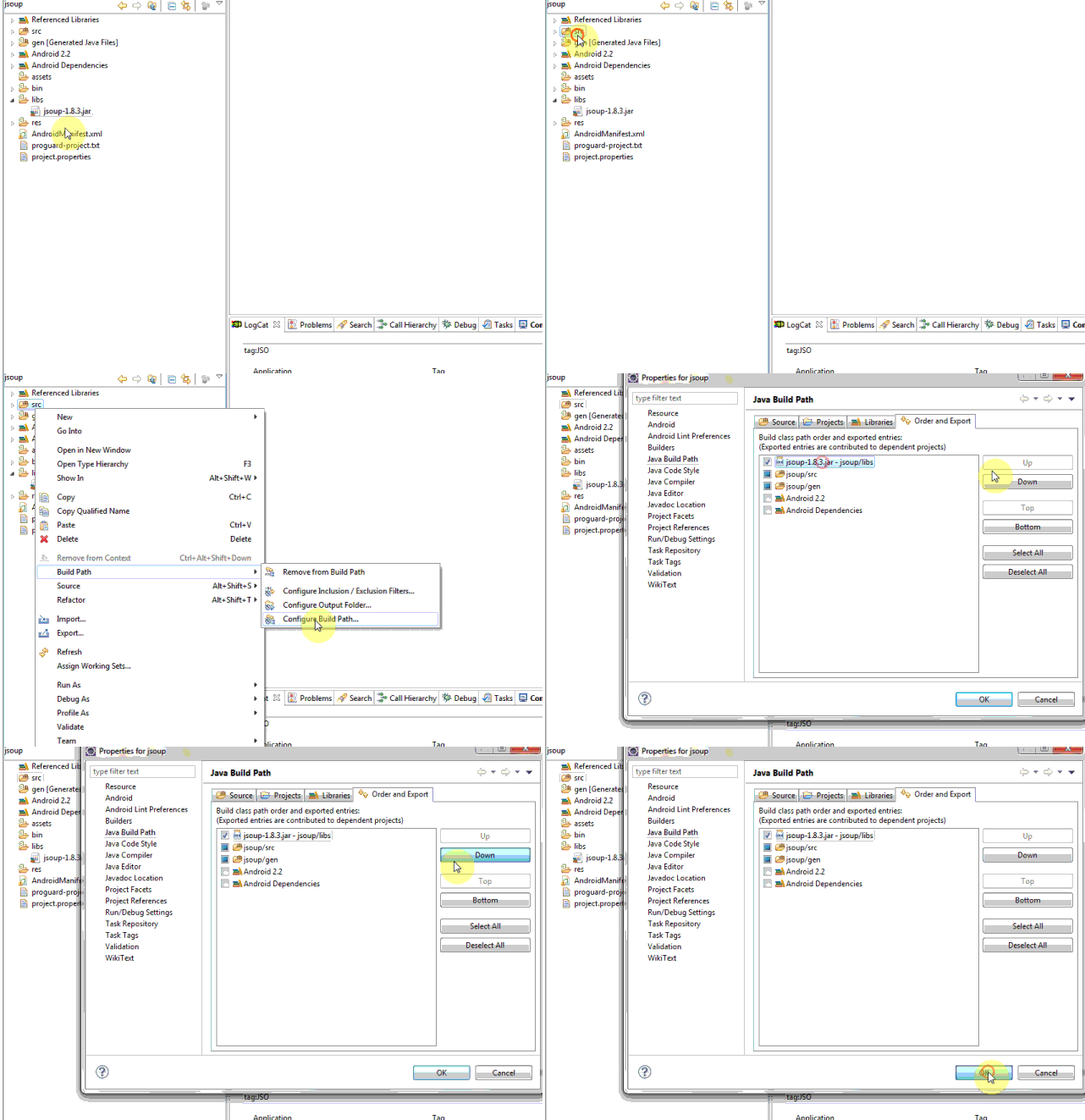
برای استفاده از اون کافیه فایل JAR رو در پوشه libs و اون رو Build کنید (نمایش زیر نحوه ساخت کتابخانه Jsoup رو نشون میده که Glide هم به همین صورت هست)
در آخر فقط خط زیر نیاز هست
Glide.with(G.context).load(URL).into(imgTmbnl);
نظرات
SaeiD-as
10 سال پیش
مرسی کریس جان، از این کتابخانه استفاده کردم و جواب گرفتم، حجم این برنامه خیلی زیاده که حجم برنامه رو تقریبا نیم مگابایت زیاد میکنه! روشی که در بالا قرار دادم رو ببین میتونی درستش کنی؟
Criss
10 سال پیش
یه روش ساده تر از کدهای بالا ، ابتدای همین پست توی لینک معرفی کردم ؛ متاسفانه کد هاتون رو نمیفهمم و وقت میگیره
فرهاد
9 سال پیش
من یه راهکار خوب پیدا کردم اینجا میگم تا دیگران استفاده کنن
اگر هم ایرادی در برنامه شما ایجاد کرد بفرمایید
 WebView webView =(WebView) findViewById(R.id.webView1);
        webView.getSettings().setJavaScriptEnabled(true);
        webView.getSettings().setLoadWithOverviewMode(true);
        webView.getSettings().setUseWideViewPort(true);
        webView.setScrollBarStyle(WebView.SCROLLBARS_OUTSIDE_OVERLAY);
        webView.setScrollbarFadingEnabled(true);
        webView.loadDataWithBaseURL("http://169.254.54.179/zarno-server/gif/","<img src=\"sample.gif\" height=\"280%\" width=\"100%\"/>","text/html","utf-8",null);
نظرات
پاسخگویی و مشاهده پاسخ های این سوال تنها برای اعضای ویژه سایت امکان پذیر است .
چنانچه تمایل دارید به همه بخش ها دسترسی داشته باشید میتوانید از این بخش لایسنس این آموزش را خریداری نمایید .
ویرایش
پیام
نظرات