


بابا بی خیال.دستت درد نکنه. انصافا براش خوب وقت گذاشتی توضیحات کاملی هم دادی.خدا خیرت بده.
بروز خطا
[message]
اشتراک در سوال
رای ها
[dataList]
پرسش و پاسخ
مشکل در Design Complex UI Layouts
مدیریت گفتگو
 top206
12 سال پیش
top206
12 سال پیش
آخرین تغییر: 11 سال پیش
خواهش میکنم یکی توضیح بده من اصن هرچیکار میکنم اون کنترل های اخر اموزش1-6رو نمیتونم جفت و جور کنم .
یکی یکم این بخش رو نمیتونه توضیح بده؟؟؟؟؟؟؟
ممنون
پاسخها 2
 sadeghbarout
12 سال پیش
sadeghbarout
12 سال پیش
درست نفهمیدم چی رو مشکل داری!
یه توضیحات کلی میدم امیدوارم مشکلت رفع بشه
ببین به طور خیلی ابتدایی سروکار ما با 3 مورده:
layout height ارتفاع کنترل
layout width عرض کنترل
layout weight وزن کنترل
یه نکته ای که خیلی مهمه و بعضا باعث خطا میشه اینه که دو بخش اول رو حتما باید با دیمانسیون وارد کنی که ما از dip استفاده میکنیم (مثلا 20dip)
مقادیر این دو بخش (height , width) سه حالت خاص هم دارن :
fill_parent و match_parent : تقریبا هر دوشون 1 کار میکنن ( خودمم دقیق فرقشون رو نمیدونم) و اون اینه که اندازه کنترل رو به اندازه کنترل پدرشون بزرگ میکنن
wrap_content : که اندازه کنترل رو به اندازه محتویات درونش بزرگ میکنه. ( یعنی اینقدر بزرگش میکنه که محتویات درونش درست نمایش داده بشن)
اما weight فقط 1 مقدار بین 0 و 1 میپذیره
برای داشتن یه UI داینامیک ، مجبور به استفاده از weight هستیم . درواقع weight همون درصد دادن به کنترله که چند درصد رو اشغال کنه
نکته اول اینکه استفاده از weight فقط برای یکی از ابعاد یک کنترل ممکنه مثلا فقط برای width یا height یک کنترل. (درواقع جایگزینشه)
نکته دوم اینکه اگه مثلا میخوایم weight رو برای عرض اون کنترل استفاده کنیم ، باید مقدار width اون رو 0dip وارد کنیم و بعد به weight مقدار بدیم. (مثلا اگه بدیم 0.3 ، داریم میگیم عرض این کنترل 30% کل عرض صفحه باشه)
نکته سوم اینکه برای استفاده از وزن، باید مجموع وزن کل اون جهت 1 باشه . مثلا نمیشه فقط 1 کنترل گذاشت و گفت 20% صفحه رو بگیر بلکه باید 2 کنترل بذاریم و بگیم یکی 20% و یکی 80% صفحه رو بگیره
نکته چهارم اینکه گاهی اوقات نیاز میشه که ما هم برای عرض و هم برای ارتفاع از درصد استفاده کنیم. برای این کار باید یه weight به یکی از ابعاد خود کنترل بدیم و یه weight به لایه پدر اون کنترل.
حالا با یه مثال توضیحات رو تموم میکنم
فرض کن میخوایم کنترل ما 20% عرض و 40% ارتفاع رو پر کنه
برای این کار چند مرحله رو باید انجام بدیم :
1- اندازه های پدر کنترل : چون پدرش باید 40% ارتفاع رو پر کنه نیازه که 2 تا لایه خطی بذاریم (چون بالاخره اون 60% هم یکی باید پر کنه و نمیشه خالی باشه). weight یکش رو 0.4 و یکیش رو 0.6 میذاریم که باعث میشه ارتفاع صفحه ما به 2 بخش تقسیم بشه (طبق چیزی که گفتم طبعا باید height هاشون هم 0dip و width هاشون رو fill_parent بذاریم)
2- اندازه های خود کنترل: خب حالا کنترلمورد نظرمون رو توی اون لایه 40% ی میندازیم و باز هم چون میخوایم فقط 20% رو بگیره باید یه کنترل دیگه هم توی اون لایه بذاریم که 80% بقیه رو برامون پر کنه. پس 2 تا از کنترل های مورد نظر رو میندازیم توش و weight یکش رو 0.2 و یکیش رو 0.8 میذاریم که باعث میشه عرضمون هم به 2 قسمت تقسیم بشه .(طبق چیزی که گفتم طبعا باید width هاشون هم 0dip و height هاشون رو fill_parent بذاریم)
3- حالا اون کنترل هایی که نمیخوایم رو invisible میکنیم
امیدوارم کمکت کرده باشم :)
بازم متوجه نشدی بگو بیشتر توضیح بدم!
نظرات
 محمد مهدی عابدینی
11 سال پیش
محمد مهدی عابدینی
11 سال پیش
سلام من می خواستم یه ماشین حساب مثل ماشین حساب ویندوز طراحی کنم و با این مشکل مواجه هستم که اندازه هام خوب در نمیاد لطفا در این مورد کمی کمکم کنید.و بگید اشکال کارم کجاست.این تصویری از UI من هستش .
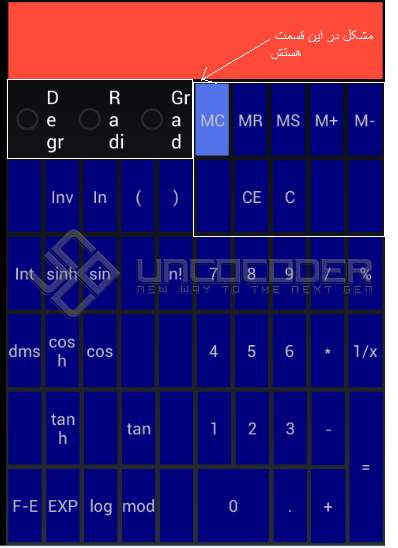
کد main شه به این شکله :
<?xml version="1.0" encoding="utf-8"?>
<LinearLayout xmlns:android="http://schemas.android.com/apk/res/android"
android:layout_width="fill_parent"
android:layout_height="fill_parent"
android:orientation="vertical" >
<TextView
android:id="@+id/txtScreen"
android:layout_width="match_parent"
android:layout_height="0dip"
android:layout_margin="2dip"
android:layout_weight="0.14"
android:background="#FF4939"
android:gravity="right|center" />
<LinearLayout
android:layout_width="match_parent"
android:layout_height="0dip"
android:layout_weight="0.14" >
<LinearLayout
android:layout_width="0dip"
android:layout_height="match_parent"
android:layout_weight="0.5" >
<RadioButton
android:id="@+id/radioButton1"
android:layout_width="0dip"
android:layout_height="match_parent"
android:layout_margin="2dip"
android:layout_weight="0.33"
android:text="Degree" android:freezesText="true"/>
<RadioButton
android:id="@+id/RadioButton01"
android:layout_width="0dip"
android:layout_height="match_parent"
android:layout_margin="2dip"
android:layout_weight="0.33"
android:text="Radians" />
<RadioButton
android:id="@+id/RadioButton02"
android:layout_width="0dip"
android:layout_height="match_parent"
android:layout_margin="2dip"
android:layout_weight="0.33"
android:text="Grads" />
</LinearLayout>
<LinearLayout
android:layout_width="0dip"
android:layout_height="match_parent"
android:layout_weight="0.51" >
<TextView
android:id="@+id/TextView02"
android:layout_width="0dp"
android:layout_height="match_parent"
android:layout_margin="2dip"
android:layout_weight="0.2"
android:background="#5473E8"
android:gravity="center"
android:text="MC" />
<TextView
android:id="@+id/TextView03"
android:layout_width="0dp"
android:layout_height="match_parent"
android:layout_margin="2dip"
android:layout_weight="0.2"
android:background="#00007f"
android:gravity="center"
android:text="MR" />
<TextView
android:id="@+id/TextView04"
android:layout_width="0dp"
android:layout_height="match_parent"
android:layout_margin="2dip"
android:layout_weight="0.2"
android:background="#00007f"
android:gravity="center"
android:text="MS" />
<TextView
android:id="@+id/TextView06"
android:layout_width="0dp"
android:layout_height="match_parent"
android:layout_margin="2dip"
android:layout_weight="0.2"
android:background="#00007f"
android:gravity="center"
android:text="M+" />
<TextView
android:id="@+id/TextView09"
android:layout_width="0dp"
android:layout_height="match_parent"
android:layout_margin="2dip"
android:layout_weight="0.2"
android:background="#00007f"
android:gravity="center"
android:text="M-" />
</LinearLayout>
</LinearLayout>
<LinearLayout
android:layout_width="match_parent"
android:layout_height="0dip"
android:layout_weight="0.14" android:gravity="center">
<TextView
android:id="@+id/TextView19"
android:layout_width="0dip"
android:layout_height="match_parent"
android:layout_margin="2dip"
android:layout_weight="0.1"
android:background="#00007f"
android:gravity="center" />
<TextView
android:id="@+id/TextView15"
android:layout_width="0dip"
android:layout_height="match_parent"
android:layout_margin="2dip"
android:layout_weight="0.1"
android:background="#00007f"
android:gravity="center"
android:text="Inv" />
<TextView
android:id="@+id/TextView13"
android:layout_width="0dip"
android:layout_height="match_parent"
android:layout_margin="2dip"
android:layout_weight="0.1"
android:background="#00007f"
android:gravity="center"
android:text="In" />
<TextView
android:id="@+id/TextView10"
android:layout_width="0dip"
android:layout_height="match_parent"
android:layout_margin="2dip"
android:layout_weight="0.1"
android:background="#00007f"
android:gravity="center"
android:text="(" />
<TextView
android:id="@+id/TextView14"
android:layout_width="0dip"
android:layout_height="match_parent"
android:layout_margin="2dip"
android:layout_weight="0.1"
android:background="#00007f"
android:gravity="center"
android:text=")" />
<TextView
android:id="@+id/TextView12"
android:layout_width="0dip"
android:layout_height="match_parent"
android:layout_margin="2dip"
android:layout_weight="0.1"
android:background="#00007f"
android:gravity="center" />
<TextView
android:id="@+id/TextView18"
android:layout_width="0dip"
android:layout_height="match_parent"
android:layout_margin="2dip"
android:layout_weight="0.1"
android:background="#00007f"
android:gravity="center"
android:text="CE" />
<TextView
android:id="@+id/TextView17"
android:layout_width="0dip"
android:layout_height="match_parent"
android:layout_margin="2dip"
android:layout_weight="0.1"
android:background="#00007f"
android:gravity="center"
android:text="C" />
<TextView
android:id="@+id/TextView16"
android:layout_width="0dip"
android:layout_height="match_parent"
android:layout_margin="2dip"
android:layout_weight="0.1"
android:background="#00007f"
android:gravity="center" />
<TextView
android:id="@+id/TextView11"
android:layout_width="0dip"
android:layout_height="match_parent"
android:layout_margin="2dip"
android:layout_weight="0.1"
android:background="#00007f"
android:gravity="center" />
</LinearLayout>
<LinearLayout
android:layout_width="match_parent"
android:layout_height="0dip"
android:layout_weight="0.14" android:gravity="center">
<TextView
android:id="@+id/TextView28"
android:layout_width="0dip"
android:layout_height="match_parent"
android:layout_margin="2dip"
android:layout_weight="0.1"
android:background="#00007f"
android:gravity="center"
android:text="Int" />
<TextView
android:id="@+id/TextView24"
android:layout_width="0dip"
android:layout_height="match_parent"
android:layout_margin="2dip"
android:layout_weight="0.1"
android:background="#00007f"
android:gravity="center"
android:text="sinh" />
<TextView
android:id="@+id/TextView22"
android:layout_width="0dip"
android:layout_height="match_parent"
android:layout_margin="2dip"
android:layout_weight="0.1"
android:background="#00007f"
android:gravity="center"
android:text="sin" />
<TextView
android:id="@+id/TextView35"
android:layout_width="0dip"
android:layout_height="match_parent"
android:layout_margin="2dip"
android:layout_weight="0.1"
android:background="#00007f"
android:gravity="center" />
<TextView
android:id="@+id/TextView37"
android:layout_width="0dip"
android:layout_height="match_parent"
android:layout_margin="2dip"
android:layout_weight="0.1"
android:background="#00007f"
android:gravity="center"
android:text="n!" />
<TextView
android:id="@+id/txt7"
android:layout_width="0dip"
android:layout_height="match_parent"
android:layout_margin="2dip"
android:layout_weight="0.1"
android:background="#00007f"
android:gravity="center"
android:text="7" />
<TextView
android:id="@+id/TextView39"
android:layout_width="0dip"
android:layout_height="match_parent"
android:layout_margin="2dip"
android:layout_weight="0.1"
android:background="#00007f"
android:gravity="center"
android:text="8" />
<TextView
android:id="@+id/TextView38"
android:layout_width="0dip"
android:layout_height="match_parent"
android:layout_margin="2dip"
android:layout_weight="0.1"
android:background="#00007f"
android:gravity="center"
android:text="9" />
<TextView
android:id="@+id/TextView25"
android:layout_width="0dip"
android:layout_height="match_parent"
android:layout_margin="2dip"
android:layout_weight="0.1"
android:background="#00007f"
android:gravity="center"
android:text="/" />
<TextView
android:id="@+id/TextView20"
android:layout_width="0dip"
android:layout_height="match_parent"
android:layout_margin="2dip"
android:layout_weight="0.1"
android:background="#00007f"
android:gravity="center"
android:text="%" />
</LinearLayout>
<LinearLayout
android:layout_width="match_parent"
android:layout_height="0dip"
android:layout_weight="0.14" android:gravity="center">
<TextView
android:id="@+id/TextView26"
android:layout_width="0dip"
android:layout_margin="2dip"
android:layout_weight="0.1"
android:background="#00007f"
android:gravity="center"
android:text="dms" android:layout_height="match_parent"/>
<TextView
android:id="@+id/TextView30"
android:layout_width="0dip"
android:layout_margin="2dip"
android:layout_weight="0.1"
android:background="#00007f"
android:gravity="center"
android:text="cosh" android:layout_height="match_parent"/>
<TextView
android:id="@+id/TextView32"
android:layout_width="0dip"
android:layout_margin="2dip"
android:layout_weight="0.1"
android:background="#00007f"
android:gravity="center"
android:text="cos" android:layout_height="match_parent"/>
<TextView
android:id="@+id/TextView33"
android:layout_width="0dip"
android:layout_margin="2dip"
android:layout_weight="0.1"
android:background="#00007f"
android:gravity="center" android:layout_height="match_parent"/>
<TextView
android:id="@+id/TextView29"
android:layout_width="0dip"
android:layout_margin="2dip"
android:layout_weight="0.1"
android:background="#00007f"
android:gravity="center" android:layout_height="match_parent"/>
<TextView
android:id="@+id/TextView31"
android:layout_width="0dip"
android:layout_margin="2dip"
android:layout_weight="0.1"
android:background="#00007f"
android:gravity="center"
android:text="4" android:layout_height="match_parent"/>
<TextView
android:id="@+id/TextView27"
android:layout_width="0dip"
android:layout_margin="2dip"
android:layout_weight="0.1"
android:background="#00007f"
android:gravity="center"
android:text="5" android:layout_height="match_parent"/>
<TextView
android:id="@+id/TextView21"
android:layout_width="0dip"
android:layout_margin="2dip"
android:layout_weight="0.1"
android:background="#00007f"
android:gravity="center"
android:text="6" android:layout_height="match_parent"/>
<TextView
android:id="@+id/TextView23"
android:layout_width="0dip"
android:layout_margin="2dip"
android:layout_weight="0.1"
android:background="#00007f"
android:gravity="center"
android:text="*" android:layout_height="match_parent"/>
<TextView
android:id="@+id/TextView34"
android:layout_width="0dip"
android:layout_margin="2dip"
android:layout_weight="0.1"
android:background="#00007f"
android:gravity="center"
android:text="1/x" android:layout_height="match_parent"/>
</LinearLayout>
<LinearLayout
android:layout_width="match_parent"
android:layout_height="0dip" android:layout_weight="0.28" android:gravity="center">
<LinearLayout
android:layout_width="0dip"
android:layout_height="match_parent"
android:orientation="vertical" android:layout_weight="0.1">
<TextView
android:id="@+id/TextView47"
android:layout_width="match_parent"
android:background="#00007f" android:gravity="center" android:layout_height="0dip" android:layout_weight="0.5" android:layout_margin="2dip"/>
<TextView
android:id="@+id/TextView66"
android:layout_width="match_parent"
android:background="#00007f"
android:text="F-E" android:gravity="center" android:layout_height="0dip" android:layout_weight="0.5" android:layout_margin="2dip"/>
</LinearLayout>
<LinearLayout
android:layout_width="0dip"
android:layout_height="match_parent"
android:orientation="vertical" android:layout_weight="0.1">
<TextView
android:id="@+id/TextView45"
android:layout_width="match_parent"
android:layout_margin="2dip"
android:background="#00007f"
android:gravity="center"
android:text="tanh" android:layout_height="0dip" android:layout_weight="0.5"/>
<TextView
android:id="@+id/TextView51"
android:layout_width="match_parent"
android:layout_margin="2dip"
android:background="#00007f"
android:gravity="center"
android:text="EXP" android:layout_height="0dip" android:layout_weight="0.5"/>
</LinearLayout>
<LinearLayout
android:layout_width="0dip"
android:layout_height="match_parent"
android:layout_weight="0.1"
android:orientation="vertical" >
<TextView
android:id="@+id/TextView74"
android:layout_width="match_parent"
android:layout_margin="2dip"
android:background="#00007f"
android:gravity="center" android:layout_height="0dip" android:layout_weight="0.5"/>
<TextView
android:id="@+id/TextView57"
android:layout_width="match_parent"
android:layout_margin="2dip"
android:background="#00007f"
android:gravity="center"
android:text="log" android:layout_height="0dip" android:layout_weight="0.5"/>
</LinearLayout>
<LinearLayout
android:layout_width="0dip"
android:layout_height="match_parent"
android:orientation="vertical" android:layout_weight="0.1">
<TextView
android:id="@+id/TextView44"
android:layout_width="match_parent"
android:layout_margin="2dip"
android:background="#00007f"
android:gravity="center"
android:text="tan" android:layout_height="0dip" android:layout_weight="0.5"/>
<TextView
android:id="@+id/TextView55"
android:layout_width="match_parent"
android:layout_margin="2dip"
android:background="#00007f"
android:gravity="center"
android:text="mod" android:layout_height="0dip" android:layout_weight="0.5"/>
</LinearLayout>
<LinearLayout
android:layout_width="0dip"
android:layout_height="match_parent"
android:orientation="vertical" android:layout_weight="0.1">
<TextView
android:id="@+id/TextView78"
android:layout_width="match_parent"
android:layout_margin="2dip"
android:background="#00007f"
android:gravity="center" android:layout_height="0dip" android:layout_weight="0.5"/>
<TextView
android:id="@+id/TextView49"
android:layout_width="match_parent"
android:layout_margin="2dip"
android:background="#00007f"
android:gravity="center" android:layout_height="0dip" android:layout_weight="0.5"/>
</LinearLayout>
<LinearLayout
android:layout_width="0dip"
android:layout_height="match_parent"
android:orientation="vertical" android:layout_weight="0.2">
<LinearLayout
android:layout_width="match_parent"
android:layout_height="0dip" android:layout_weight="0.14">
<TextView
android:id="@+id/TextView77"
android:layout_width="0dip"
android:layout_margin="2dip"
android:background="#00007f"
android:gravity="center"
android:text="1" android:layout_height="match_parent" android:layout_weight="0.1"/>
<TextView
android:id="@+id/TextView80"
android:layout_width="0dip"
android:layout_margin="2dip"
android:background="#00007f"
android:gravity="center"
android:text="2" android:layout_height="match_parent" android:layout_weight="0.1"/>
</LinearLayout>
<TextView
android:id="@+id/TextView53"
android:layout_width="match_parent"
android:layout_margin="2dip"
android:background="#00007f"
android:gravity="center"
android:text="0" android:layout_height="0dip" android:layout_weight="0.13"/>
</LinearLayout>
<LinearLayout
android:layout_width="0dip"
android:layout_height="match_parent"
android:orientation="vertical" android:layout_weight="0.1">
<TextView
android:id="@+id/TextView79"
android:layout_width="match_parent"
android:layout_margin="2dip"
android:background="#00007f"
android:gravity="center"
android:text="3" android:layout_weight="0.5" android:layout_height="0dip"/>
<TextView
android:id="@+id/TextView64"
android:layout_width="match_parent"
android:layout_margin="2dip"
android:background="#00007f"
android:gravity="center"
android:text="." android:layout_weight="0.5" android:layout_height="0dip"/>
</LinearLayout>
<LinearLayout
android:layout_width="0dip"
android:layout_height="match_parent"
android:orientation="vertical" android:layout_weight="0.1">
<TextView
android:id="@+id/TextView46"
android:layout_width="match_parent"
android:layout_margin="2dip"
android:background="#00007f"
android:gravity="center"
android:text="-" android:layout_height="0dip" android:layout_weight="0.5"/>
<TextView
android:id="@+id/TextView65"
android:layout_width="match_parent"
android:layout_margin="1dip"
android:background="#00007f"
android:gravity="center"
android:text="+" android:layout_height="0dip" android:layout_weight="0.5"/>
</LinearLayout>
<LinearLayout
android:layout_width="0dip"
android:layout_height="match_parent" android:layout_weight="0.1">
<TextView
android:id="@+id/TextView43"
android:layout_width="0dip"
android:layout_margin="2dip"
android:background="#00007f"
android:gravity="center"
android:text="=" android:layout_weight="0.1" android:layout_height="match_parent"/>
</LinearLayout>
</LinearLayout>
</LinearLayout>
نظرات
 doost_fu
11 سال پیش
doost_fu
11 سال پیش
اونجایی که اشاره کردید مشکلات زیادی به چشم می خوره ! بهتر بود توضیح میدادید و چرا این همه textView چرا از button استفاده نکردید !
 Devtpoint
11 سال پیش
Devtpoint
11 سال پیش
اگه به من گوش میدی وقتت رو تلف نکن یه پروژه بردار یاد بگیر و...
محمد مهدی عابدینی
11 سال پیش
دوست من پروژ ام کجا بود من سربازم
محمد مهدی عابدینی
11 سال پیش
ببینید من می خوام اندازه بالا و پایین یکی باشه یعنی سطر بالا دقیقا هم اندازه سطر پایین باشه .
محمد مهدی عابدینی
11 سال پیش
ببینید من می خوام اندازه بالا و پایین یکی باشه یعنی سطر بالا دقیقا هم اندازه سطر پایین باشه . با Butten هم امتحان کردم ولی اون هم تقریبا همین طوری بود گفتم با TextView شاید درست بشه
پاسخگویی و مشاهده پاسخ های این سوال تنها برای اعضای ویژه سایت امکان پذیر است .
چنانچه تمایل دارید به همه بخش ها دسترسی داشته باشید میتوانید از این بخش لایسنس این آموزش را خریداری نمایید .
ویرایش
پیام
نظرات