


سلام ممنون از پاسختون
NOTIFICATION_ID برابر چی قرار بدیم که برنامه کرش java.lang.NullPointerException نکنه؟
بروز خطا
[message]
اشتراک در سوال
رای ها
[dataList]
پرسش و پاسخ
ساخت انواع Notification بصورت Custom
مدیریت گفتگو
 Criss
11 سال پیش
Criss
11 سال پیش
آخرین تغییر: 9 سال پیش
چطوری میشه مثل زیر نوتیفیکیشن ساخت ؟
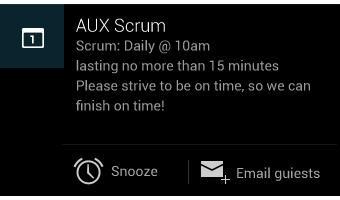
Here is just below some type of advanced customization you can image to do..
|
|
||||
|
|
||||
|
|
پاسخها 1
Criss
10 سال پیش
سلام به همه دوستان : کلی وقت گرفته شد تا تونستم جواب سوال بالا رو پیدا کنم < شما میتونید خیلی راحتتر به نتیجه برسید (باتشکر از محسن علیزاده عزیز که میگه : همیشه سعی کنید اگه چیزی بلدید یاد بدید، این باعث میشه همه باهم پیشرفت کنن... اشتباه نکنید، این رقیب درست کردن نیست.. )
جواب سوال بالا :
نمونه های مختلف ساخت Notification
  private void Big_View() {
        Bitmap remote_picture = null;
        remote_picture = BitmapFactory.decodeResource(getApplicationContext().getResources(), R.drawable.large_icon);
        ;

        // Create the style object with BigPictureStyle subclass.
        NotificationCompat.BigPictureStyle notiStyle = new
                NotificationCompat.BigPictureStyle();
        notiStyle.setBigContentTitle("Big Picture Expanded");
        notiStyle.setSummaryText("Nice big picture.");

        /*try {
            remote_picture = BitmapFactory.decodeStream(
                    (InputStream) new URL(sample_url).getContent());
        }
        catch (IOException e) {
            e.printStackTrace();
        }*/

        // Add the big picture to the style.
        notiStyle.bigPicture(remote_picture);

        // Creates an explicit intent for an ResultActivity to receive.
        Intent resultIntent = new Intent(this, NotificationActivity.class);


        // This ensures that the back button follows the recommended
        // convention for the back key.
        TaskStackBuilder stackBuilder = TaskStackBuilder.create(this);

        // Adds the back stack for the Intent (but not the Intent itself).
        stackBuilder.addParentStack(NotificationActivity.class);

        // Adds the Intent that starts the Activity to the top of the stack.
        stackBuilder.addNextIntent(resultIntent);
        PendingIntent resultPendingIntent = stackBuilder.getPendingIntent(
                0, PendingIntent.FLAG_UPDATE_CURRENT);

        Notification myNotification = new NotificationCompat.Builder(this)
                .setSmallIcon(R.drawable.ic_launcher)
                .setAutoCancel(true)
                .setLargeIcon(remote_picture)
                .setContentIntent(resultPendingIntent)
                .setContentTitle("Big Picture Normal")
                .setContentText("This is an example of a Big Picture Style.")
                .setStyle(notiStyle).build();
        NotificationManager notificationManager = (NotificationManager) getSystemService(NOTIFICATION_SERVICE);
        notificationManager.notify(NOTIFICATION_ID + 13, myNotification);
    }


    private void Normal_View() {
        NotificationManager notificationManager = (NotificationManager) getSystemService(NOTIFICATION_SERVICE);
        // Creates an explicit intent for an ResultActivity to receive.
        Intent resultIntent = new Intent(this, NotificationActivity.class);

        // This ensures that the back button follows the recommended
        // convention for the back key.
        TaskStackBuilder stackBuilder = TaskStackBuilder.create(this);

        // Adds the back stack for the Intent (but not the Intent itself)
        stackBuilder.addParentStack(NotificationActivity.class);

        // Adds the Intent that starts the Activity to the top of the stack
        stackBuilder.addNextIntent(resultIntent);
        PendingIntent resultPendingIntent = stackBuilder.getPendingIntent(
                0, PendingIntent.FLAG_UPDATE_CURRENT);

        // Create the final Notification object.
        Bitmap icon = BitmapFactory.decodeResource(getApplicationContext().getResources(), R.drawable.large_icon);
        Notification myNotification = new NotificationCompat.Builder(this)
                .setSmallIcon(R.drawable.ic_launcher)
                .setAutoCancel(true)
                .setLargeIcon(icon)
                .setContentIntent(resultPendingIntent)
                .setContentTitle("Normal Notification")
                .setContentText("This is an example of a Normal Style.").build();

        notificationManager.notify(NOTIFICATION_ID + 12, myNotification);
    }


    private void RemoteViews() {
        int icon = R.drawable.ic_launcher;
        long when = System.currentTimeMillis();
        Notification notification = new Notification(icon, "Hello", when); //getString(R.string.text)

        RemoteViews contentView = new RemoteViews("com.freestyler.notification.criss", R.layout.noti);
        contentView.setImageViewResource(R.id.notification_image, R.drawable.ic_launcher);
        contentView.setTextViewText(R.id.notification_title, "My custom notification title");
        contentView.setTextViewText(R.id.notification_text, "My custom notification text");
        notification.contentView = contentView;

        //Intent notificationIntent = new Intent(this, NotificationActivity.class);
        Intent intent = new Intent(Intent.ACTION_VIEW, Uri.parse("http://www.google.co.in/"));
        PendingIntent contentIntent = PendingIntent.getActivity(getApplicationContext(), 0, intent, 0);
        //PendingIntent contentIntent = PendingIntent.getActivity(getApplicationContext(), 0, notificationIntent, 0);
        //notification.contentIntent = contentIntent;

        //notification.flags |= Notification.FLAG_NO_CLEAR; //Do not clear the notification
        notification.defaults |= Notification.FLAG_AUTO_CANCEL;//canclable with click
        notification.defaults |= Notification.DEFAULT_LIGHTS; // LED
        notification.defaults |= Notification.DEFAULT_VIBRATE; //Vibration
        notification.defaults |= Notification.DEFAULT_SOUND; // Sound
        NotificationManager mNotifyManager = (NotificationManager) getApplicationContext().getSystemService(getApplicationContext().NOTIFICATION_SERVICE);
        mNotifyManager.notify(NOTIFICATION_ID + 20, notification);
        contentView.setOnClickPendingIntent(R.id.notification_image, contentIntent);
    }


    private void ProgressBar() {
        NotificationManager mNotifyManager;
        mNotifyManager = (NotificationManager) getApplicationContext().getSystemService(getApplicationContext().NOTIFICATION_SERVICE);

        Builder mBuilder = new NotificationCompat.Builder(getApplicationContext());

        mBuilder.setContentTitle("your title").setContentText("your Content");

        mBuilder.setProgress(100, 25, false);
        mBuilder.setSmallIcon(R.drawable.ic_launcher);
        //mBuilder.setLargeIcon()
        mBuilder.setOngoing(false);
        mNotifyManager.notify(NOTIFICATION_ID - 1, mBuilder.build());
    }


    private void triggerNotification() {
        CharSequence title = "Hello";
        CharSequence message = "Hello, Android!";

        NotificationManager notificationManager = (NotificationManager) getSystemService(NOTIFICATION_SERVICE);
        Notification notification = new Notification(R.drawable.ic_launcher, "A New Message!", System.currentTimeMillis());

        Intent notificationIntent = new Intent(this, NotificationActivity.class);
        PendingIntent pendingIntent = PendingIntent.getActivity(this, 0, notificationIntent, 0);

        notification.setLatestEventInfo(NotificationActivity.this, title, message, pendingIntent);
        notificationManager.notify(NOTIFICATION_ID, notification);
    }


    private void sampleNotification(String title, String matn, String link, String title_first) {

        //Uri uri = Uri.parse("market://details?id=" + link);
        Uri uri = Uri.parse("market://search?q=pub:" + link);
        Intent goToMarket = new Intent(Intent.ACTION_VIEW, uri);
        Uri alarmSound = RingtoneManager.getDefaultUri(RingtoneManager.TYPE_NOTIFICATION);
        PendingIntent pIntent = PendingIntent.getActivity(this, 0, goToMarket, PendingIntent.FLAG_UPDATE_CURRENT);

        NotificationCompat.Builder builder = new NotificationCompat.Builder(this)
                .setSound(alarmSound)
                .setSmallIcon(R.drawable.ic_launcher)
                .setTicker(title_first)
                .setContentTitle(title)
                .setContentText(matn)
                .setContentIntent(pIntent)
                .setAutoCancel(true);

        NotificationManager notificationmanager = (NotificationManager) getSystemService(NOTIFICATION_SERVICE);
        notificationmanager.notify(NOTIFICATION_ID + 1, builder.build());

    }
نظرات
Criss
10 سال پیش
هر عددی که دوست دارید
 احمد
10 سال پیش
احمد
10 سال پیش
تبدیل به کلاس شده اینو نداری داداش که بشه همه جا استفاده کرد
 هادی بی غم
10 سال پیش
هادی بی غم
10 سال پیش
Criss جان همیشه تکی دمت گرم
 jbRhmNqb
9 سال پیش
jbRhmNqb
9 سال پیش
NotificationCompat چیه؟!
وقتی سورس رو کپی میکنم اینو نمیشناسه!
پاسخگویی و مشاهده پاسخ های این سوال تنها برای اعضای ویژه سایت امکان پذیر است .
چنانچه تمایل دارید به همه بخش ها دسترسی داشته باشید میتوانید از این بخش لایسنس این آموزش را خریداری نمایید .
ویرایش
پیام
نظرات