


دوستان میشه راهنمایی کنید ،؟ نمیتونم کدها رو اکی کنم ؟
بروز خطا
[message]
اشتراک در سوال
رای ها
[dataList]
پرسش و پاسخ
ذخیره پارامترهای دلخواه از سورس یک سایت در لیست ویو
مدیریت گفتگو
 sadra
11 سال پیش
sadra
11 سال پیش
آخرین تغییر: 11 سال پیش
دوستان لطفا راهنمایی کنید که خروجی پارامترهای title ، img ،l ink در یک دیتابیس ذخیره کنم ؟ البته این اطلاعات از سایت مورد نظر به صورت آنلاین دریافت میشه و باید آنلاین در دیتا بیس ذخیره بشه و سپس در لیست ویو نمایش داده بشه ، سپاسگزارم
کد های مورد نظر
 public class AparatActivity extends Activity {
    @Override
 public void onCreate(Bundle savedInstanceState) {
        super.onCreate(savedInstanceState);
        setContentView(R.layout.main);
        ArrayList videoLink = new ArrayList();
        ArrayList videoImage = new ArrayList();
        ArrayList videoTitle = new ArrayList();

        try {
            Document doc = Jsoup.connect("http://video.varzesh3.com/").get();
            Element recentVideoHtml = doc.getElementById("recent_posts");
            Elements links = recentVideoHtml.select("a[href]");
            Elements imgs = recentVideoHtml.select("img[src]");
            Elements titles = recentVideoHtml.select("strong");
            for (Element link: links) {
                videoLink.add(link.attr("href"));
            }
            for (Element img: imgs) {
                videoImage.add(img.attr("src"));
            }
            for (Element title: titles) {
                videoTitle.add(title.text());
            }
        }
        catch (IOException e) {
            e.printStackTrace();
        }
    }
}
پاسخها 15
sadra
11 سال پیش
دوستان لطفا در این موارد کمکم کنید طبق کدهای بالا سورس سایت خونده شد و درون پارامترهای مورد نظر ذخیره شده ، حالا من میخام این پارامترها رو مستقیم به لیست ویو انتقال بدم ، ممنونم میشم راهنمایی کنید باس چیکار کنم
کلاس aparatactivity خواندن سورس سایت و ذخیره مقادیر در پارامترها
publicclassAparatActivityextendsActivity{
    @Override
 publicvoid onCreate(Bundle savedInstanceState){
        super.onCreate(savedInstanceState);
        setContentView(R.layout.main);
        ArrayList videoLink =newArrayList();
        ArrayList videoImage =newArrayList();
        ArrayList videoTitle =newArrayList();

        try{
            Document doc =Jsoup.connect("http://video.varzesh3.com/").get();
            Element recentVideoHtml = doc.getElementById("recent_posts");
            Elements links = recentVideoHtml.select("a[href]");
            Elements imgs = recentVideoHtml.select("img[src]");
            Elements titles = recentVideoHtml.select("strong");
            for(Element link: links){
                videoLink.add(link.attr("href"));
            }
            for(Element img: imgs){
                videoImage.add(img.attr("src"));
            }
            for(Element title: titles){
                videoTitle.add(title.text());
            }
        }
        catch(IOException e){
            e.printStackTrace();
        }
کلاس adapternote
 public class AdapterNote extends ArrayAdapter<StructNote> {

    public AdapterNote(ArrayList<StructNote> array) {
        super(G.context, R.layout.adapter_notes, array);
    }


    private static class ViewHolder {

        public ViewGroup layoutRoot;
        public TextView  txtvideotime;
        public TextView  txtvideotitle;
        public ImageView imgvideolink;
       public TextView txtvideolink;


        public ViewHolder(View view) {
        	txtvideotime = (TextView) view.findViewById(R.id.txtvideotime);
        	txtvideotitle = (TextView) view.findViewById(R.id.txtvideotitle);
        	layoutRoot = (ViewGroup) view.findViewById(R.id.layoutRoot);
         	imgvideolink = (ImageView) view.findViewById(R.id.imgvideolink);
            txtvideolink = (TextView) view.findViewById(R.id.txtvideotitle);


        }

        public void fill(final ArrayAdapter<StructNote> adapter, final StructNote item, final int position) {
        	txtvideotitle.setText(item.videotitles);
        	txtvideolink.setTag(item.videolinks);
        	txtvideotime.setTag(item.videotimes);
        	imgvideolink.setTag(item.videoimgs);


	  layoutRoot.setOnClickListener(new OnClickListener() { 		وقتی روی لایه کلیک میشه میره اکتوتیه ویدیو پلی برای پخش ویدیو


		 //  G.selectedSerials item;

				@Override
				public void onClick(View arg0) {

					  Intent intent = new Intent(G.currentActivity,VideoPlay.class);
					  intent.putExtra("item.videolinks", item + "");
				      G.currentActivity.startActivity(intent);

								}

	          });
            }

        }


    @Override
    public View getView(int position, View convertView, ViewGroup parent) {
        ViewHolder holder;

        StructNote item = getItem(position);
        if (convertView == null) {
            convertView = G.inflater.inflate(R.layout.adapter_notes, parent, false);
            holder = new ViewHolder(convertView);
            convertView.setTag(holder);
        } else {
            holder = (ViewHolder) convertView.getTag();
        }

        holder.fill(this, item, position);
        return convertView;
    }
}
کلاس G
 public class G extends Application {
    public static Context               context;
    public static LayoutInflater        inflater;
    public static Activity              currentActivity;
    public static ArrayList<StructNote> notes = new ArrayList<StructNote>();


    @Override
    public void onCreate() {
        super.onCreate();
        context = getApplicationContext();
        inflater = (LayoutInflater) getSystemService(Context.LAYOUT_INFLATER_SERVICE);
    }
}
کلاس لیست ویو
public class Listview extends Activity {

    public ArrayAdapter adapter;


    @Override
    protected void onResume() {
        G.currentActivity = this;
        super.onResume();

        if (adapter != null) {
            adapter.notifyDataSetChanged();
        }
    }


    @Override
    public void onCreate(Bundle savedInstanceState) {
        super.onCreate(savedInstanceState);
        setContentView(R.layout.listview_using);

        ListView lstContent = (ListView) findViewById(R.id.lstContent);

        adapter = new AdapterNote(G.notes);
        lstContent.setAdapter(adapter);

        for (int i = 0; i < 10; i++) {
            StructNote note = new StructNote();
            note.videotitles = "Title " + i;
            note.videolinks = "Link" + i ;
            note.videoimgs = "Img" + i ;
            note.videotimes = "Time " + i;

            G.notes.add(note);
        }

        adapter.notifyDataSetChanged();
    }
}
کلاس structnote
 package com.example.jsoupusing;

public class StructNote {

	 public String  videotitles;

	 public String videolinks;

	 public String videoimgs;

	 public String  videotimes;


}
چطوری میشه بعد از خوندن محتوی سایت و گرفتن موارد دلخواه و ذخیره آنها در پارامترهای link، img ،title ، مقدار موجود در این سه پارامتر رو روی لیست ویو ست کرد ؟؟ سپاسگزارم
نظرات
 mtn67
11 سال پیش
mtn67
11 سال پیش
من خودم ک میسازم کلاس لیست ویو رو جدا نمیسازم.توو همون اکتیویتی اصلی کد مربوط به لیست ویو رو هم می نویسم.
for(int i =0; i <10; i++){StructNote note =newStructNote();
            note.videotitles ="Title "+ i;
            note.videolinks ="Link"+ i ;
            note.videoimgs ="Img"+ i ;
            note.videotimes ="Time "+ i;

            G.notes.add(note);}

        adapter.notifyDataSetChanged();}
در کد بالا به جای Title مقدار Title که با Jsoup گرفتی رو جایگزین کن.برا موارد دیگه هم به همون صورت مثلا:
for(int i =0; i <10; i++){StructNote note =newStructNote();
            note.videotitles =videoTitle.get(i);
            note.videolinks = videoLink.get(i)
            note.videoimgs = videoImage.get(i);
            note.videotimes ="Time "+ i;

            G.notes.add(note);}

        adapter.notifyDataSetChanged();}
نظرات
sadra
11 سال پیش
هر کدوم از خروجی های jsoup رو به جای ( i ) ست کردم ارور داد ؟ ممنون میشم کمکم کنی پارامترها رو جایگزین کنم
  publicclassListviewextendsActivity{
   publicArrayAdapter adapter;
  @Overrideprotectedvoid onResume(){
        G.currentActivity =this;
super.onResume();
if(adapter !=null)
{
            adapter.notifyDataSetChanged();
}
}
    @Overridepublicvoid onCreate(Bundle savedInstanceState)
    {
super.onCreate(savedInstanceState);
        setContentView(R.layout.listview_using);

     final ArrayList videoLink = new ArrayList();
	  	  final ArrayList videoImage = new ArrayList();
	  	    final ArrayList videoTitle = new ArrayList();
	  	    final ArrayList videoTime = new ArrayList();


	  	     Thread thread = new Thread(new Runnable()

 {

		        @Override
		         public void run() {

		        try {
		         Document doc =Jsoup.connect("http://video.varzesh3.com/").get();
            Element recentVideoHtml = doc.getElementById("recent_posts");
            Elements links = recentVideoHtml.select("a[href]");
            Elements imgs = recentVideoHtml.select("img[src]");
            Elements titles = recentVideoHtml.select("strong");

            for(Element link: links){
                videoLink.add(link.attr("href"));
            }

            for(Element img: imgs){
                videoImage.add(img.attr("src"));
            }

            for(Element title: titles){
                videoTitle.add(title.text());
            }
        }
        catch(IOException e){
            e.printStackTrace();
        }
 });
  thread.start();
 }
ListView lstContent = (ListView) findViewById(R.id.lstContent);

private ArrayList<Element> videoTitle;
			private ArrayList<Element> videoLink;
			private ArrayList<Element> videoImage;

 private ArrayList videoTitle; private ArrayList videoLink; private ArrayList videoImage;
{
adapter = new AdapterNote(G.notes);
lstContent.setAdapter(adapter);
 for (int i = 0; i < 10; i++)
 {
StructNote note = new StructNote();
 //note.videotitle = "Title " + i;
 // note.videoimg = "Img " + i;
 // note.videotime ="Time "+ i;
 note.videotitle = videoTitle.get(i);
 note.videolink = videoLink.get(i);
note.videoimg = videoImage.get(i);
note.videotime ="Time "+ i;
G.notes.add(note);
 }
adapter.notifyDataSetChanged();
 }
}
نظرات
sadra
11 سال پیش
کلاس StrcuntNote
 import org.jsoup.nodes.Element;

public class StructNote {

    public Element  videotitle;
    public String   videotime;
    public Element  videoimg;
    public Element  videolink;


}
نظرات
mtn67
11 سال پیش
سورس کامل پروژه رو آپلود کن بزار تا دانلود کنم ببینم مشکلش چیه
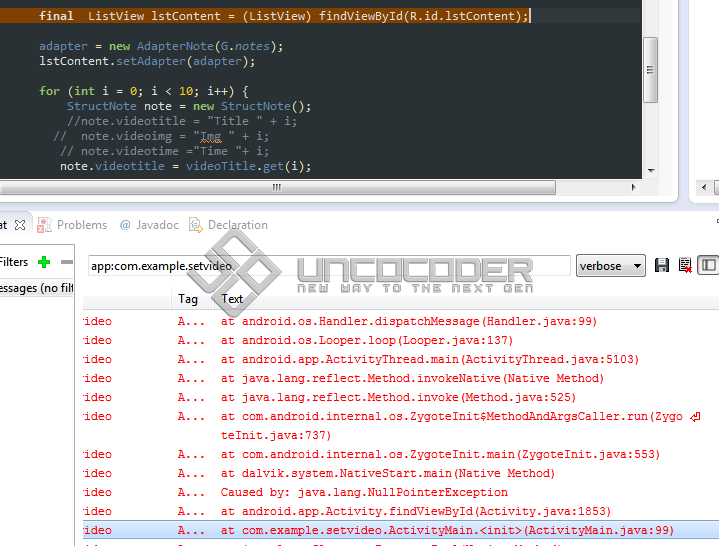
 sadra
11 سال پیش
sadra
11 سال پیش
ممنونم از شما این سورس پروژمه ، سپاسگزارم داداش
http://uplod.ir/42iaq04di03h/SetVideo.zip.htm
نظرات
mtn67
11 سال پیش
ActivityMain
 package ir.sportin.app.aparat;

import java.io.IOException;
import java.util.ArrayList;
import org.jsoup.Jsoup;
import org.jsoup.nodes.Document;
import org.jsoup.nodes.Element;
import org.jsoup.select.Elements;
import android.app.Activity;
import android.os.Bundle;
import android.util.Log;
import android.widget.ArrayAdapter;
import android.widget.ListView;


public class ActivityMain extends Activity {

    private ArrayList<StructNote> notes = new ArrayList<StructNote>();
    public ArrayAdapter           adapter;
    private StructNote            note;
    private ListView              lstContent;


    @Override
    protected void onResume() {
        G.currentActivity = this;
        super.onResume();

        if (adapter != null) {
            adapter.notifyDataSetChanged();
        }
    }


    @Override
    protected void onCreate(Bundle savedInstanceState) {
        super.onCreate(savedInstanceState);
        setContentView(R.layout.activity_main);
        lstContent = (ListView) findViewById(R.id.lstContent);
        adapter = new AdapterNote(notes);
        lstContent.setAdapter(adapter);

        final ArrayList<String> videoLink = new ArrayList<String>();
        final ArrayList<String> videoImage = new ArrayList<String>();
        final ArrayList<String> videoTitle = new ArrayList<String>();
        final ArrayList<String> videoTime = new ArrayList<String>();

        Thread thread = new Thread(new Runnable() {

            @Override
            public void run() {

                try {
                    Document doc = Jsoup.connect("http://video.varzesh3.com/").get();
                    Element recentVideoHtml = doc.getElementById("recent_posts");
                    Elements links = recentVideoHtml.select("a[href]");
                    Elements imgs = recentVideoHtml.select("img[src]");
                    Elements titles = recentVideoHtml.select("strong");
                    Elements times = recentVideoHtml.select("span");

                    for (Element time: times) {
                        videoTime.add(time.text());
                        Log.i("LOG", time.text());
                    }

                    for (Element link: links) {
                        videoLink.add(link.attr("href"));
                        Log.i("LOG", link.attr("href"));
                    }

                    for (Element img: imgs) {
                        videoImage.add(img.attr("src"));
                        Log.i("LOG", img.attr("src"));
                    }

                    for (Element title: titles) {
                        videoTitle.add(title.text());
                        Log.i("LOG", title.text());
                    }

                }

                catch (IOException e) {
                    e.printStackTrace();
                }
                runOnUiThread(new Runnable() {

                    @Override
                    public void run() {

                        for (int i = 0; i < 10; i++) {
                            note = new StructNote();
                            note.videotitle = videoTitle.get(i);
                            note.videolink = videoLink.get(i);
                            note.videoimg = videoImage.get(i);
                            note.videotime = videoTime.get(i);
                            notes.add(note);
                        }
                        adapter.notifyDataSetChanged();
                    }
                });
            }

        });

        thread.start();

    }
}
AdapterNote
 package ir.sportin.app.aparat;

import java.util.ArrayList;
import android.content.Intent;
import android.view.View;
import android.view.View.OnClickListener;
import android.view.ViewGroup;
import android.widget.ArrayAdapter;
import android.widget.ImageView;
import android.widget.TextView;
import com.squareup.picasso.Picasso;


public class AdapterNote extends ArrayAdapter<StructNote> {

    public AdapterNote(ArrayList<StructNote> array) {
        super(G.context, R.layout.adapter_notes, array);
    }


    private static class ViewHolder {

        public ViewGroup layoutRoot;
        public TextView  txtVideoTitle;
        public TextView  txtVideoTime;
        public ImageView imgvideo;


        public ViewHolder(View view) {
            txtVideoTitle = (TextView) view.findViewById(R.id.txtVideoTitle);
            txtVideoTime = (TextView) view.findViewById(R.id.txtVideoTime);
            imgvideo = (ImageView) view.findViewById(R.id.imgVideo);
            layoutRoot = (ViewGroup) view.findViewById(R.id.layoutRoot);
        }


        public void fill(final ArrayAdapter<StructNote> adapter, final StructNote item, final int position) {
            txtVideoTitle.setText(item.videotitle);
            txtVideoTime.setText(item.videotime);
            Picasso.with(G.context).load(item.videoimg).into(imgvideo);
            imgvideo.setOnClickListener(new OnClickListener() {

                @Override
                public void onClick(View arg0) {
                    adapter.remove(item);
                }
            });

            layoutRoot.setOnClickListener(new OnClickListener() {

                // برای رفتن به اکتویتیه پخش ویدیو و ارسال پارامتر لینک ویدیو که هنوز کامل نیست //
                @Override
                public void onClick(View arg0) {
                    Intent intent = new Intent(G.currentActivity, VideoPlay.class);
                    intent.putExtra("POSITION", position);
                    G.currentActivity.startActivity(intent);
                }
            });

        }
    }


    @Override
    public View getView(int position, View convertView, ViewGroup parent) {
        ViewHolder holder;

        StructNote item = getItem(position);
        if (convertView == null) {
            convertView = G.inflater.inflate(R.layout.adapter_notes, parent, false);
            holder = new ViewHolder(convertView);
            convertView.setTag(holder);
        } else {
            holder = (ViewHolder) convertView.getTag();
        }

        holder.fill(this, item, position);
        return convertView;
    }
}
StructNote
 package ir.sportin.app.aparat;


public class StructNote {

    public String videotitle;
    public String videotime;
    public String videoimg;
    public String videolink;
}
من کد ست کردن پارامترها بر روی لیست ویو رو نوشتم دیگه خودتون تعریف کنید که کلیک شد چه اتفاقی بیوفته.در ضمن من برای گرفتن عکس از وب از کتابخونه Picasso استفاده میکنم که خیلی کار کردن باهاش راحته و خیلی هم قدرتمند.از این لینک دانلود کن لینک
در اکتیویتی AdapterNote از این کتابخونه استفاده کردم.فقظ کتابخونه رو وارد پروژه کن.اگه به AdapterNote نگاه کنی میبینی که استفاده از این کتابخونه خیلی راحته فقط نیم خط کد نیاز داره که البته من براتون نوشتم:
Picasso.with(G.context).load(item.videoimg).into(imgvideo);
نظرات
sadra
11 سال پیش
داداش گلم خیلی ممنوم ازت کمک بزرگی بهم کردی ، خیلی ممنون
sadra
11 سال پیش
داداش برنامه به درستی واسم کار می کنه ، روی یک url دیگه ست کردم و پارامترهاشو جایگزین کردم، توی حلقه for در activitymain ارور دارم
IndexOutOfBoundsException: Invalid index 7, size is 7
مفهومشو پیدا کردم ، میگه که من 7 تا آیتم در این url دارم و به جای مقادیر i باید یکی از این آیتم ها رو انتخاب کنم
مثلا من چک کردم اگر به جای i =0 یعنی اینطوری بشن کدها
for(int i =0; i <10; i++){
                            note =newStructNote();
                            note.videotitle = videoTitle.get(0);
                            note.videolink = videoLink.get(0);
                            note.videoimg = videoImage.get(0);
                            note.videotime = videoTime.get(0);
                            notes.add(note);
اولین ویدیو یا آیتم رو به 10 بار در خروجی لیست ویو تکرار می کنه ؟ این حالت در این url جدید اتفاق میفته اما در url قبلی برنامه به خوبی کار میکنه ، سپاسگزارم
نظرات
mtn67
11 سال پیش
من منظور شمارو نفهمیدم.اون ارور بخاطر این هست که شما مثلا 8 آیتم داخل آرایه ریختید و بیشتر از 8 آیتم از آرایه درخواست کرفتن اطلاعات کردید.حلقه for رو به صورت زیر بنویسید تا داینامیک باشه :
for(int i =0; i <videoTitle.size(); i++){
                            note =newStructNote();
                            note.videotitle = videoTitle.get(0);
                            note.videolink = videoLink.get(0);
                            note.videoimg = videoImage.get(0);
                            note.videotime = videoTime.get(0);
                            notes.add(note);
نظرات
sadra
11 سال پیش
سورس صفحه ی که من میخوام بخونم 8 تا ویدیو داره ، بعدش ارور میده که شما از 0 تا 7 آیتم داری ، که باید تعیین کنی کدومشو میخای و به بجای i مقدار بزاری ؟ اگه به جای i بزارم صفر توی هر سه تا پارامتر ، برنامه آیتم اول یا همون ویدیویی آیتم صفر رو 10 بار در لیست ویو تکرار می کنه ؟ این کد رو چک کردم لیست ویو بارگذاری نمیشه ولی اروری هم ندارم ؟! ممنونم از پاسخت داداشی
sadra
11 سال پیش
سورس صفحه ی که من میخوام بخونم 8 تا ویدیو داره و واس دیدن بقیه باید read more زده بشه ، ارور میده که شما از 0 تا 7 آیتم داری ، که باید تعیین کنی کدومشو میخای و به بجای i مقدار بزاری ؟ اگه به جای i بزارم صفر توی هر سه تا پارامتر بزارم ، برنامه آیتم اول یا همون ویدیویی آیتم صفر رو 10 بار در لیست ویو تکرار می کنه ؟ در حالی که من کل 8 آیتم رو میخام نه فقط یکیشو، این کد رو چک کردم لیست ویو بارگذاری نمیشه ولی اروری هم ندارم ؟! ممنونم از پاسخت داداشی
mtn67
11 سال پیش
من باز هم منظور شما رو نگرفتم :-) و نفهمیدم که آیا مشکل شما حل شد یا نه چون در آخر تشکر کردید؟
sadra
11 سال پیش
نه داداش مشکلم حل نشده ، سورس صفحه ی که خونده میشه 8 تا ویدیو داره که کامل پارامترهای مورد نظر منو میخونه ، اما در قسمت حلقه for برنامه به مشکل میخوره ، تا جای که من متوجه شدم برنامه نمیتونه همه 8 آیتم رو انتخاب کنه و میگه باید یکی از این 8 آیتم رو انتخاب کنم و پارامتر i رو مقدار دهی کنم ، مثلا اگر حلقه for اینطوری باشه :
for(int i =0; i <videoTitle.size(); i++){
                            note =newStructNote();
                            note.videotitle = videoTitle.get(2);
                            note.videolink = videoLink.get(2);
                            note.videoimg = videoImage.get(2);
                            note.videotime = videoTime.get(2);
                            notes.add(note);
برنامه میاد ویدیوی دوم رو 8 بار در لیست ویو نمایش میده ، در حالی که باید کل 8 آیتم رو در لیست ویو نمایش بده ؟ ممنون میشم راهنمایی کنی باید چیکار کنم ؟؟
اروری که میده اینه :
IndexOutOfBoundsException: Invalid index 7, size is 7
نظرات
mtn67
11 سال پیش
من فکر کنم مشکل از یه جای دیگه باشه.فکر کنم مشکل از آرایه ها باشه.مثلا videoTitle مشکل داره و حاوی مقدار تکراری هست
mtn67
11 سال پیش
قبل از حلقه ایی که نوشتی یه حلقه به صورت زیر بنویس و نتیجه شو توو لوگ کت ببین:
for(int i =0; i <videoTitle.size(); i++){
Log.i("LOG",""+videoLink.get(i));
Log.i("LOG",""+videoImage.get(i));
Log.i("LOG",""+videoTime.get(i));
}
نظرات
mtn67
11 سال پیش
من کد شمارو بررسی نکردم که آیا مشکل داره یا نه ولی یه کد نوشتم که اطلاعاتی که نیاز داشتی رو از آدرس مورد نظر دریافت میکنه در آخر هم با حلقه for درستی کد رو چک کردم:
       try {
            Document doc = Jsoup.connect("http://90tv.ir/frontcms/tag/viewvideos/id/1051").get();
            Elements VideoHtmlData = doc.select("div[class=col-xs-6 col-sm-6 col-md-3]");
            for (Element videoLinks: VideoHtmlData) {
                videoLink.add(videoLinks.select("a[href]").attr("href"));
            }
            for (Element videoImages: VideoHtmlData) {
                videoImage.add(videoImages.select("img[alt]").attr("data-original"));
            }
            for (Element videoTitles: VideoHtmlData) {
                videoTitle.add(videoTitles.select("figcaption").text());
            }
            for (Element videoTimes: VideoHtmlData) {
                videoTime.add(videoTimes.select("time").text());
            }
        }
        catch (IOException e) {
            Toast.makeText(getBaseContext(), "errrrrrr", Toast.LENGTH_LONG).show();
            e.printStackTrace();
        }
        for (int i = 0; i < videoLink.size(); i++) {
            Log.i("LOG", videoLink.get(i));
        }
        for (int i = 0; i < videoLink.size(); i++) {
            Log.i("LOG", videoImage.get(i));
        }
        for (int i = 0; i < videoLink.size(); i++) {
            Log.i("LOG", videoTitle.get(i));
        }
        for (int i = 0; i < videoLink.size(); i++) {
            Log.i("LOG", videoTime.get(i));
        }
نظرات
sadra
11 سال پیش
ممنونم از شما ، اما برای من یک آیتم رو 8 بار تکرار می کنه ؟! کد ها رو من اینطوری جایگزین کردم
 @Override
	protected void onCreate(Bundle savedInstanceState) {
		super.onCreate(savedInstanceState);
		setContentView(R.layout.activity_main);

     ListView lstContent = (ListView)findViewById(R.id.lstContent);
		 adapter = new AdapterNote(notes);
	        lstContent.setAdapter(adapter);


		 final ArrayList<String> videoLink = new ArrayList<String>();
	  	  final ArrayList<String> videoImage = new ArrayList<String>();
	  	   final ArrayList<String> videoTitle = new ArrayList<String>();
	  	    final ArrayList<String> videoTime = new ArrayList<String>();


	  Thread thread = new Thread(new Runnable() {

		     @Override
		       public void run() {

		        try {

		        	 Document doc =Jsoup.connect("http://90tv.ir/frontcms/tag/viewvideos/id/1051/").get();
		        	 Elements VideoHtmlData = doc.select("div[class=col-xs-6 col-sm-6 col-md-3]");

		        	  for (Element videoLinks: VideoHtmlData) {
		                  videoLink.add(videoLinks.select("a[href]").attr("href"));
		              }
		        	  for (Element videoImages: VideoHtmlData) {
		                  videoImage.add(videoImages.select("img[alt]").attr("data-original"));
		              }
		        	  for (Element videoTitles: VideoHtmlData) {
		                  videoTitle.add(videoTitles.select("figcaption").text());
		              }
		        	     for (Element videoTimes: VideoHtmlData) {
		                     videoTime.add(videoTimes.select("time").text());
		                 }
		             }

		       catch (IOException e) {
		         Toast.makeText(getBaseContext(), "errrrrrr", Toast.LENGTH_LONG).show();
		           e.printStackTrace();

                }


		          runOnUiThread(new Runnable() {

                  @Override

                  public void run() {

                                        note = new StructNote();

                                         for (int i = 0; i < videoLink.size(); i++) {

                                            note.videolink = videoLink.get(i);

                                             Log.i("LOG", videoLink.get(i));

                                         }


                                         for (int i = 0; i < videoLink.size(); i++) {

                                             note.videoimg = videoImage.get(i);

                                             Log.i("LOG", videoImage.get(i));


                                         }
                                         for (int i = 0; i < videoLink.size(); i++) {


                                        note.videotitle = videoTitle.get(i);


                                             Log.i("LOG", videoTitle.get(i));


                                         }


                                         for (int i = 0; i < videoLink.size(); i++) {

                                         note.videoimg = videoImage.get(i);

                                             Log.i("LOG", videoTime.get(i));

                                             notes.add(note);

                                         }


                                         adapter.notifyDataSetChanged();


                                    }


                              });


                      }


                 });


		thread.start();


      	  	   }

	}
نظرات
mtn67
11 سال پیش
والا چی بگم برا من درست نمایش میده.اگه ممکنه یک عکس از نتایج لوگ بزار
sadra
11 سال پیش
الان کدی که من گذاشتم درسته ؟ خطا ندارم ، ولی نمیدونم چرا یک آیتم رو با عکس و زمان و تایتل 8 بار تکرار میکنه ؟ تو این لینک لینک آیتم ( حواشی جشن ذوب آهن ) رو 8 بار تکرا میکنه
sadra
11 سال پیش
اگر ممکن اکتیوتی مین خودتو که اکیه برام تو همین جا یا یه فایل ورد بزار ؟ ممنونم داداش گلم
mtn67
11 سال پیش
اینو امتحان کن:
  @Override
    protected void onCreate(Bundle savedInstanceState) {
        super.onCreate(savedInstanceState);
        setContentView(R.layout.activity_main);

     ListView lstContent = (ListView)findViewById(R.id.lstContent);
         adapter = new AdapterNote(notes);
            lstContent.setAdapter(adapter);


         final ArrayList<String> videoLink = new ArrayList<String>();
          final ArrayList<String> videoImage = new ArrayList<String>();
           final ArrayList<String> videoTitle = new ArrayList<String>();
            final ArrayList<String> videoTime = new ArrayList<String>();


      Thread thread = new Thread(new Runnable() {

             @Override
               public void run() {

                try {

                     Document doc =Jsoup.connect("http://90tv.ir/frontcms/tag/viewvideos/id/1051/").get();
                     Elements VideoHtmlData = doc.select("div[class=col-xs-6 col-sm-6 col-md-3]");

                      for (Element videoLinks: VideoHtmlData) {
                          videoLink.add(videoLinks.select("a[href]").attr("href"));
                      }
                      for (Element videoImages: VideoHtmlData) {
                          videoImage.add(videoImages.select("img[alt]").attr("data-original"));
                      }
                      for (Element videoTitles: VideoHtmlData) {
                          videoTitle.add(videoTitles.select("figcaption").text());
                      }
                         for (Element videoTimes: VideoHtmlData) {
                             videoTime.add(videoTimes.select("time").text());
                         }
                     }

               catch (IOException e) {
                 Toast.makeText(getBaseContext(), "errrrrrr", Toast.LENGTH_LONG).show();
                   e.printStackTrace();

                }


                  runOnUiThread(new Runnable() {

                  @Override

                  public void run() {

                                         for (int i = 0; i < videoLink.size(); i++) {
                                             note = new StructNote();
                                             note.videotitle = videoTitle.get(i);
                                             note.videolink = videoLink.get(i);
                                             note.videoimg = videoImage.get(i);
                                             note.videotime = videoTime.get(i);
                                             notes.add(note);
                                         }
                                         adapter.notifyDataSetChanged();


                                    }


                              });


                      }


                 });


        thread.start();


               }

    }
نظرات
mtn67
11 سال پیش
من که کد کامل رو فرستادم.من فقط کار دریافت اطلاعات رو انجام دادم روو لیست ویو کار نکردم که بخوام کدشو برات بفرسم.کد مربوط به لیست ویو شما مشکل داشت که فکر کنم این کد بالا درست باشه.البته من امتحانش نکردم
sadra
11 سال پیش
اکی ، درست شد طلا خیلی ممنون داداشی ، کدهای مربوط به اتریبیوت های من کلا اشتباه بود که تکرار می کرد و ... ، یک قسمت دیگه مونده تلاشمو می کنم ، اگر نتونستم ازت کمک میگیرم داداش ، مربوط به قسمتی که اگر یورز روی یک ویدیو کلیک کرد ، بتونه همون ویدیو رو در یک اکتیوتیه دیگه ببینه و ....
mtn67
11 سال پیش
در خدمتم.من.فقط این نکته رو بگم که این ویدئوها بر روی گوشیهای با اندروید 3.1 به پایین پخش نمیشن مگر اینکه کاربر روو گوشیش یه پلیر قوی داشته باشه وگرنه پلیر پیش فرض نمیتونه پخش کنه.
sadra
11 سال پیش
دوستان در ادامه این پروژه چطوری میشه ، با کلیک بر روی آیتم های لیست ویو در اکتیوتی استارت آپ یا بر روی لایه در آداپتو نوت بشه ، محتوی لینک رو در سایت مور نظر بستگی به نوع لینک که مشتکل از ویدیو ، خبر ، یا عکس رو در سایت مبدا مشاهده کرد؟
نظرات
پاسخگویی و مشاهده پاسخ های این سوال تنها برای اعضای ویژه سایت امکان پذیر است .
چنانچه تمایل دارید به همه بخش ها دسترسی داشته باشید میتوانید از این بخش لایسنس این آموزش را خریداری نمایید .
ویرایش
پیام
نظرات