


اگر محل خطا رو درست گفته باشین بخاطر اینه که احتمالا G.currentActivity پوچ هست - از G.context استفاده کنید، یا arg0.getContext - کلا G.currentActivity رو استفاده نکنید بهتره :) Context از جنس Activity به ندرت نیاز میشه که اگرم نیاز شد (مثلا در ایجاد Dialog) بهتره از اسم کلاس و this استفاده کنید (MyAcitivty.this)
بروز خطا
[message]
اشتراک در سوال
رای ها
[dataList]
پرسش و پاسخ
استارت اکتیوتی از کلاس غیر اکتیوتی، دوستان لطفا همکاری کنید ( حل شد )
مدیریت گفتگو
 sadra
11 سال پیش
sadra
11 سال پیش
آخرین تغییر: 11 سال پیش
دوستان چطوری اکتیوتی رو که از کلاس غیر اکتویتی اکستند شده استارت کرد؟ طبق آموزش بخش 24 پروژه خبرخوان که استاد تدریس کردند میخام واس هر کانتنت پروژه خبر خوان باتن شیر در شبکه های اجتماعی بزارم ، اما استارت اکتویتی نمیشه چون از کلاس غیر اکتویتی اکستند شده ، ارور روی استارت اکتویتیه
کلاس اکستند شده :
 public class AdapterItems extends ArrayAdapter<RssParser.Item> {

    public AdapterItems(ArrayList<RssParser.Item> array) {
        super(G.context, 0, array);
    }
کدی که برای شیر کردن نوشتم
 btnshare.setOnClickListener(new OnClickListener() {

				@Override
				public void onClick(View arg0) {


				//	String shareBody ="txtDescription";
	            	 Intent shareIntent = new Intent(android.content.Intent.ACTION_SEND);
	                  shareIntent.setType("text/plain");
	                   shareIntent.putExtra(android.content.Intent.EXTRA_TEXT,txtDescription.getText().toString());
	                   G.currentActivity.startActivity(Intent.createChooser(shareIntent,"share"));
	            	}

	              });
ممنون میشم راهنمایی کنید
پاسخها 5
sadra
11 سال پیش
ممنونم Spirit جان ، متاسفانه هر مدلی که با این کد ها امتحان کردم نشد ، نمیدونم باس چکار کرد ممنون میشم بیشتر راهنمایی کنی ،؟
نظرات
sadra
11 سال پیش
این هم کلا G
 public class G extends Application {

    public static Context        context;
    public static LayoutInflater inflater;
    public static Activity  currentActivity;


    @Override
    public void onCreate() {
        super.onCreate();
        context = getApplicationContext();
        inflater = (LayoutInflater) getSystemService(Context.LAYOUT_INFLATER_SERVICE);
    }
}
نظرات
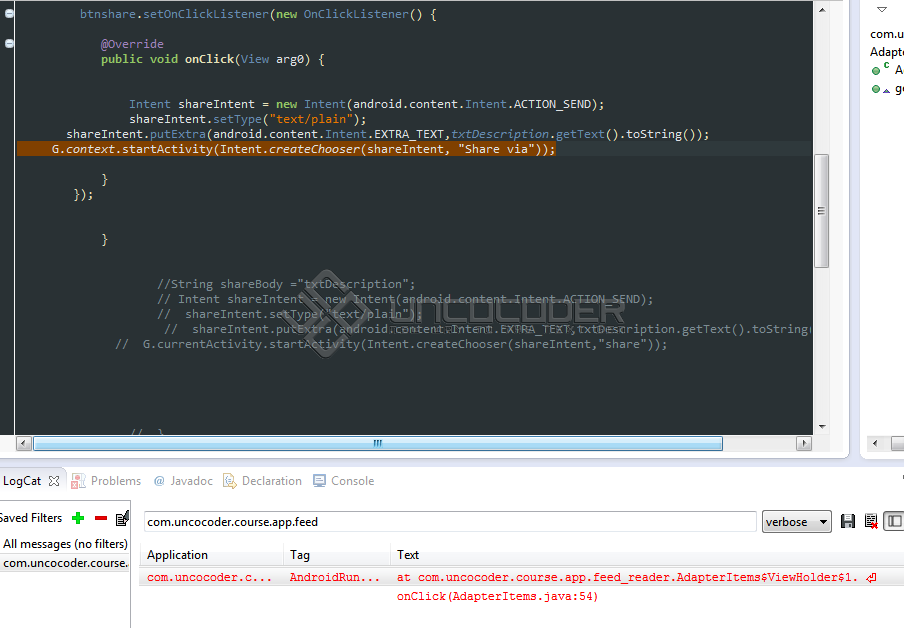
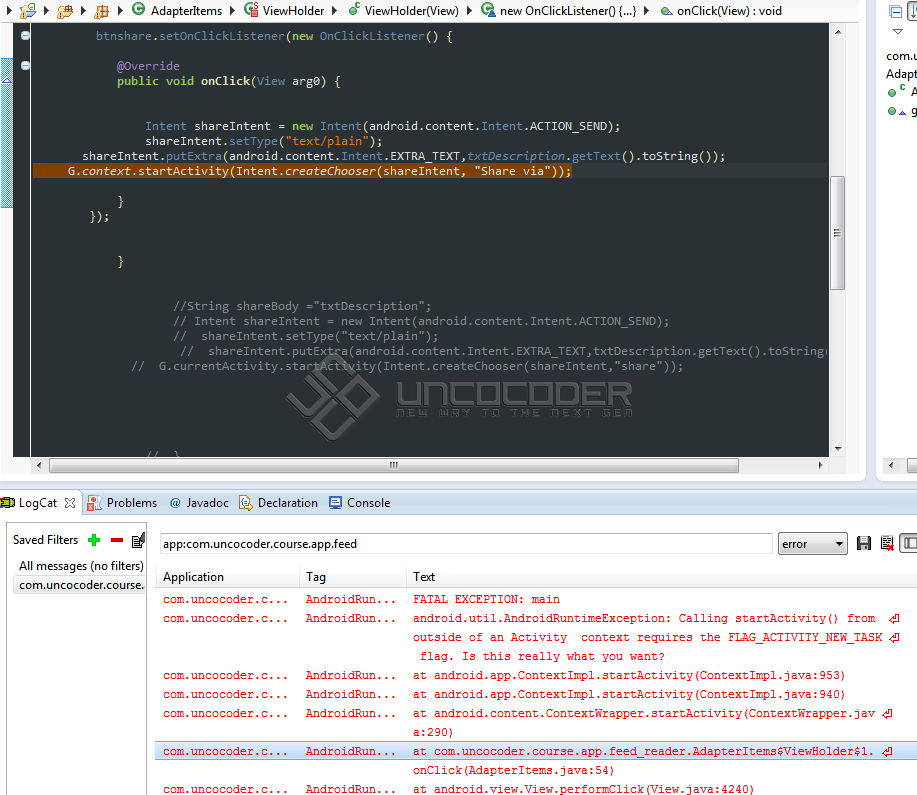 sadra
11 سال پیش
sadra
11 سال پیش
جواب کامل رو به صورت کامل تشریح میدم
کلاس G
 public class G extends Application {

    public static Context        context;
    public static LayoutInflater inflater;
    public static Activity  currentActivity;


    @Override
    public void onCreate() {
        super.onCreate();
        context = getApplicationContext();
        inflater = (LayoutInflater) getSystemService(Context.LAYOUT_INFLATER_SERVICE);
    }
}
کلاس اکتویتی اصلی که پرژه خبرخوان آموزش ها بخش 24 کلاس adapteritems
public class AdapterItems extends ArrayAdapter<RssParser.Item> {

    public AdapterItems(ArrayList<RssParser.Item> array) {
        super(G.context, 0, array);
    }


    private static class ViewHolder {

        public TextView txtTitle;
        public TextView txtDate;
        public TextView txtCategory;
        public static TextView txtDescription;
        public Button btnshare;


        public ViewHolder(View view) {
            txtTitle = (TextView) view.findViewById(R.id.txtTitle);
            txtDate = (TextView) view.findViewById(R.id.txtDate);
            txtCategory = (TextView) view.findViewById(R.id.txtCategory);
            txtDescription = (TextView) view.findViewById(R.id.txtDescription);
با فرض اینکه یک باتن برای شیر اختصاص داده باشیم در اینصورت مراحل شیر به اینصورت خواهد بود .
 btnshare = (Button) view.findViewById(R.id.btnshare);

         btnshare.setOnClickListener(new OnClickListener() {

			@Override
			public void onClick(View arg0) {


                Intent shareIntent = new Intent(android.content.Intent.ACTION_SEND);
                shareIntent.setFlags(Intent.FLAG_ACTIVITY_NEW_TASK);
                shareIntent.setType("text/plain");
       shareIntent.putExtra(android.content.Intent.EXTRA_TEXT,txtDescription.getText().toString());
       Intent new_intent = Intent.createChooser(shareIntent, "Share via");
     new_intent.setFlags(Intent.FLAG_ACTIVITY_NEW_TASK);
       G.context.startActivity(new_intent);

			}
		});


			}
امیدوارم به دردتون بخوره
نظرات
پاسخگویی و مشاهده پاسخ های این سوال تنها برای اعضای ویژه سایت امکان پذیر است .
چنانچه تمایل دارید به همه بخش ها دسترسی داشته باشید میتوانید از این بخش لایسنس این آموزش را خریداری نمایید .
ویرایش
پیام
نظرات